This post tells you how to add register and unregister commands to the right-click menu for DLL and OCX files in Windows Vista, 7, 8 and 10.
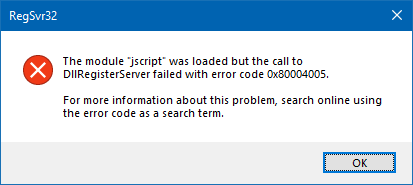
To register a DLL or OCX file, you usually need to run regsvr32.exe from an elevated Command Prompt. Registering system DLLs from a non-elevated state may cause an error. For example, try to register the system module JScript.dll from Start, Search box (i.e., without elevating it). You’ll see the error 0x80004005 or 0x80007005 (“ACCESS IS DENIED”) when you do so.
Method 1: Register DLLs via Context Menu – “runas” verb
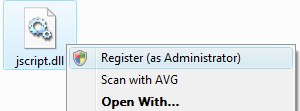
To add the Register command in the context menu that’ll run the Regsvr32.exe command under elevated rights, you can use the special runas verb. Here is a REG file that I created, adds the runas verb for DLL and OCX file types in the following registry keys:
HKEY_CLASSES_ROOT\dllfile\runas
HKEY_CLASSES_ROOT\ocxfile\runas
- Download the file register_runas.reg and save to Desktop.
- Right-click on the file and choose Merge.
- Click Yes when you’re asked for confirmation.
You should now see the Register (as Administrator) command in the right-click menu for DLL and OCX file types.
Method 2: Set Regsvr32.exe to always run elevated
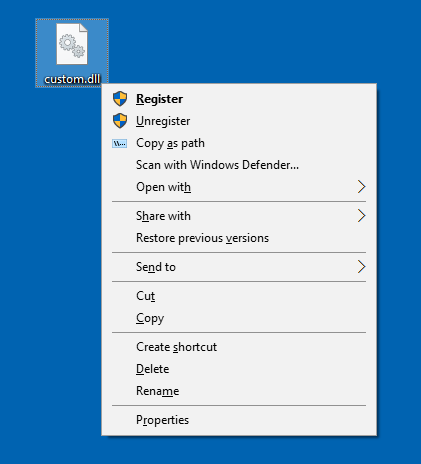
As you can use the “runas” verb for only one item, to add a “Unregister” command you need to use a different method than the above. Here is another way to add “Register” and “Unregister” commands to the context menu for DLL files, without using the “runas” verb.
This method instructs the system to always run Regsvr32.exe elevated, by adding a AppCompatFlags\Layers registry entry, and implements the “Register” and “Unregister” context menu entries in the usual way.
REG File
Windows Registry Editor Version 5.00

[HKEY_CURRENT_USER\SOFTWARE\Microsoft\Windows NT\CurrentVersion\AppCompatFlags\Layers]
"C:\\Windows\\System32\\regsvr32.exe"="~ RUNASADMIN"

[HKEY_CLASSES_ROOT\DllFile\Shell\Register]
"HasLUAShield"=""

[HKEY_CLASSES_ROOT\DllFile\Shell\Register\command]
@="C:\\Windows\\System32\\regsvr32.exe \"%1\""

[HKEY_CLASSES_ROOT\DllFile\Shell\Unregister]
"HasLUAShield"=""

[HKEY_CLASSES_ROOT\DllFile\Shell\Unregister\command]
@="C:\\Windows\\System32\\regsvr32.exe -u \"%1\""

[HKEY_CLASSES_ROOT\OcxFile\Shell\Register]
"HasLUAShield"=""

[HKEY_CLASSES_ROOT\OcxFile\Shell\Register\command]
@="C:\\Windows\\System32\\regsvr32.exe \"%1\""

[HKEY_CLASSES_ROOT\OcxFile\Shell\Unregister]
"HasLUAShield"=""

[HKEY_CLASSES_ROOT\OcxFile\Shell\Unregister\command]
@="C:\\Windows\\System32\\regsvr32.exe -u \"%1\""
Copy the above lines to Notepad, and save the file with .reg extension. Double-click to run the .reg file. This adds the “Register” and “Unregister” commands to the context menu for DLL and OCX files.
To remove (undo) the Register and Unregister commands from the context menu, use the following .reg file:
Windows Registry Editor Version 5.00

[HKEY_CURRENT_USER\SOFTWARE\Microsoft\Windows NT\CurrentVersion\AppCompatFlags\Layers]
"C:\\Windows\\System32\\regsvr32.exe"=-

[-HKEY_CLASSES_ROOT\DllFile\Shell\Register]

[-HKEY_CLASSES_ROOT\DllFile\Shell\Unregister]

[-HKEY_CLASSES_ROOT\OcxFile\Shell\Register]

[-HKEY_CLASSES_ROOT\OcxFile\Shell\Unregister]
That’s it!
One small request: If you liked this post, please share this?
One "tiny" share from you would seriously help a lot with the growth of this blog. Some great suggestions:- Pin it!
- Share it to your favorite blog + Facebook, Reddit
- Tweet it!

Comments are closed.