Schtasks.exe console tool helps you create, delete, query, change, run, and end scheduled tasks on a local or remote computer. Running Schtasks.exe without arguments displays the list of each registered task, the Next Run Time, and the Status for each task.
For example, you may want to run the RegIdleBackup task manually using Schtasks.exe.
Launching a Scheduled Task manually using Schtasks.exe
To launch a Scheduled Task item on-demand, open a Command Prompt (admin) window and type:
SCHTASKS.EXE /RUN /TN "task name"
Replace the text <task name> with the actual name of the task.
If the task name is Sync Files, run the following command:
SCHTASKS.EXE /RUN /TN "Sync Files"
If the task exists under a separate folder in Task Scheduler, make sure you enter the full path:
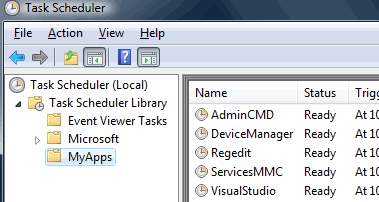
SCHTASKS.EXE /RUN /TN "\MyApps\Regedit"
Schtasks.exe can also take a remote computer name as the parameter. Here are the command-line arguments for the Schtasks.exe /Run command.
schtasks /Run [/S system [/U username [/P [password]]]] /TN taskname
Examples:
SCHTASKS /Run /?
SCHTASKS /Run /TN "\Backup\Start Backup"
SCHTASKS /Run /S system /U user /P password /I /TN "\Backup\Backup and Restore"
| /S | system | Specifies the remote computer to connect to. If omitted, the system parameter defaults to the local computer. |
| /U | username | Specifies the user context under which Schtasks.exe should run. |
| /P | password | Specifies the password for the given user context. If omitted, Schtasks.exe prompts the user for input. |
| /I | Runs the task immediately by ignoring any constraint. | |
| /TN | taskname | Specifies the name of the scheduled task to run. |
| /? | Displays Help for Schtasks.exe. |
For detailed information on Schtasks.exe, see Schtasks.exe documentation at the Microsoft site.
One small request: If you liked this post, please share this?
One "tiny" share from you would seriously help a lot with the growth of this blog. Some great suggestions:- Pin it!
- Share it to your favorite blog + Facebook, Reddit
- Tweet it!

