Is your PC waking up automatically when in Sleep mode, and wondering which device is waking the system up? Here is a command which gets the list of devices that are configured to wake the computer up.
Open a Command Prompt window (cmd.exe) and run the following command:
powercfg –devicequery wake_armed
The output contains the list of devices that can wake your computer from sleep or hibernate mode. Sample output is below:
HID Keyboard Device
HID-compliant mouse
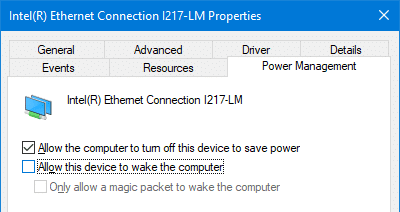
Intel(R) Ethernet Connection I217-LM
HID Keyboard Device (001)
If you find a device in the list that may be causing the problem, open Device Manager and disable Allow this device to wake the computer setting for each device. This can be done by double-clicking the corresponding device in Device Manager, clicking Properties and clicking on the Power Management tab.
One small request: If you liked this post, please share this?
One "tiny" share from you would seriously help a lot with the growth of this blog. Some great suggestions:- Pin it!
- Share it to your favorite blog + Facebook, Reddit
- Tweet it!

