Have you come across the problem where some of the Gadgets that you added to the Sidebar/Desktop are not displayed correctly? For example, the clock gadget may be displayed as a black square containing only the “seconds” hand. Other gadgets may show up as white rectangles with an information (i) icon and a plus sign. The settings button next to the gadget does not work, but the x to close does. Here are some screenshots:
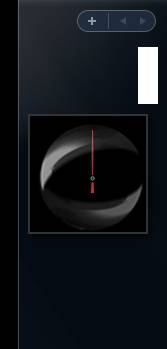
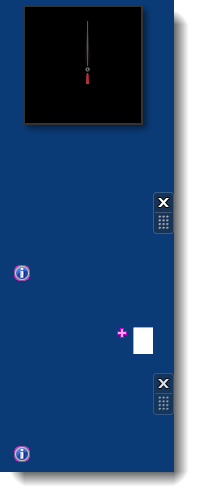
The above-mentioned behavior is caused due to the following reasons:
- A subkey with foreign/ASCII character exists under the “Zones” registry key.
- XML registration is missing in the system.
Use these steps to fix the problem:
Fix for Case 1
1. Click Start, type Regedit.exe and press {ENTER}
2. Navigate to the following branch:
HKEY_CURRENT_USER\Software\Microsoft\Windows\CurrentVersion\Internet Settings\Zones
3. Under the Zones key, delete the subkey shown with an ASCII character:
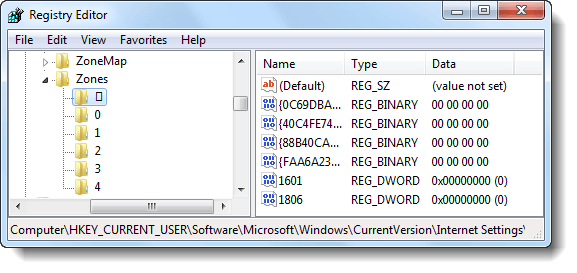
4. Exit the Registry Editor.
5. Logoff and login back to your user account.
Fix for Case 2
1. Open an elevated Command Prompt window. To open an elevated (admin) Command Prompt, click Start, click All Programs, click Accessories, right-click Command Prompt, and then click Run as administrator.
2. In the Command Prompt window, type the following command and press ENTER:
3. Similarly, run these commands:
You should see the DllRegisterServer in <filename> succeeded message for each command executed.
4. Logoff and login back to your user account and see if the Gadgets display correctly.
One small request: If you liked this post, please share this?
One "tiny" share from you would seriously help a lot with the growth of this blog. Some great suggestions:- Pin it!
- Share it to your favorite blog + Facebook, Reddit
- Tweet it!
