When you open Explorer, the shell folders such as Documents, Videos, Music, or Pictures may be displayed with a standard folder icon rather than the special folder icons. This behavior can occur when the desktop.ini file in the shell folder is missing or incorrect, or the folder has lost its read-only attribute.
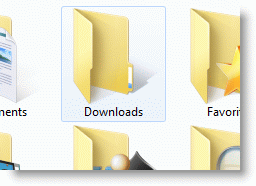
If a shell folder has lost its special icon and showing up as a generic (yellow) folder, you need to create or fix the Desktop.ini file for the shell folder.
Contents
Method 1: Fix the shell folder icons using GUI
To reset the shell folder icon automatically, follow these steps:
The following procedure is especially for Windows 11. Let’s say the “Music” folder is showing up with a generic/yellow folder icon.
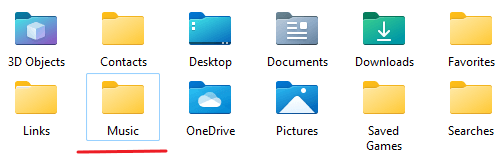
All you need to do is right-click “Music” and click Properties.
Click the Customize tab, click “Change icon”, and click “Restore Defaults.”
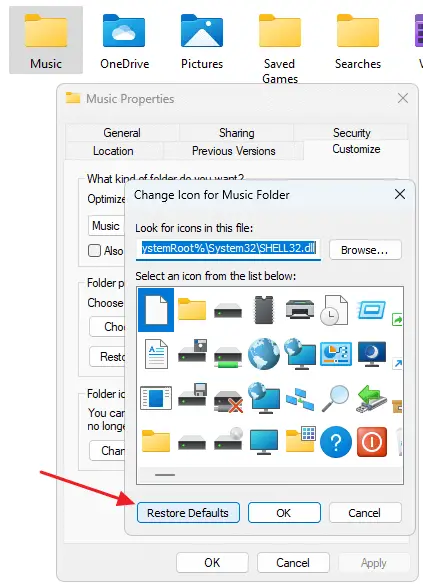
Click OK, Apply, and click OK.
That’s it. The Music folder icon is back!
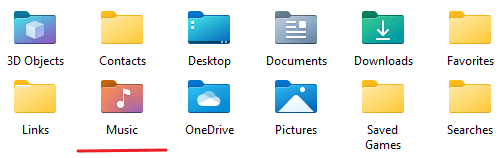
The above procedure fixes the desktop.ini in that shell folder, sets “system” and “hidden” attributes to it, and then sets the folder attributes to “Read-only”. Note that the read-only attribute for a folder simply means that the folder is customized. Only if that bit is set, the folder will show up with the custom icon.
This GUI method works on Windows 10 as well, but there is a glitch. It sets a different icon than the default one when resetting the Videos and Pictures folder icons.
Method 2: Fixing the shell folder icon manually
The default contents of the desktop.ini file for various shell folders are given below for each Operating System. In each shell folder that’s missing the special icon, create a file named desktop.ini and paste the content corresponding to the shell folder.
Once done, set the Read-only attribute for the shell folder using the attrib command, and set the desktop.ini file attributes to Hidden (and, optionally, the System attribute). If the icons don’t update automatically, refresh the shell icons, or log off and log in again for the icons to refresh. See the full instructions provided at the bottom of this article.
Desktop.ini Contents for Various Shell Folders
Step 1: Fix the Desktop.ini contents
For Windows 11
3D Objects
[.ShellClassInfo]
LocalizedResourceName=@%SystemRoot%\system32\windows.storage.dll,-21825
IconResource=%SystemRoot%\system32\imageres.dll,-198
Contacts
[.ShellClassInfo]
LocalizedResourceName=@%CommonProgramFiles%\system\wab32res.dll,-10100
InfoTip=@%CommonProgramFiles%\system\wab32res.dll,-10200
IconResource=%SystemRoot%\system32\imageres.dll,-181
Desktop
[.ShellClassInfo]
LocalizedResourceName=@%SystemRoot%\system32\shell32.dll,-21769
IconResource=%SystemRoot%\system32\imageres.dll,-183
Documents
[.ShellClassInfo]
LocalizedResourceName=@%SystemRoot%\system32\windows.storage.dll,-21770
IconResource=%SystemRoot%\system32\imageres.dll,-112
IconFile=%SystemRoot%\system32\shell32.dll
IconIndex=-235
Downloads
[.ShellClassInfo]
IconResource=%SystemRoot%\system32\imageres.dll,-184
LocalizedResourceName=@%SystemRoot%\system32\shell32.dll,-21798
Music
[.ShellClassInfo]
LocalizedResourceName=@%SystemRoot%\system32\windows.storage.dll,-21790
InfoTip=@%SystemRoot%\system32\shell32.dll,-12689
IconResource=%SystemRoot%\system32\imageres.dll,-108
IconFile=%SystemRoot%\system32\shell32.dll
IconIndex=-237
Pictures
[.ShellClassInfo]
LocalizedResourceName=@%SystemRoot%\system32\windows.storage.dll,-21779
InfoTip=@%SystemRoot%\system32\shell32.dll,-12688
IconResource=%SystemRoot%\system32\imageres.dll,-113
IconFile=%SystemRoot%\system32\shell32.dll
IconIndex=-236
Saved Games
[.ShellClassInfo]
LocalizedResourceName=@%SystemRoot%\system32\shell32.dll,-21814
IconResource=%SystemRoot%\system32\imageres.dll,-186
Searches
[.ShellClassInfo]
LocalizedResourceName=@%SystemRoot%\system32\shell32.dll,-9031
IconResource=%SystemRoot%\system32\imageres.dll,-18
[LocalizedFileNames]
Indexed [email protected],-32820
[email protected],-32822
Videos
[.ShellClassInfo]
LocalizedResourceName=@%SystemRoot%\system32\shell32.dll,-21791
InfoTip=@%SystemRoot%\system32\shell32.dll,-12690
IconResource=%SystemRoot%\system32\imageres.dll,-189
IconFile=%SystemRoot%\system32\shell32.dll
IconIndex=-238
For Windows 10
3D Objects
[.ShellClassInfo]
LocalizedResourceName=@%SystemRoot%\system32\windows.storage.dll,-21825
IconResource=%SystemRoot%\system32\imageres.dll,-198
Contacts
[.ShellClassInfo]
LocalizedResourceName=@%CommonProgramFiles%\system\wab32res.dll,-10100
InfoTip=@%CommonProgramFiles%\system\wab32res.dll,-10200
IconResource=%SystemRoot%\system32\imageres.dll,-181
Desktop
[.ShellClassInfo]
LocalizedResourceName=@%SystemRoot%\system32\shell32.dll,-21769
IconResource=%SystemRoot%\system32\imageres.dll,-183
[LocalizedFileNames]
computer.lnk=@%SystemRoot%\system32\shell32.dll,-9216
4 - Control Panel.lnk=@%SystemRoot%\system32\shell32.dll,-4161
Documents
[.ShellClassInfo]
LocalizedResourceName=@%SystemRoot%\system32\shell32.dll,-21770
IconResource=%SystemRoot%\system32\imageres.dll,-112
IconFile=%SystemRoot%\system32\shell32.dll
IconIndex=-235
Downloads
[.ShellClassInfo]
LocalizedResourceName=@%SystemRoot%\system32\windows.storage.dll,-21798
IconResource=%SystemRoot%\system32\imageres.dll,-184
Favorites
[.ShellClassInfo]
LocalizedResourceName=@%SystemRoot%\system32\shell32.dll,-21796
IconResource=%SystemRoot%\system32\imageres.dll,-115
IconFile=%SystemRoot%\system32\shell32.dll
IconIndex=-173
Music
[.ShellClassInfo]
LocalizedResourceName=@%SystemRoot%\system32\shell32.dll,-21790
InfoTip=@%SystemRoot%\system32\shell32.dll,-12689
IconResource=%SystemRoot%\system32\imageres.dll,-108
IconFile=%SystemRoot%\system32\shell32.dll
IconIndex=-237
Pictures
[.ShellClassInfo]
LocalizedResourceName=@%SystemRoot%\system32\windows.storage.dll,-21779
InfoTip=@%SystemRoot%\system32\shell32.dll,-12688
IconResource=%SystemRoot%\system32\imageres.dll,-113
IconFile=%SystemRoot%\system32\shell32.dll
IconIndex=-236
Public Desktop
[.ShellClassInfo]
LocalizedResourceName=@%SystemRoot%\system32\shell32.dll,-21799
Recent
[.ShellClassInfo]
LocalizedResourceName=@%SystemRoot%\system32\shell32.dll,-21797
InfoTip=@shell32,dll,-12692
IconResource=%SystemRoot%\system32\imageres.dll,-117
CLSID={0C39A5CF-1A7A-40C8-BA74-8900E6DF5FCD}
[LocalizedFileNames]
Paint.lnk=@%SystemRoot%\system32\shell32.dll,-22054
Desktop.lnk=@%SystemRoot%\system32\shell32.dll,-21769
Videos
[.ShellClassInfo]
LocalizedResourceName=@%SystemRoot%\system32\shell32.dll,-21791
InfoTip=@%SystemRoot%\system32\shell32.dll,-12690
IconResource=%SystemRoot%\system32\imageres.dll,-189
IconFile=%SystemRoot%\system32\shell32.dll
IconIndex=-238
For Windows 7
Contacts
[.ShellClassInfo]
LocalizedResourceName=@%CommonProgramFiles%\system\wab32res.dll,-10100
InfoTip=@%CommonProgramFiles%\system\wab32res.dll,-10200
IconResource=%SystemRoot%\system32\imageres.dll,-181
Documents
[.ShellClassInfo]
LocalizedResourceName=@%SystemRoot%\system32\shell32.dll,-21770
IconResource=%SystemRoot%\system32\imageres.dll,-112
IconFile=%SystemRoot%\system32\shell32.dll
IconIndex=-235
Desktop
[.ShellClassInfo]
LocalizedResourceName=@%SystemRoot%\system32\shell32.dll,-21769
IconResource=%SystemRoot%\system32\imageres.dll,-183
[LocalizedFileNames]
GameExplorer.lnk=@%SystemRoot%\system32\gameux.dll,-10082
Windows Media Player.lnk=@%SystemRoot%\system32\unregmp2.exe,-4
Chess.lnk=@%SystemRoot%\system32\gameux.dll,-10054
FreeCell.lnk=@%SystemRoot%\system32\gameux.dll,-10055
Hearts.lnk=@%SystemRoot%\system32\gameux.dll,-10056
Internet Checkers.lnk=@%SystemRoot%\system32\gameux.dll,-10101
Minesweeper.lnk=@%SystemRoot%\system32\gameux.dll,-10057
Spider Solitaire.lnk=@%SystemRoot%\system32\gameux.dll,-10061
Downloads
[.ShellClassInfo]
LocalizedResourceName=@%SystemRoot%\system32\shell32.dll,-21798
IconResource=%SystemRoot%\system32\imageres.dll,-184
Favorites
[.ShellClassInfo]
LocalizedResourceName=@%SystemRoot%\system32\shell32.dll,-21796
IconResource=%SystemRoot%\system32\imageres.dll,-115
IconFile=%SystemRoot%\system32\shell32.dll
IconIndex=-173
Links
[.ShellClassInfo]
LocalizedResourceName=@%SystemRoot%\system32\shell32.dll,-21810
IconResource=%SystemRoot%\system32\imageres.dll,-185
DefaultDropEffect=4
[LocalizedFileNames]
[email protected],-37217
[email protected],-21769
[email protected],-21798
Music
[.ShellClassInfo]
LocalizedResourceName=@%SystemRoot%\system32\shell32.dll,-21790
InfoTip=@%SystemRoot%\system32\shell32.dll,-12689
IconResource=%SystemRoot%\system32\imageres.dll,-108
IconFile=%SystemRoot%\system32\shell32.dll
IconIndex=-237
Pictures
[.ShellClassInfo]
LocalizedResourceName=@%SystemRoot%\system32\shell32.dll,-21779
InfoTip=@%SystemRoot%\system32\shell32.dll,-12688
IconResource=%SystemRoot%\system32\imageres.dll,-113
IconFile=%SystemRoot%\system32\shell32.dll
IconIndex=-236
Recent
[.ShellClassInfo]
LocalizedResourceName=@%SystemRoot%\system32\shell32.dll,-21797
InfoTip=@shell32,dll,-12692
IconResource=%SystemRoot%\system32\imageres.dll,-117
CLSID={0C39A5CF-1A7A-40C8-BA74-8900E6DF5FCD}
Saved Games
[.ShellClassInfo]
LocalizedResourceName=@%SystemRoot%\system32\shell32.dll,-21814
IconResource=%SystemRoot%\system32\imageres.dll,-186
Searches
[.ShellClassInfo]
LocalizedResourceName=@%SystemRoot%\system32\shell32.dll,-9031
IconResource=%SystemRoot%\system32\imageres.dll,-18
[LocalizedFileNames]
Indexed [email protected],-32820
[email protected],-32822
For Windows Vista
Documents
[.ShellClassInfo]
LocalizedResourceName=@%SystemRoot%\system32\shell32.dll,-21770
IconResource=%SystemRoot%\system32\imageres.dll,-112
IconFile=%SystemRoot%\system32\shell32.dll
IconIndex=-235
Pictures
[.ShellClassInfo]
LocalizedResourceName=@%SystemRoot%\system32\shell32.dll,-21779
InfoTip=@%SystemRoot%\system32\shell32.dll,-12688
IconResource=%SystemRoot%\system32\imageres.dll,-113
IconFile=%SystemRoot%\system32\shell32.dll
IconIndex=-236
[LocalizedFileNames]
Sample Pictures.lnk=@%SystemRoot%\system32\shell32.dll,-21805
Music
[.ShellClassInfo]
LocalizedResourceName=@%SystemRoot%\system32\shell32.dll,-21790
InfoTip=@%SystemRoot%\system32\shell32.dll,-12689
IconResource=%SystemRoot%\system32\imageres.dll,-108
IconFile=%SystemRoot%\system32\shell32.dll
IconIndex=-237
[LocalizedFileNames]
Sample Music.lnk=@%SystemRoot%\system32\shell32.dll,-21806
Videos
[.ShellClassInfo]
LocalizedResourceName=@%SystemRoot%\system32\shell32.dll,-21791
InfoTip=@%SystemRoot%\system32\shell32.dll,-12690
IconResource=%SystemRoot%\system32\imageres.dll,-189
IconFile=%SystemRoot%\system32\shell32.dll
IconIndex=-238
[LocalizedFileNames]
Sample Videos.lnk=@%SystemRoot%\system32\shell32.dll,-21807
Searches
[.ShellClassInfo]
LocalizedResourceName=@%SystemRoot%\system32\shell32.dll,-9031
IconResource=%SystemRoot%\system32\imageres.dll,-18
[LocalizedFileNames]
Indexed [email protected],-32811
[email protected],-32814
Shared By [email protected],-32802
Recent [email protected],-32803
Recent [email protected],-32804
Recent Pictures and [email protected],-32806
Recent [email protected],-32807
Recently [email protected],-32813
Downloads
[.ShellClassInfo]
LocalizedResourceName=@%SystemRoot%\system32\shell32.dll,-21798
IconResource=%SystemRoot%\system32\imageres.dll,-184
Favorites
[.ShellClassInfo]
LocalizedResourceName=@%SystemRoot%\system32\shell32.dll,-21796
IconResource=%SystemRoot%\system32\imageres.dll,-115
IconFile=%SystemRoot%\system32\shell32.dll
IconIndex=-173
Contacts
[.ShellClassInfo]
LocalizedResourceName=@%CommonProgramFiles%\system\wab32res.dll,-10100
InfoTip=@%CommonProgramFiles%\system\wab32res.dll,-10200
IconResource=%SystemRoot%\system32\imageres.dll,-181
Desktop
[.ShellClassInfo]
LocalizedResourceName=@%SystemRoot%\system32\shell32.dll,-21769
IconResource=%SystemRoot%\system32\imageres.dll,-183
Links
[.ShellClassInfo]
LocalizedResourceName=@%SystemRoot%\system32\shell32.dll,-21810
IconResource=%SystemRoot%\system32\imageres.dll,-185
DefaultDropEffect=4
[LocalizedFileNames]
[email protected],-21816
[email protected],-9031
Recently [email protected],-32813
[email protected],-21790
[email protected],-21779
[email protected],-21770
Saved Games
[.ShellClassInfo]
LocalizedResourceName=@%SystemRoot%\system32\shell32.dll,-21814
IconResource=%SystemRoot%\system32\imageres.dll,-186
Public Desktop
[.ShellClassInfo]
LocalizedResourceName=@%SystemRoot%\system32\shell32.dll,-21799
Public Documents
[.ShellClassInfo]
LocalizedResourceName=@%SystemRoot%\system32\shell32.dll,-21801
IconResource=%SystemRoot%\system32\shell32.dll,-235
Public Music
[.ShellClassInfo]
LocalizedResourceName=@%SystemRoot%\system32\shell32.dll,-21803
InfoTip=@%SystemRoot%\system32\shell32.dll,-12689
IconResource=%SystemRoot%\system32\shell32.dll,-237
Public Pictures
[.ShellClassInfo]
LocalizedResourceName=@%SystemRoot%\system32\shell32.dll,-21802
InfoTip=@%SystemRoot%\system32\shell32.dll,-12688
IconResource=%SystemRoot%\system32\shell32.dll,-236
Public Videos
[.ShellClassInfo]
LocalizedResourceName=@%SystemRoot%\system32\shell32.dll,-21804
InfoTip=@%SystemRoot%\system32\shell32.dll,-12690
IconResource=%SystemRoot%\system32\shell32.dll,-238
Using DesktopINIFix for Windows Vista
Here is a small utility DesktopINIFix that I wrote which fixes the desktop.ini file for various shell folders in Windows Vista.
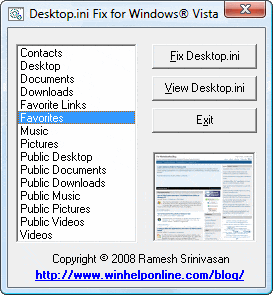
Download DesktopINIFix.zip for Windows Vista.
Note: After fixing the Desktop.ini, you may have to log off and login back (or restart explorer.exe shell) for the folder icons to refresh.
Step 2: Enable the Hidden attribute for Desktop.ini
After adding contents and saving the desktop.ini file, right-click the file desktop.ini and choose Properties.
Place checkmarks near Hidden and Read-only attributes, and click OK. The read-only attribute for desktop.ini is optional, though.
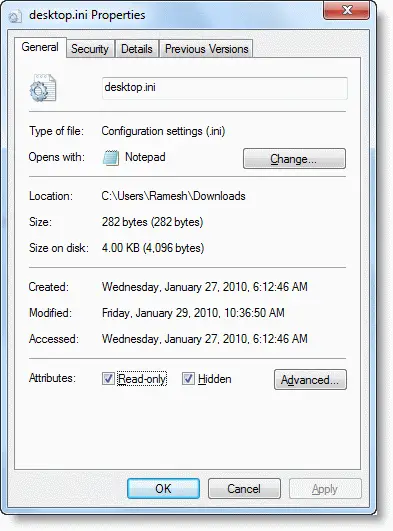
Press {F5} to refresh the folder views, and see if the special folder icon is restored. Or better, you may check again after a reboot cycle.
If the icons are not refreshed, you need to set the read-only attribute for the shell folder if it’s not already set.
Step 3: Set the Read-Only Attribute for the Folder
Open a Command Prompt (CMD.EXE) window. To do so, click Start, click All Programs, click Accessories, click Command Prompt. Using the Attrib command, set the Read-only attribute for the shell folder. Here is an example, which explains how to set the Read-only attribute for the special folder “Downloads”
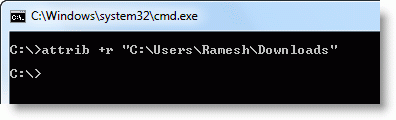
Note: Where Ramesh (in the above example) is the user account name, and Downloads is the shell folder name. You may run the Attrib command from any Command Prompt path, as long as you mention the full path to the folder, as in the above example.
You could use the Copy as Path shell command to copy a shell folder path to the clipboard, and paste it in the Command Prompt so that you don’t have to manually type the entire path.
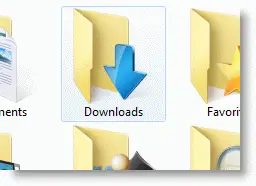
Desktop.ini file automatically opens when you start Windows?
When you start your computer, the desktop.ini file may automatically open showing the following contents:
[.ShellClassInfo]
LocalizedResourceName=@%SystemRoot%\system32\shell32.dll,-21787
This happens if the hidden attribute for the desktop.ini file in the Startup folder is somehow removed. Enable the hidden attribute for desktop.ini in your Startup and Common Startup folders. To do so, you can use the Command Prompt.
Open an elevated Command Prompt window and run these two commands:
attrib +s +h "%appdata%\Microsoft\Windows\Start Menu\Programs\Startup\desktop.ini"
attrib +s +h "%programdata%\Microsoft\Windows\Start Menu\Programs\Startup\desktop.ini"
One small request: If you liked this post, please share this?
One "tiny" share from you would seriously help a lot with the growth of this blog. Some great suggestions:- Pin it!
- Share it to your favorite blog + Facebook, Reddit
- Tweet it!

Comments are closed.