Aero Snap is a feature introduced in Windows 7 wherein the windows will automatically arrange (dock) when moved to the edge of the screen. When you drag a window to the left side of the screen, it will automatically dock to the left side of the screen taking half of the screen space.
The same goes for the right side. When dragged to the top of the screen, the window maximizes.
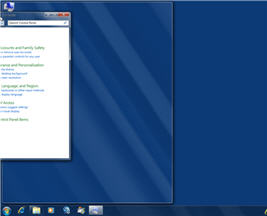
Enable and Disable Aero Snap (Docking) Feature
To enable or disable the automatic arrangement (Aero Snap) feature, use these steps:
Windows 10
- Click Start, Settings, System, Multitasking.
- Enable or disable the “Snap windows” toggle switch.
- Turn on one or more of the following options if needed:
- When I snap a window, automatically size it to fill available space.
- When I snap a window, show what I can snap next to it.
- When I resize a snapped window, simultaneously resize any adjacent snapped window.
Windows 8 and Windows 7
- Click Start, Control Panel
- Click Ease of Access and click Ease of Access Center
- Click one of the following options:
- Make the mouse easier to use
- Make the keyboard easier to use
- Make it easier to focus on tasks
- Configure the following option accordingly:
Prevent windows from being automatically arranged when moved to the edge of the screen
- Click OK, and close the Ease of Access Center.
One small request: If you liked this post, please share this?
One "tiny" share from you would seriously help a lot with the growth of this blog. Some great suggestions:- Pin it!
- Share it to your favorite blog + Facebook, Reddit
- Tweet it!

Thanks so much. Working Working!!!!!
With all this annoying Microsoft automation continually doing stuff it’s as if you don’t even need to be there