Are you receiving low disk space messages and wondering where has the free space gone? System Restore, Hibernation and Pagefile are the major occupants of disk space, but there could be several other big files and folders buried deep inside sub-directories. Try WinDirStat (Freeware), a disk usage statistics viewer and cleanup tool for Windows.
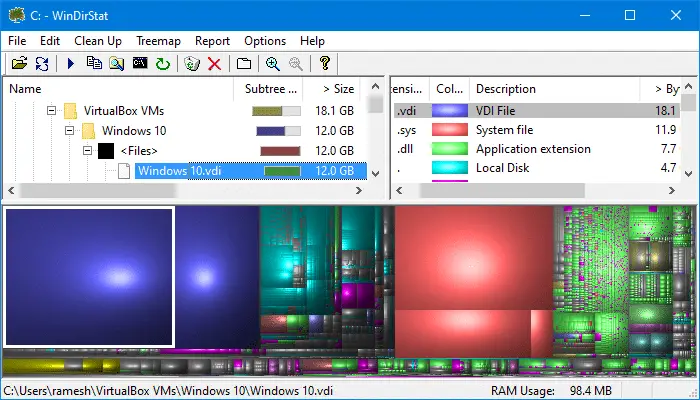
WinDirStat presents the files and directories in your hard disk in these three useful views:
- Directory List: This resembles the Windows Explorer.
- Extension List: This list contains all types (extensions) occurring in the directory tree. The total file size information, % of disk space utilized and the number of files are displayed for each file type.
- Treemap: This view shows the whole contents of the directory tree. It represents each file as a colored rectangle, the area of which is proportional to the file’s size. You can easily find out the major consumers of your hard disk space using this view mode.
Selecting a block from the treemap selects the item in the directory list.
Selecting a file or folder in the Treemap or Directory List and right-clicking on it shows some useful context menu options.
Several clean up actions can be applied to a selected item. The cleanups are accessible through the main menu, the toolbar and through keyboard shortcuts. Advanced users can even create user-defined cleanup actions specified by command lines. For instance, you can create a custom cleanup command to compress directories via the Clean Up menu.
Download WinDirStat – Windows Directory Statistics.
See Also: TreeSize Free – Microsoft Store
One small request: If you liked this post, please share this?
One "tiny" share from you would seriously help a lot with the growth of this blog. Some great suggestions:- Pin it!
- Share it to your favorite blog + Facebook, Reddit
- Tweet it!

Directory Report is faster