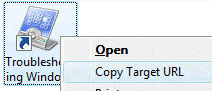
The Copy as Path shell command that’s built into Windows Vista inspired me to write a script that copies the target hyperlink of an .URL file when passed as a parameter. After following the steps in this article, you’ll see a Copy Target URL context menu option when you right-click on an Internet Shortcut (.URL) file. Clicking this option copies the hyperlink of the file to the Windows 7/Vista Clipboard.

Add "Copy Target URL" command to the context menu

1. Download CopyURL.vbs and save to Desktop.

2. Move the file CopyURL.vbs to your Windows directory.

3. Double-click CopyURL.vbs to run it.

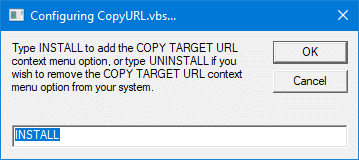
4. To add the Copy Target URL, type INSTALL when you see this dialog

5. Press ENTER and you’ll get the confirmation message.

The Copy Target URL command should be available in the right-click menu.

Note to Windows 7 Users

In order for this script to work in Windows 7, follow these steps first:

Click Start, Default Programs

Click Set your default programs

Select Internet Explorer

Click Set this program as default, and click OK.

Removing the Option

To remove the Copy Target URL context menu option, double-click CopyURL.vbs in your Windows folder. Type the word UNINSTALL in the input box that will be presented. After you see the confirmation message, simply delete the file CopyURL.vbs from your Windows directory.

Related Posts


Email SubscriptionPrefer an E-mail subscription?

Enter your email address:

Delivered by FeedBurner

9 Comments

  1. said this on Monday, April 5th 2010 11:02 am

    @jcimarron: It works fine here (Windows 7 64-bit) after resetting IE as default. Pls send the .URL file type association report to my mail id (via contact form).

  2. jcimarron
    said this on Monday, April 5th 2010 2:44 am

    I went into Registry and find that after running the .vbs script the Data column for “IE.AssocFile.URL\shell\CopyURL\command is entered as ” wscript.exe %systemroot%\copyurl.vbs “%1″ ” and for “IE.AssocFile.URL\shell\CopyURL\” the Data column reads ” Copy Target URL “. That seems to be correct based on looking at the content of the .vbs file. But no “Copy Target URL” appears in context menu when right clicking on a Favorite (.URL) file.

  3. jcimarron
    said this on Monday, April 5th 2010 12:24 am

    @Ramesh Srinivasan–Thanks for your response.
    Yes, I did that.
    Do you have experience using Win7 64bit? (And the 32 bit version of IE8?)
    MoonShellTools’ “Copy Url” will not work with Win7 64bit (even when installed into the Program Files (x86) folder), but supposedly does work with Win7 32bit.

  4. said this on Sunday, April 4th 2010 7:53 am

    @jcimarron: Pls see “Note to Windows 7 Users”

  5. jcimarron
    said this on Sunday, April 4th 2010 5:20 am

    Does not work for me. Win7 Ultimate 64-bit, IE8.

  6. said this on Friday, January 29th 2010 11:05 am

    @Greg: See the Windows 7 note added in the article.

  7. Greg
    said this on Tuesday, October 20th 2009 1:06 pm

    This does not work on my Windows 7 :(.

  8. said this on Wednesday, August 27th 2008 11:40 pm

    this is very useful for links that are re-routed. I need to get the original link before opening the page.

    Thank you!

  9. said this on Monday, July 7th 2008 12:13 pm

    very nice work! thank you for this :)

Leave a Reply