 Did you accidentally land on a bad site when browsing the Web? While it’s advisable to close bad websites immediately, you can quickly block that particular site before closing it so that you don’t visit that site in the future.
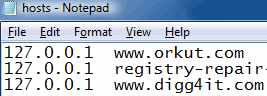
This can be done using the BlockThisSite Internet Explorer Menu Extension that I’ve created for Internet Explorer. The extension works by automatically adding an entry to the HOSTS file for each site you block.
Add “Block This Site” to the Right-Click Menu in IE
- Download BlockThisSite.zip, unzip the contents to a folder.
- Double-click BlockThisSite.reg to run it.
- Move the file BlockThisSite.htm to the C:\Windows\Web directory.
- Move the file BlockThisSite.vbs to the C:\Windows directory.
Usage
To block the current website, all you need to do is right-click on the webpage and click Block This Site. You’ll see the UAC elevation prompt. Click Continue in the UAC dialog.
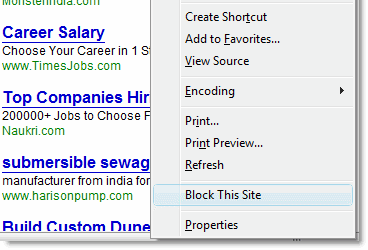
The website is now blocked using the HOSTS file.
To test if the “block” really works, open a new instance of Internet Explorer and try to visit the blocked site. You should see the Internet Explorer cannot display the webpage error when you do so.
Removal
To remove the extension, run the file Undo.reg. Then manually delete the files BlockThisSite.htm and BlockThisSite.vbs from the C:\Windows\Web and C:\Windows directories respectively.
Note: The extension may fail to work if you don’t have write access to the HOSTS file, or if the HOSTS file is locked by a security suite installed in the system.
One small request: If you liked this post, please share this?
One "tiny" share from you would seriously help a lot with the growth of this blog. Some great suggestions:- Pin it!
- Share it to your favorite blog + Facebook, Reddit
- Tweet it!
