By default, Windows does not include the Run as Administrator option in the context menu for Vbscript (.VBS) and JScript (.JS) files. So, to run a script elevated, you either need to launch the script from elevated Command Prompt window, or use the VBScript self-elevation method as described in article How to Automatically Elevate a Vbscript to Run it as Administrator?
Besides that, you can add the Run as Administrator option to the context menu so that you can run a script elevated from the right-click menu.
Add “Run as Administrator” Context Menu option for VBScript and JScript files
Copy the following contents to Notepad and make a .reg file. Let’s say script_runas.reg
Double-click on the file to apply the settings to the registry. Click Yes when prompted.
Windows Registry Editor Version 5.00

[HKEY_LOCAL_MACHINE\SOFTWARE\Classes\VBSFile\Shell\runas\Command]
@=hex(2):22,00,25,00,53,00,79,00,73,00,74,00,65,00,6d,00,52,00,6f,00,6f,00,74,\
00,25,00,5c,00,53,00,79,00,73,00,74,00,65,00,6d,00,33,00,32,00,5c,00,57,00,\
53,00,63,00,72,00,69,00,70,00,74,00,2e,00,65,00,78,00,65,00,22,00,20,00,22,\
00,25,00,31,00,22,00,20,00,25,00,2a,00,00,00

[HKEY_LOCAL_MACHINE\SOFTWARE\Classes\JSFile\Shell\runas\Command]
@=hex(2):25,00,53,00,79,00,73,00,74,00,65,00,6d,00,52,00,6f,00,6f,00,74,00,25,\
00,5c,00,53,00,79,00,73,00,74,00,65,00,6d,00,33,00,32,00,5c,00,57,00,53,00,\
63,00,72,00,69,00,70,00,74,00,2e,00,65,00,78,00,65,00,20,00,22,00,25,00,31,\
00,22,00,20,00,25,00,2a,00,00,00
This .reg file adds the runas command for VBSFile and JSFile registry keys located here:
HKEY_CLASSES_ROOT\VBSFile\Shell\runas
HKEY_CLASSES_ROOT\JSFile\Shell\runas
The hex codes in the above .reg file translate to the following command:
%SystemRoot%\System32\WScript.exe "%1" %*
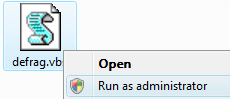
Now, when you right-click a VBScript or JavaScript file, you’ll have an option to run it as administrator.
One small request: If you liked this post, please share this?
One "tiny" share from you would seriously help a lot with the growth of this blog. Some great suggestions:- Pin it!
- Share it to your favorite blog + Facebook, Reddit
- Tweet it!
Related Posts
- Open an elevated Command Prompt from the folder context menu
- Automatically elevate a Vbscript to run it as administrator (using “runas”)
- Register DLLs (elevated) using the context menu
- Add “Edit HOSTS file” option in the context menu

