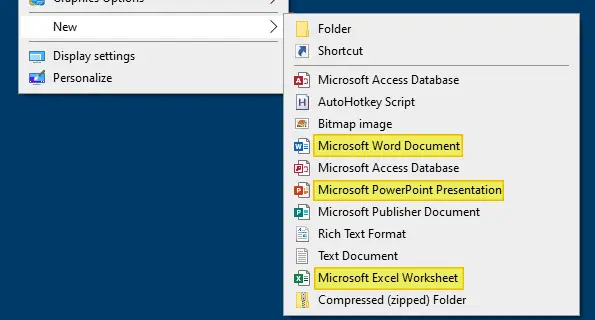
The New menu that appears when you right-click on your Desktop has options or templates to create documents of a particular type quickly. For example, after you install Microsoft Office, the New menu shows Microsoft Word Document, Microsoft Excel Worksheet, Microsoft Access Database, and entries for other Office products installed in the system.
Sometimes the options Word Document, Excel Worksheet or PowerPoint Presentation may be missing in the New menu after upgrading your Office installation. To restore the entries back, short of repairing Microsoft Office, you can use the registry fix in this article.
New Menu Missing Word Document or Excel Worksheet
To restore Microsoft Word Document, Microsoft Excel Worksheet, and Microsoft PowerPoint Presentation entries in the Desktop New menu, follow these steps:
- Copy the following lines to Notepad.
Windows Registry Editor Version 5.00

;Restores missing Word, Excel or PowerPoint option to the Desktop New menu

[HKEY_CLASSES_ROOT\.docx\Word.Document.12\ShellNew]
"NullFile"=""
"FileName"=-

[HKEY_CLASSES_ROOT\.pptx\PowerPoint.Show.12\ShellNew]
"NullFile"=""
"FileName"=-

[HKEY_CLASSES_ROOT\.xlsx\Excel.Sheet.12\ShellNew]
"NullFile"=-
"FileName"="C:\\Windows\\ShellNew\\excel12.xlsx"
- Save the file as
office_new_menu.reg - Close Notepad and run
office_new_menu.regby double-clicking on it.
Additional Steps for Microsoft Excel
In the above registry file, you may have noticed that Excel sheet registry key refers to a template file in order for you to create a new document via Desktop New menu. Using NullFile registry value (for .xlsx) instead of a template file name for Excel causes the following error:
Excel cannot open the file ‘New Microsoft Excel Worksheet.xlsx’ because the file format or file extension is not valid. Verify that the file has not been corrupted and that the file extension matches the format of the file.
The .reg file prevents the above error.
As we’ve referenced a template file in the .reg file above, we need to create a blank .xlsx worksheet and use it as a template. Follow these steps:
- Open Microsoft Excel and save a blank sheet and name it
excel12.xlsx - Move
excel12.xlsxto the following directory:C:\Windows\ShellNew

Note that the Office 365 installations use the following Template folder path by default:
C:\Program Files\Microsoft Office\Root\VFS\Windows\ShellNew
However, the standard location
C:\Windows\ShellNewalso works absolutely fine in any version of Office/Windows.
That’s it! This restores Word document, Excel Worksheet, and PowerPoint Presentation options to the Desktop New menu.
The above registry file works on any version of Microsoft Office.
(Last tested on Office 2019/O365 1906 build 11727.20210)
One small request: If you liked this post, please share this?
One "tiny" share from you would seriously help a lot with the growth of this blog. Some great suggestions:- Pin it!
- Share it to your favorite blog + Facebook, Reddit
- Tweet it!

script not working ms office 2019
Script did not work for me either. I’m using Ms Office 2019.
Error is seen as “Cannot import C:\Users\ADmin\Desktop\office_new.reg: The specified file is not a registry script.
You can only import binary registry files from within the editor.
@Pranil: The REG file has been updated now. The 1st line in the REG file should always be
Windows Registry Editor Version 5.00Didn’t work on windows 11. I ran it and still no change in the new context.