When you run the Visual C++ Redistributable setup file or install a program that adds the VC++ redistributables, error 1935 may occur. The following is the full error message verbatim:
Microsoft Visual C++ 2008 Redistributable Setup

Error 1935.An error occurred during the installation of assembly 'Microsoft.VC90.ATL,version="9.0.30729.6161",publicKeyToken="1fc8b3b9a1e18e3b",processorArchitecture="x86",type="win32"'. Please refer to Help and Support for more information. HRESULT: 0x80070422.
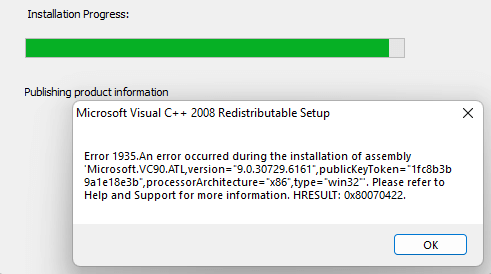
The HRESULT code varies. It could be 0x80070422, 0x80070005, 0x800736B3, etc.
The error occurs when the installer (msiexec.exe) tries to copy the following manifest file to a subfolder under “C:\Windows\WinSxS\InstallTemp“:
x86_Microsoft.VC90.ATL_1fc8b3b9a1e18e3b_9.0.30729.6161_x-ww_92453bb7.manifest
Solution
If the HRESULT code is 0x80070422, it means “The service cannot be started, either because it is disabled or because it has no enabled devices associated with it.” To fix the problem, enable the Windows Modules Installer (TrustedInstaller) service.
- Launch the Services console (
services.mmc) - Double-click “Windows Modules Installer.”
- Change the Startup type to Manual.
- Click Ok.
If the HRESULT code is 0x80070005, it means “ACCESS IS DENIED”, and this error can easily be traced using Process Monitor. For instance, the setup (msiexec.exe) may be unable to create a subfolder or file in the following folder:
C:\Windows\winsxs\InstallTemp\
In that case, checking the permissions for the above folder is a good idea. On a Windows 10 21H2 computer, the “ICACLS.exe InstallTemp” command-line (the icacls.exe tool shows the file/folder permissions) reported this:
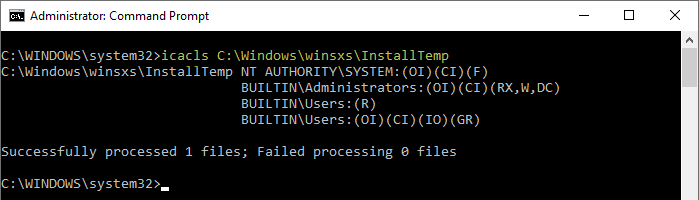
NT AUTHORITY\SYSTEM:(OI)(CI)(F)
BUILTIN\Administrators:(OI)(CI)(RX,W,DC)
BUILTIN\Users:(R)
BUILTIN\Users:(OI)(CI)(IO)(GR)
Compare the permissions with that of the subject computer.
Regardless of any HRESULT code in the above error message, it’s advisable to ensure that the TrustedInstaller service is set to Manual and is able to start on demand.
(If that doesn’t help, please upload your Process Monitor log (.PML) and CBS.log located at C:\Windows\logs\CBS\ and share the link in the Comments section below.)
See also: Fix 1935 error with HRESULT 0x80070005 when installing the .NET Framework – Aaron Stebner’s WebLog
One small request: If you liked this post, please share this?
One "tiny" share from you would seriously help a lot with the growth of this blog. Some great suggestions:- Pin it!
- Share it to your favorite blog + Facebook, Reddit
- Tweet it!

Hi,
i tried a lot. Nothing works.
The solution for me was: I have to deactivate the “HP Wolf”.
Then i could install Microsoft Visual C++ 205 + 2008 Redistributable without problems.
This does not work or is too difficult to implement.
My CBS log is indicating perhaps that the directory the installer is trying to install files to is not empty. I can’t find the directy in order to empty it.