One of the many small changes in Windows 10 Fall Creators Update is that the operating system can now automatically reopen programs that were running before shutdown or restart. If you shut down Windows 10 with some apps (e.g., Chrome browser, Microsoft Excel, Microsoft Word) open, some of them are relaunched at next startup, which is undesirable; to put it fairly, it can be annoying for many. How to disable this feature?
A Support Engineer at Microsoft posted the following info at Microsoft Answers.
This is actually a change in the core functionality of Windows in this development cycle.
Old behavior:
- When you shut down your PC, all apps are closed
- After reboot/restart, you have to re-open any app you’d like to use
New behavior:
- When shutting down your PC, any open apps are “bookmarked” (for lack of a better word)
- After reboot/restart, these apps will re-open automatically
If you want to start with no apps open (other than those set to auto-start via Task Manager/Start), you’ll need to ensure all apps are closed before shutting down or restarting the PC.
Why?
The desire is to create a seamless experience wherein, if you have to reboot a PC, you can pick back up quickly from where you left off and resume being productive. This has far-ranging impacts across the OS (in a good way).
Updated (2/20/18)
There is a change with the Fall Creator’s Update where applications that have registered via RegisterApplicationRestart will re-open after a shutdown or reboot.
What changed? The advanced Windows Update feature which restores running applications after an update has been extended to regular shutdowns and restarts initiated through power options available on the Start Menu and various other locations. This is to create a seamless experience wherein, if you have to reboot your PC, you can pick back up from where you left off and resume being productive.
We’ve heard the feedback that some of you would like to have a switch for turning on and off this feature, and have now added the ability to do this.
Once you have installed the January 31st update (KB4058258 (OS Build 16299.214)), you will be able to turn off this feature by going to Settings > Accounts > Sign-in options > Scroll down to Privacy > Toggle off Use my sign-in info to automatically finish setting up my device after an update or restart.
Note: Not all apps are relaunched after a reboot. When I tested, Task Manager, Microsoft Excel, Word, and Internet Explorer have always reopened automatically, but Microsoft Edge and Notepad didn’t. Disabling Fast Startup feature does not change this behavior. Also, the Restore previous folder windows at logon Folder Options setting has nothing to do with this.
Stop Auto Reopen of Programs after Restart
There is a way to prevent Windows 10 from restoring previously opened programs after a restart.
- Open Settings → Accounts → Sign-in options → Scroll down to Privacy
- Turn off the option Use my sign in info to automatically finish setting up my device after an update or restart.
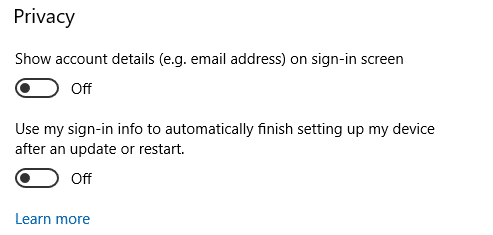
If that doesn’t help, manually exit programs before the shutdown, so that they won’t be relaunched after reboot. However, if you don’t want to (or can’t always) do that before shutting down the system, here are the other options you have:
Other options
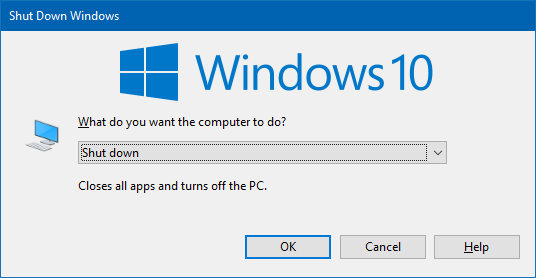
Use the Classic Shut Down Dialog to Shutdown or Restart
- Minimize all programs by pressing WinKey + M.
- Click on the Desktop to set the focus on it.
- Press Alt + F4 to display the classic “Shut Down Windows” dialog
- Select shut down or restart option from the drop-down menu.
Use Shutdown.exe to Shutdown or Restart
Use the Shutdown.exe command-line to shut down or restart Windows.
Create a desktop shortcut with the following command-line:
shutdown.exe /s /t 0
The above shortcut is to shut down the system immediately, after 0-second timeout.
To restart the system, create another shortcut with the following command-line:
shutdown.exe /r /t 0
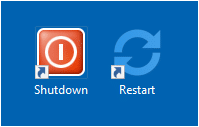
Desktop shortcuts
Shutdown with Fast Startup
Fast Startup won’t work when you use the above two shutdown.exe shortcuts. But if you want Fast Startup to still work, use the following command-line for shutdown:
shutdown.exe /s /hybrid /t 0
That’s it! This prevents Microsoft Excel, Word or any other programs from reopening at startup. Hope Microsoft adds an option to disable this “automatic reopen of apps” feature in a future update or feature upgrade.
One small request: If you liked this post, please share this?
One "tiny" share from you would seriously help a lot with the growth of this blog. Some great suggestions:- Pin it!
- Share it to your favorite blog + Facebook, Reddit
- Tweet it!

AAAAAAHHHHH!!! I went back to PC systems because I got so annoyed with this annoying MAC authoritarian ‘we know best’ arrogance – to this day I have never managed to close any of my mac book office files! And now microsoft copy this stupid annoying behaviour (opening up stuff like a bad smell that just wont’ go away after start up). And I CAN’T STOP IT ON PCS NOW!!!! I’ve read these work arounds…they’re all more time consuming that closing the apps. But I LOVED the old approach…you shut down and it goes off into neverland…I had some ‘closure’ with the digital world. Every time we started up it was like a new day! And now microsoft go and copy the MOST ANNOYNING feature of their competitors!!! I’ll go to linux next in the hope that some one actually listens to users.
I don’t know if this is new, but NOW, Win10, after restart will open apps (especially google chrome) EVEN WHEN IT WAS CLOSED before restarting!!!
Perhaps is MIGHT be because Google may not close all processes related to Chrome or not all of them get closed in time.
It’s just annoying.
I don’t mind if it were to open to last instance, all programs
IF AND ONLY if there was an auto update that forced a restart.
But when I CHOOSE to restart, then THAT should be MY option, NOT MS’s.
Let me also chime in that this is a stupid feature, that should be removed.
Unforseen things can happen when you think you’re doing a clean reboot.
.
At the very least, when the “use my sign in info …” is disabled,
reopening applications should be prevented.
It currently is not (Windows 1909).
Here, the “Use my sign in info to automatically finish setting up my device after an update or restart” option is not visible, whatsoever.
As, according to information from the net, this option is supposed to be available everywhere, it looks like I am one of the only two persons on this planet where it isn’t.
The other person is ozmixcn on Superuser.com 🙂
MS is a truly disgusting and revolting corporation for killing humanity with this needless additions. Do they not realise that needless additions like this force greater climate change. Stop being murderers and get back to basic functionality like Windows 2000.
Windows does NOT do this to help the user, it does this to expose the user online. It will restart P2P applications and the browser, but it will NOT restart your VPN. This is a purely vindictive “feature.”
In General, I’m shutting down or restarting my computer because it’s become _cked in some way and I want to improve the performance, clear or troubleshoot the error. Now thanks to this shortsighted move, I can find myself in an endless loop of failure.
As for “save time and be more productive”, there’s nothing at all productive about waiting for unwanted apps to start up, and then having to close down those unwanted apps the moment my system is rebooted.
Also, after years of MS trying to boost startup performance and making great improvements, why go and tag this unnecessary extra waste of time on the end of the startup? Stupidity!
Reminds me of a scene from the classic British comedy series in which the _diot Baldrick, packs a stupid fancy dress costume as a disguise for his friend Blackadders escape from jail….
Blackadder: You brought me a Robin Hood costume?
Baldrick: I put in a French peasant’s outfit first, but then I thought ‘What if you arrive in a French peasant’s village and they’re in the middle of a fancy dress party?’
Edmund: And what if I arrive in a French peasant village, dressed in a Robin Hood costume and there ISNT a fancy dress party?
Baldrick: Well, to be quite frank sir, I didn’t consider that eventuality, because if you did, you’d stick out like a…..
Edmund: Like a man standing in a lake with a small painted wooden duck on his head?
Baldrick: Exactly!
The entire point of restarting is to get rid of whatever bs was fmessing you up in the first place. If new consoles have a Mouse and KB I am done with PCS until something like 7 comes out again. Why would you use the same OS on a touch screen and a pc? That’s like putting a nes OS on a windows pre 95 comp makes no sense.
I want this feature as i have many apps & tabs open for my work across multiple screens & i forget the thread of most of them. reloading is very long winded & a pain after every windows update which can happen several times a day or week.
Of course there should be an off or edit feature button, & it should work properly, not half assed.
Anyone have any idea how to make the applications startup in the same GUI configuration as when Windows was shut down? Specifically, I have two applications up with a split screen however upon restart, one goes to the foreground, full screen.
Thanks for this!
If it worked as described that would be one thing, but I’m sick of having movies start playing in the middle of the night because I had them on pause and then MS rebooted. Just had it happen again last night and said “enough!” Did no one test this???
“The desire is to create a seamless experience wherein, if you have to reboot a PC, you can pick back up quickly from where you left off and resume being productive. This has far-ranging impacts across the OS (in a good way).” That’s the stupidest thing I’ve ever heard. (I’m 55.) What if the reason I shut down the computer was to escape an errant application I couldn’t stop any other way? And windoze helpfully starts it up again? I appreciate the addition of a switch to turn of this bizarre behaviour, but the language “finish setting up my device and reopen my apps” suggests that I’m also turning off something that might be useful, (in addition to reopening apps, of which I’m fully capable my-ownself).
This is a massive security flaw microsoft, pull you’re head out from your a__e and smell the fresh air. In the past if I wanted to have my previous browser session opened upon restart/shutdown I would hit ctrl+shift+T as long as I had it enabled and didn’t open another browser session. Not hard would save any embarrassing moment’s or personal data kept at least hidden from accidental/prying eyes from immediate exposure.
I actually like the feature! But not all the time, especially when I want a quick start up!
Thanks for the tips, I did a combination of the first two. I first disabled “Use my sign in info to automatically finish setting up my device after an update or restart.” (hell of a description that tells you little, beating around the bush). After this I stopped getting reopened all possible apps that I’d had open – word, xls, pdf, folders, which would all reopen upon restart before I switched that off. But I would still get browsers and browsing sessions reopened (and I have disabled restore in the browser itself). As a total fan of shortcuts – i barely use a mouse, I was happy to learn Win+M (I use Win+D to get to desktop, but I did not know the one for minimize). And then when I restart with Alt+F4, nothing reopens anymore, just the way I like it.
Ive been fighting with MS on this topic since the days of crappy TSR executables and getting enough HIMEM. Never forget this mess started with MS releasing DOS 3.3. and Windows nowadays is nothing more than huge crapfest of Terminate and Stay resident chunks of windows. It has become the monster Gates always wanted it to me.
Totally amazed at the hate this feature seems to have on here. It’s about bloody time that Windows did this – you can do a full MacOS upgrade and still get straight back to where I was without endless faffing around. As a perpetual victim of Central IT administered random reboots this has significantly reduced the pain that they cause me.
F__K MICROSOFT, awaken by re-opened chrome video tab at mid-night, very annoying!