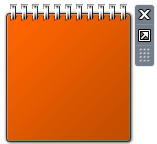
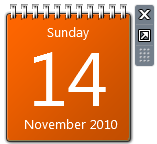
When you open Windows Sidebar and add the Calendar Gadget, it may show a plain orange background with no date. Also, the Stocks Gadget may now show when you add it to the Sidebar. Registering the vbscript.dll file from an admin Command Prompt fixes the problem. Follow these steps:
Open an elevated Command Prompt window. To do so, click Start, click All Programs, click Accessories, right-click Command Prompt, and then click Run as Administrator.
Type the following command and press ENTER:
You should see the following message after running the command:
DllRegisterServer in vbscript.dll succeeded.
Exit the Windows Sidebar and re-open again. To exit the Windows Sidebar, right-click on the Windows Sidebar Notification icon and choose Exit. If that does not help, restart Windows and see if the Calendar and Stocks Gadgets render correctly.
Bookmark this Page!
BlinkList | del.icio.us | Digg it | Furl | reddit | Spurl | StumbleUpon |
Related Posts
- Why There Are Two Instances of Sidebar.exe Running
- Installation of Windows Sidebar Gadgets Is Managed by Your System Administrator
- Make Windows 7 Gadgets (Sidebar) Work With UAC Disabled
- Fix Windows Sidebar Does Not Start in Windows Vista
- Utility: Windows 7 LogonUI Background Changer Is Released
- Using the Desktop Background Slideshow Feature in Windows 7
- Cannot Change the Desktop Wallpaper – Fix
- Activate the Desktop Background Slideshow Feature in Windows 7 via Explorer
- Windows 7 Lets You Change the Logon Background Image
- Utility: Logon Changer for Windows 7 Is Released
If you enjoyed this post, make sure you subscribe to our RSS feed! We feature Tips, Troubleshooting information, Scripts and Utilities for Microsoft Windows Operating Systems!
Prefer an E-mail subscription?

› 
I have a problem with some of the sidebar gadgets’ background is magenta. Only some of them.
This started after the last Vista update on 4/29/09, which also installed IE8. I have seen some users complaining or this same thing after IE8 install.
I tried the suggested “regsvr32.exe vbscript.dll” fix. It ran without error, but did not fix the problem with the magenta background on some of the sidebar gadgets.
Also noticed that no clock gadget works now either (including the default gadget from MS). The clocks do not respond and can not be closed with the “X” at the gadget, but must be removed in sidebar properties.
Any insight on this issue would be appreciated.
Haha, finally this problem is solved.
The reason is that I used a IE tool (IEMaster) to optimalize IE8 and deleted some activex or somthing else.
So, after uninstalled IE8, the calendar is normal.
This is a leason that I should never try a third deep cleaner except MS.
It doesn’t work! My calender is still plain orange. I have registered both jscript.dll and vbscript.dll.
Also, tried other methods than could searched by Google.
Is there another solution to this problem?
thanku Mr. srinivasan……………….
may god bless you……….long lasting and forever…………….
Thanks a lot, this worked perfect. Your help is much appriatiated
Thanks for this usefull post! GOD bless you!
Just happened to me, I thought that it had something to do with the latest Windows Updates.
Sidebar works well again.
I just have to thank Mr Ramesh Srinivasan for the prompt and wonderful response. Romba Nanri Sir!!!
My problem got solved with the above cmd entry. Now my question is can i now again install KIS 2009? will the installation/uninstallation cause any more such problems? will this recurr?
Has use of cc registry cleaner got anything to do wih it?
Thanks a lot for this! It happened on my friend’s computer, but I couldn’t remember how to fix it.
Thanks for your help, much appreciated! :)
Mike.