There are several third-party extensions out there to copy webpage title and address, for browsers like Chrome, Firefox and others. Here is a neat trick to add your own Copy Title & URL bookmarklet for Microsoft Edge.
Copy Title and URL Bookmarklet for Microsoft Edge
In Microsoft Edge (Chromium), create a bookmark to a sample site.
Then replace (edit) the URL of the bookmark with the following target:
javascript:(function() { function copyToClipboard(text) { if (window.clipboardData && window.clipboardData.setData) { /*IE specific code path to prevent textarea being shown while dialog is visible.*/ return clipboardData.setData("Text", text); } else if (document.queryCommandSupported && document.queryCommandSupported("copy")) { var textarea = document.createElement("textarea"); textarea.textContent = text; textarea.style.position = "fixed"; /* Prevent scrolling to bottom of page in MS Edge.*/ document.body.appendChild(textarea); textarea.select(); try { return document.execCommand("copy"); /* Security exception may be thrown by some browsers.*/ } catch (ex) { console.warn("Copy to clipboard failed.", ex); return false; } finally { document.body.removeChild(textarea); } } } var markdown = document.title + ':' + '\r\n' + window.location.href; copyToClipboard(markdown); })();
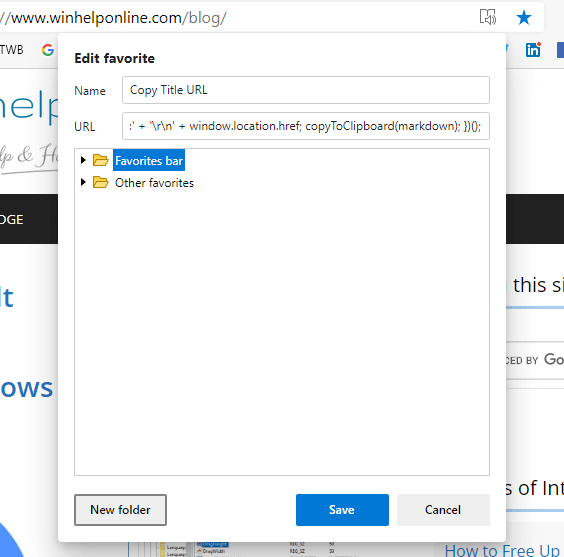
Visit a website and click on the bookmarklet. It will copy the title and the URL of the current webpage, in the following format:
Microsoft Edge Copy Title and URL of a Web Page [Bookmarklet] » Winhelponline:
https://www.winhelponline.com/blog/edge-copy-title-url-web-page-bookmarklet/
Credits to bradleybossard/titleUrlMarkdownClip.js — Bookmarklet to copy current page title and url
The above javascript code also works on Google Chrome, Firefox, and other browsers.
One small request: If you liked this post, please share this?
One "tiny" share from you would seriously help a lot with the growth of this blog. Some great suggestions:- Pin it!
- Share it to your favorite blog + Facebook, Reddit
- Tweet it!

Hi,
I think this is a very cool concept, but it doesn’t do exactly the same as MS Edge, however. When I use this on this page, this it the result:
Microsoft Edge Copy Title and URL of a Web Page [Bookmarklet] » Winhelponline:
https://www.winhelponline.com/blog/edge-copy-title-url-web-page-bookmarklet/
In MS Edge, it would have returned the page title as a hyperlink, which I think is more elegant. De you know if this is possible at all with javascript? I am very much a dabbler in it. I tried to change the last bit of the code to this:
But then the result is this:
Microsoft Edge Copy Title and URL of a Web Page [Bookmarklet] » Winhelponline
Which… would be a hyperlink in HTML, but is not exactly what I’m trying to do here.
Anybody has any idea how to do this / if it’s possible?
I jsut realized the HTML code made the hyperlink when the comment was published, but it wouldn’t work if I pasted it in an email or word document or something, it would like like this (hopefully this works this time):
“Microsoft Edge Copy Title and URL of a Web Page [Bookmarklet] » Winhelponline“
Thanks a million! LOVE IT!
Also, it would be great if there was a simple button to share this post!