Here is a utility that helps you unassociate a file type quickly in your Windows Vista or Windows 7 computer without the need to edit the registry manually. Windows 7 & Vista do not provide a GUI option to unassociate file types, thus the need arises for such a tool below.
Related article:How to Remove a File Association Using the Registry Editor?
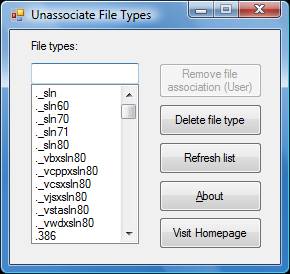
Unassociate file types in Windows 7 & Windows Vista
- Download unassoc.zip and save to Desktop
- Extract the contents to a folder and run the file unassoc.exe
- Select the file type from the list
- Click Remove file association (User)
The user-specific association for the chosen file type is now removed from the registry. The system will now use the global file association settings.
One small request: If you liked this post, please share this?
One "tiny" share from you would seriously help a lot with the growth of this blog. Some great suggestions:- Pin it!
- Share it to your favorite blog + Facebook, Reddit
- Tweet it!
More information
| Command | Description |
| Remove file association (User) | Removes the user-specific association (via the Open With dialog) for the chosen file type. Note that this button will remain dimmed if there is no user-specific association for the file type. |
| Delete file type | Deletes the file type completely from the registry. Both the user-specific and global associations for the chosen file type is removed. |
| Refresh list | Refreshes the list box contents. |

Thank you so much..Your website save my life ..hahaha thnx
Thank you very much. I accidentally associated .lnk files with WordPad, and I’m sure you know what kind of a clustercluck my Start menu became. I don’t know *why* the system asked me to associate .lnk files in the first place, but that’s a whole other bag of beans. This little utility really saved my bacon — thanks!
Thanks. It worked well. Each time i wanted to open shortcut MS Word was being launched.
Thank you very much, It worked. You solved my problem.
I tried to use this utility on a win7 PC which has a problem opening the MS Security Essentials program (keeps opening the ‘Open With’ dialog) but there is no user asoociated file type for this so no further forward – but can see it is a useful link for many other extensions. Thanks for putting it up.
really grateful and i suggest you help us understand to create such tool by ourself. thanks
solves my .lnk problem. this is a great tool. thanks to the author.
Thank yoy very much !! solved my .lnk problem too :). . very helpful man
It’s saved me from reinstalling Windows… Great software !
Thank you so much for this. I was in a panic. Somehow all my icons got linked to Adobe Reader. The only way I was able to get a browser to open to find this was through the Reader. Don’t even ask me how I got there. This little program worked like a charm. Brought everything back to normal.
Thanks again
Mark
Solves mine too. Brilliant job guys.
Appreciate all your effort on resolving this issue.
thank you…. you saved my pc
Thanks! Helped me out of a jam!
Gracias. Me ha solucionado el problema.