- Home
- Windows Vista
- Error messages
- Error "800A0046 - Permission Denied" when installing the Windows Installer Cleanup Utility in Windows Vista
Error "800A0046 - Permission Denied" when installing the Windows Installer Cleanup Utility in Windows Vista
- Ramesh Srinivasan
- March 21, 2007
- Windows Vista
Symptom
When you try to install the Windows Installer Cleanup Utility in Windows Vista, the following error may appear:
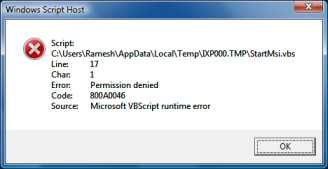
Script: C:\Users\Ramesh\AppData\Local\Temp\IXP000.TMP\StartMsi.vbs
Line: 17
Char: 1
Error: Permission denied
Code: 800A0046
Source: Microsoft VBScript runtime error
Cause
With the User Account Control (UAC) enabled in Windows Vista, you may be denied write access to the Program Files directory and its sub-directories by default. The error above occurs when the Windows Installer Cleanup Utility's setup script (StartMSI.vbs) attempts to copy the extracted files from the Temporary folder to the C:\Program Files\MSECache\WICU3 folder.
Resolution
To resolve the problem, you need to install the Windows Installer Cleanup Utility as administrator. To do so, right-click the setup file (msicuu2.exe) and choose Run as Administrator. If you are prompted for an administrator password or for confirmation, type your password, or click Continue.
Related Articles
 If you enjoyed this post, make sure you
subscribe to our RSS feed!
We feature Tips, Troubleshooting information, Scripts and Utilities for Microsoft Windows Operating Systems!
If you enjoyed this post, make sure you
subscribe to our RSS feed!
We feature Tips, Troubleshooting information, Scripts and Utilities for Microsoft Windows Operating Systems! Prefer an E-mail subscription?