- Home
- Windows XP
- General
- Configure Internet Explorer to open linked Office files in their respective applications
Configure Internet Explorer to open linked Office files in their respective applications
- Ramesh Srinivasan
- February 5, 2008
- Internet Explorer 7 , Windows Vista , Windows XP
Question
Windows XP had an option to configure Internet Explorer to open Office documents in the appropriate Office program instead of in Internet Explorer. As the option (File Types tab) is missing in Windows Vista, can anyone aid in a solution other than saving the file upon download?
Answer
Option 1
Follow the steps listed under Method 2 in the following Microsoft article, a registry edit which works fine in Windows Vista as well.
Option 2: Using the FileTypesMan freeware utility
- Download FileTypesMan utility from Nirsoft.net and save it to Desktop
- Unzip the archive and run FileTypesMan.exe
- Double-click the office file extension for which you want to enable or disable browser integration
- To view Office documents in their respective programs (instead of in Internet Explorer), enable the following checkbox:
Don't open inside a Web browser window
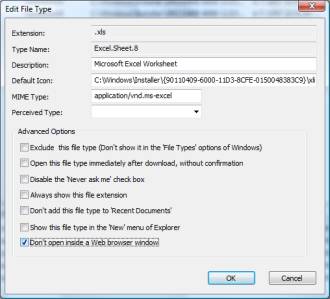
- Click OK
 If you enjoyed this post, make sure you
subscribe to our RSS feed!
We feature Tips, Troubleshooting information, Scripts and Utilities for Microsoft Windows Operating Systems!
If you enjoyed this post, make sure you
subscribe to our RSS feed!
We feature Tips, Troubleshooting information, Scripts and Utilities for Microsoft Windows Operating Systems! Prefer an E-mail subscription?