- Home
- Windows XP
- Context Menu
- Unable to rotate images in thumbnail or filmstrip view
Unable to rotate images in thumbnail or filmstrip view
- Ramesh Srinivasan
- March 8, 2006
- Windows XP
Symptoms
When you open a pictures folder (in thumbnail or in filmstrip view), one of the following behavior may occur when you select the Rotate Clockwise or the Rotate Counter Clockwise context menu items:
- Nothing happens, or
- The image is rotated correctly, but the following warning screen is not displayed prior to rotating the image:
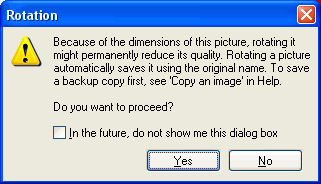
Resolution
This happens if you've chosen the In the future, do not show me this dialog box and clicked the Yes / No button earlier. However, there is no option provided by the user interface to revert the setting back.
Here is an undocumented way to fix the problem. Follow the steps below:
Preview a picture using Windows Picture and Fax Viewer. Then press and hold the CTRL key, and then close Windows Picture and Fax Viewer window (by pressing the [X] button in the top right corner). You'll then see the following message:
Any rotation warnings that you may have suppressed have been reset, and may appear again when you rotate a picture.
Click OK. The Rotate functionality is now restored back.
(This tip was gleaned from a newsgroup posting)
 If you enjoyed this post, make sure you
subscribe to our RSS feed!
We feature Tips, Troubleshooting information, Scripts and Utilities for Microsoft Windows Operating Systems!
If you enjoyed this post, make sure you
subscribe to our RSS feed!
We feature Tips, Troubleshooting information, Scripts and Utilities for Microsoft Windows Operating Systems! Prefer an E-mail subscription?