Copy command-line output directly to the Clipboard using Clip.exe
- Ramesh Srinivasan
- Windows
Summary
This article explains how to redirect the output of command line tools to the Windows Vista Clipboard.
Redirecting the console output to Clipboard
Windows Vista ships with Clip.exe, a console tool that can be used to redirect the console output directly to the Windows Clipboard. To get more information about this utility, open a Command Prompt window and type:
Clip /?
Press {ENTER}
CLIP
Description:
Redirects output of command line tools to the Windows clipboard.
This text output can then be pasted into other programs.
Parameter List:
/? Displays this help message.
Examples:
DIR | CLIP Places a copy of the current directory listing into the Windows clipboard.
CLIP < README.TXT Places a copy of the text from readme.txt on to the Windows clipboard.
For example, to generate the System information and copy the output directly to the clipboard, type the following:
Systeminfo | Clip
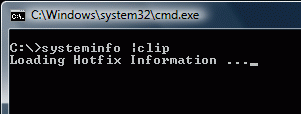
The pipe (|) operator reads the output from one command and writes it to the input of another command.
Open a Notepad window and press CTRL+V to paste the System information data from the clipboard.
 If you enjoyed this post, make sure you
subscribe to our RSS feed!
We feature Tips, Troubleshooting information, Scripts and Utilities for Microsoft Windows Operating Systems!
If you enjoyed this post, make sure you
subscribe to our RSS feed!
We feature Tips, Troubleshooting information, Scripts and Utilities for Microsoft Windows Operating Systems! Prefer an E-mail subscription?