Favorite Links in the Windows Explorer navigation pane is completely empty
- Ramesh Srinivasan
- Windows Vista
Symptom
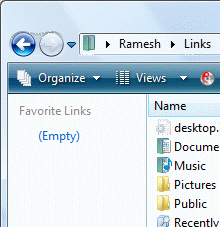
When you open Windows Explorer, the Favorite Links area may be completely empty (as shown in the figure below), even though the %userprofile%\Links folder contains the actual shortcuts. Normally, the Favorite Links area displays the list of shortcuts present in the %userprofile%\Links folder. Where %userprofile% represents your user profile home folder, which is typically C:\Users\{username}
Resolution
This happens if the IsShortcut registry value for .lnk files (Shortcuts) is deleted in an attempt to hide the overlay icon in shortcuts. To resolve the problem, re-create the IsShortcut registry value.
Method 1
Download and apply the .lnk file association fix from the following link:
File association fixes for Windows Vista
Method 2
- Click Start, type regedit.exe and press ENTER
- Navigate to the following key:
HKEY_CLASSES_ROOT\lnkfile
- In the right-pane, create a String value (REG_SZ) named IsShortcut
- Close Registry Editor and restart Windows.
More information
To remove the shortcut arrow in Windows Vista, see article How to remove or modify the Shortcut overlay in Windows Vista
 If you enjoyed this post, make sure you
subscribe to our RSS feed!
We feature Tips, Troubleshooting information, Scripts and Utilities for Microsoft Windows Operating Systems!
If you enjoyed this post, make sure you
subscribe to our RSS feed!
We feature Tips, Troubleshooting information, Scripts and Utilities for Microsoft Windows Operating Systems! Prefer an E-mail subscription?
4 Responses to "Favorite Links in the Windows Explorer navigation pane is completely empty" 
|
said this on 16 May 2007 1:45:24 PM PDT
Quick and to the point - this solved a problem I was afraid would be unsolvable.
|
 Author)
|
said this on 29 Feb 2008 1:57:30 PM PDT
You can't imagine how much this article SAVED ME from a complete re-install of Windows Vista. There are NO WORDS in this world to thank you my friend!!!
|
|
said this on 15 Jun 2008 2:24:39 PM PDT
Though I have seen this advice repeatedly, it does not work for me. This is just a warning so others won't be frustrated if it does not work for them either.
|