When you open Task Manager to investigate a sluggish computer, you may see that the WMI Provider Host (WmiPrvSE.exe) process uses a lot of CPU and memory.
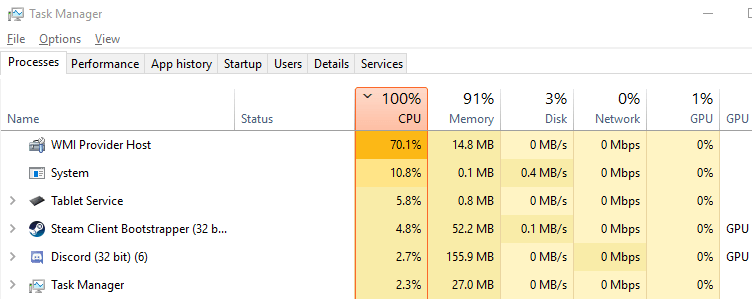
Here’s a screenshot from another computer where the Windows Management Instrumentation service (Winmgmt) occupies more CPU usage on some systems than on a regular computer.

While 4% usage (in the above screenshot) by might the Winmgmt service may look fine, on a standard system, the WMI service’s CPU usage is usually 0% when idle. If it’s consistently busy, it needs to be investigated.
Cause
The above screenshots indicate that one or more third-party programs are using many WMI calls. The WMI processes using a high amount of CPU implies that another application is requesting data via WMI. The culprit is not WMI but a program that makes frequent WMI calls. When an application requests information using a WMI class, the data is obtained dynamically through a WMI provider.
Microsoft has an excellent article on Troubleshoot WMI high CPU usage issues at the Microsoft Learn portal. The WMIMon utility mentioned in that article is one of the easiest options for tracing WMI calls by processes and services.
Resolution
To see which programs are querying information using the WMI, download WMIMon (from GitHub), a tool for monitoring WMI activity on Windows.
Unzip the archive to a folder. Run WMIMon.exe or WMITrace.exe as administrator.

It opens in a console window and starts the trace right away. Keep the utility running for 2 minutes or so. If the WMI CPU usage is high in Task Manager, you’ll see many WMI calls in the WMImon output. The output shows the process name, ID, the WMI namespace accessed by that process, and the user account context in which the process is running.
Here’s an example where LightingService.exe (part of the ASUS AURA lighting service) frequently accesses the WMI.
(right-click on the following images and choose to open in a new window to see the full-sized image.)


On some systems, the LightingService.exe process consumes high CPU and memory usage.

There are many posts on the ASUS forums regarding this issue.
High CPU usage by LightingService.exe - Republic of Gamers Forum - 904889:
https://rog-forum.asus.com/t5/rampage-vi-strix-x299-series/high-cpu-usage-by-lightingservice-exe/td-p/904889

Aura - Temporary fix for high CPU usage and freezing... - Republic of Gamers Forum - 739086:
https://rog-forum.asus.com/t5/asus-software/aura-temporary-fix-for-high-cpu-usage-and-freezing-lights/td-p/739086

AURA Lighting Service using high CPU resources - Republic of Gamers Forum - 751143:
https://rog-forum.asus.com/t5/asus-software/aura-lighting-service-using-high-cpu-resources/td-p/751143

LightingService.exe causing 5 % CPU load: - Republic of Gamers Forum - 847845:
https://rog-forum.asus.com/t5/asus-software/lightingservice-exe-causing-5-cpu-load/td-p/847845
I hope WMImon helped you find the root cause of the high WMI usage issue. In the above example, it was ASUS software. But in your case, it might be some other program or your antivirus program itself.
One small request: If you liked this post, please share this?
One "tiny" share from you would seriously help a lot with the growth of this blog. Some great suggestions:- Pin it!
- Share it to your favorite blog + Facebook, Reddit
- Tweet it!
