After uninstalling Windows Subsystem for Linux (WSL) and Virtual Machine Platform using OptionalFeatures.exe, the “Linux” icon may remain in the Desktop and File Explorer navigation pane.
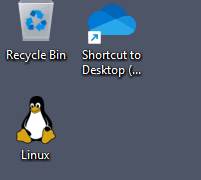
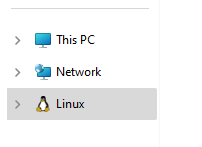
Running the following PowerShell command may also not remove the Linux icon.
Disable-WindowsOptionalFeature -Online -FeatureName Microsoft-Windows-Subsystem-Linux
Resolution
To remove the Linux icon from the desktop namespace, please download remove_linux_icon.reg (zipped), unzip and run it. Click Yes to confirm.
If you wish to manually delete the keys, open Regedit.exe and delete them.
HKEY_LOCAL_MACHINE\SOFTWARE\Microsoft\Windows\CurrentVersion\Explorer\Desktop\NameSpace\{B2B4A4D1-2754-4140-A2EB-9A76D9D7CDC6}

HKEY_LOCAL_MACHINE\SOFTWARE\WOW6432Node\Microsoft\Windows\CurrentVersion\Explorer\Desktop\NameSpace\{B2B4A4D1-2754-4140-A2EB-9A76D9D7CDC6}

HKEY_CURRENT_USER\SOFTWARE\Microsoft\Windows\CurrentVersion\Explorer\Desktop\NameSpace\{B2B4A4D1-2754-4140-A2EB-9A76D9D7CDC6}

HKEY_CURRENT_USER\SOFTWARE\WOW6432Node\Microsoft\Windows\CurrentVersion\Explorer\Desktop\NameSpace\{B2B4A4D1-2754-4140-A2EB-9A76D9D7CDC6}
(Deleting keys 1 & 2 above should be sufficient in most cases. Keys 3 & 4 may not exist. Check them anyway.)
One small request: If you liked this post, please share this?
One "tiny" share from you would seriously help a lot with the growth of this blog. Some great suggestions:- Pin it!
- Share it to your favorite blog + Facebook, Reddit
- Tweet it!

Worked thanks +++++
that’ll do pig, that’ll do