Both Windows Sysinternals and Nirsoft offer a fantastic set of tools to tune up and troubleshoot PCs. The combined total of such tiny tools from those two sites certainly exceeds a hundred. Unfortunately, most, if not all, of the tools in the suite don’t have an automatic update feature, which makes managing them slightly tricky.
To alleviate this problem and allow easy organizing and automatic updating of these tools, we have the Windows System Control Center tool from KLS Soft.
WSCC is a free, portable program that allows you to install, update, execute and organize the utilities from various system utility suites. The included Update Manager can check for newer versions of the utilities already installed and download and install the missing items.
The current version of WSCC supports the following utility suites:
Many people (especially IT/Helpdesk techs) who use Sysinternals & Nirsoft utilities frequently, would find Windows System Control Center very useful. This utility is completely portable, which means no installation is required.
WSCC – Screenshots
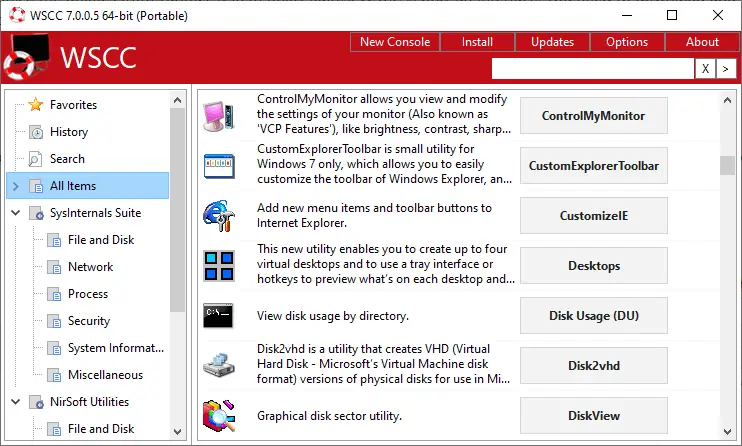
From the main window, you can launch any tool. For console tools, WSCC runs them using the built-in console (instead of the regular Command Prompt) by default. You can disable the built-in console if required.
And, to set the startup parameters or command-line arguments for each app, right-click on an item, click Properties, and select the Run tab. You can mention the “Start in” directory and the additional command-line switches in that dialog.
Also, you can update individual programs by right-clicking on an item and clicking “Check for updates”. Alternately, you can click the “Updates” link at the menu bar. In the Update Manager dialog that opens, select the programs you want to update. It shows the currently installed version and the latest available version for each app.
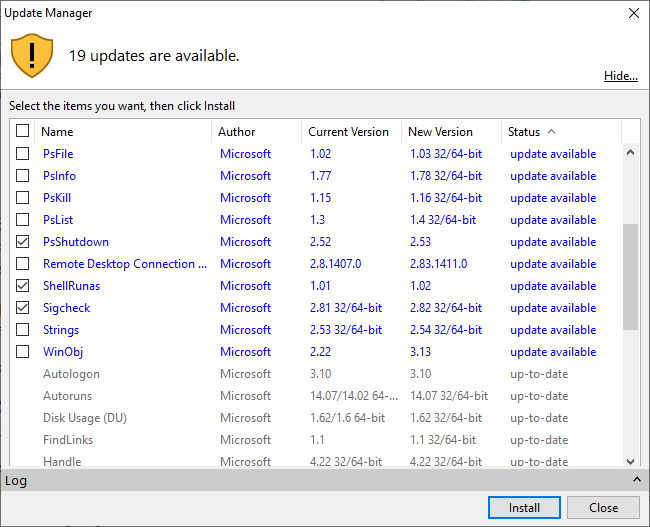
You can also schedule updates via Options → Update Manager → “Schedule Updates” section. Enabling the “Schedule Updates” option automatically creates a Scheduled Task (in Windows Task Scheduler) with the following command-line:
wscc.exe -updateapps -scheduled
The task (“WSCC 7 x64 Update”) is located under Task Scheduler Library.
[Download Windows System Control Center from KLS Soft.]
One small request: If you liked this post, please share this?
One "tiny" share from you would seriously help a lot with the growth of this blog. Some great suggestions:- Pin it!
- Share it to your favorite blog + Facebook, Reddit
- Tweet it!


Thank you, Ramesh
It was one of the best posts here.