The Folder Options dialog’s View tab allows you to show or hide hidden and system (protected) files in Explorer. The hidden files have the HIDDEN attribute. Protected files (aka, “super-hidden ” files) have the SYSTEM attribute.
There have been many support incidents lately where the File Explorer does not show hidden files and folders even though you enable the Show hidden files, folders and drives option in the Folder Options dialog. However, the files and folders can be viewed when using Windows Search or using the DIR /A command from a Command Prompt window.
Also, when you go to open the Folder Options and click the View tab, both the radio buttons Do not show hidden files and folders and Show hidden files, folders and drives may be enabled.

Cause
The above symptoms occur if the system is infected by Malware that modifies the CheckedValue registry value in these registry branches:
HKEY_LOCAL_MACHINE\SOFTWARE\Microsoft\Windows\CurrentVersion\Explorer\Advanced\Folder\Hidden\NOHIDDEN
HKEY_LOCAL_MACHINE\SOFTWARE\Microsoft\Windows\CurrentVersion\Explorer\Advanced\Folder\Hidden\SHOWALL
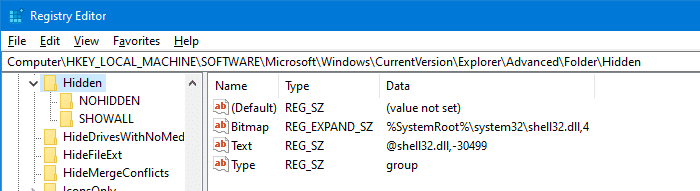
The malware would also have removed a registry value named Type (whose data is, by default, set to “group“) in the Hidden registry branch above.
This ploy is used by many viruses so that the hidden file — e.g., a malicious executable or script, won’t be displayed in Explorer. Also, some viruses remove the option Hidden files and folders altogether from the Folder Options → View tab.
[Fix] Show Hidden Files and Folders Missing or Does Not Work
Option 1: BitDefender setting
 If you’re using Bitdefender security software, you may be unable to toggle the hidden files setting from the View tab or File Explorer ribbon. If you enable the checkbox for Hidden items in the ribbon, the checkmark may appear for a second and disappear again.
This is caused by Bitdefender’s Intrusion Detection module or a similar feature. BitDefender’s Active Virus Control Usermode Filtering Library avcuf64.dll blocks attempts to change critical files and registry entries. BitDefender is protecting certain registry keys to prevent them from being modified by Malware. Temporarily disabling the feature in Bitdefender allows you to hide or show hidden files in Explorer.
Option 2: “Show hidden files and folders” registry fix
If you’re not using Bitdefender, then apply the registry fix below:
- Copy the .reg file contents given below to Notepad.
Windows Registry Editor Version 5.00

;For Windows 10

[-HKEY_LOCAL_MACHINE\SOFTWARE\Microsoft\Windows\CurrentVersion\Explorer\Advanced\Folder\Hidden]

[HKEY_LOCAL_MACHINE\SOFTWARE\Microsoft\Windows\CurrentVersion\Explorer\Advanced\Folder\Hidden]
"Bitmap"=hex(2):25,00,53,00,79,00,73,00,74,00,65,00,6d,00,52,00,6f,00,6f,00,74,\
00,25,00,5c,00,73,00,79,00,73,00,74,00,65,00,6d,00,33,00,32,00,5c,00,73,00,\
68,00,65,00,6c,00,6c,00,33,00,32,00,2e,00,64,00,6c,00,6c,00,2c,00,34,00,00,\
00
"Text"="@shell32.dll,-30499"
"Type"="group"

[HKEY_LOCAL_MACHINE\SOFTWARE\Microsoft\Windows\CurrentVersion\Explorer\Advanced\Folder\Hidden\NOHIDDEN]
"CheckedValue"=dword:00000002
"DefaultValue"=dword:00000002
"HKeyRoot"=dword:80000001
"Id"=dword:00000001
"RegPath"="Software\\Microsoft\\Windows\\CurrentVersion\\Explorer\\Advanced"
"Text"="@shell32.dll,-30501"
"Type"="radio"
"ValueName"="Hidden"

[HKEY_LOCAL_MACHINE\SOFTWARE\Microsoft\Windows\CurrentVersion\Explorer\Advanced\Folder\Hidden\SHOWALL]
"CheckedValue"=dword:00000001
"DefaultValue"=dword:00000002
"HKeyRoot"=dword:80000001
"Id"=dword:00000002
"RegPath"="Software\\Microsoft\\Windows\\CurrentVersion\\Explorer\\Advanced"
"Text"="@shell32.dll,-30500"
"Type"="radio"
"ValueName"="Hidden"
- Save the file with .reg extension — eg.,
showallfiles.reg. For more information, see how to create and run .reg files. - Double-click
showallfiles.regfile to run it. - Reconfigure the Show hidden files and folders option in the Folder Options → View tab.
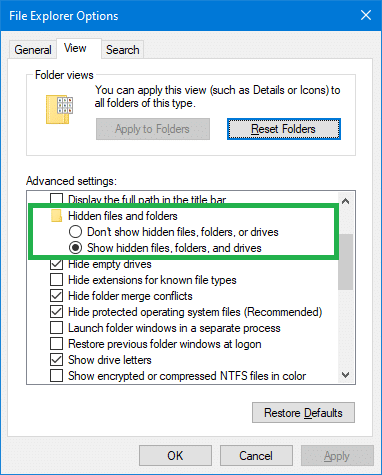
That’s it! It should fix the Show hidden files and folders setting in Folder Options → View tab. Make sure you update your anti-virus software and run a full system scan. And don’t forget to follow up with a thorough scan using Malwarebytes Antimalware.
One small request: If you liked this post, please share this?
One "tiny" share from you would seriously help a lot with the growth of this blog. Some great suggestions:- Pin it!
- Share it to your favorite blog + Facebook, Reddit
- Tweet it!

April 2022, worked for me! thanks a lot!!!