 When you perform a System Restore rollback in earlier versions of Windows, you’ll see the list of changes in the file system/registry that had occurred after restoring to an earlier System Restore point. Windows 7 introduces a new System Restore feature wherein you can know beforehand the list of programs and drivers that will be affected (added/removed) in the event of restoration to a particular point.
Launch the System Restore window via Start, All Programs, Accessories, System Tools.
Click Next, and select a System Restore point from the list.
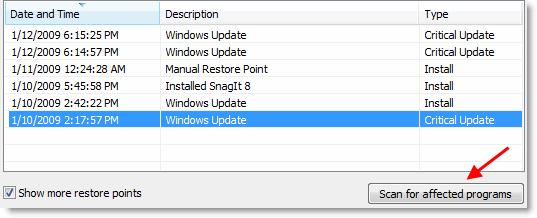
Click Scan for affected programs
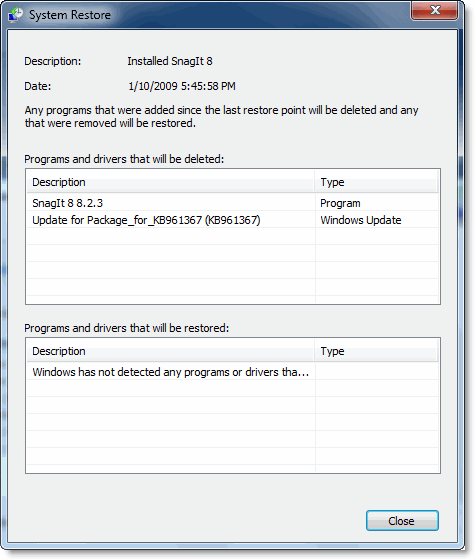
The list of Program and driver changes (for the chosen System Restore snapshot) would be listed in the dialog. This is yet another excellent feature which is introduced in Windows 7.
One small request: If you liked this post, please share this?
One "tiny" share from you would seriously help a lot with the growth of this blog. Some great suggestions:- Pin it!
- Share it to your favorite blog + Facebook, Reddit
- Tweet it!


This is only half an article… scan for affected programs (system restore) feature.
What next? Do you close and proceed with system restore… ? Is this necessary?
Guess I will search for another article…
never ever ever finds any affected. Ive proved it wrong by rolling back a point on occasion and everythings all messed up.