When you click a hyperlink in Microsoft Outlook or other Office applications, you may receive one of the following errors, depending upon the version of Office installed.
Your organization's policies are preventing us from completing this action for you. For more info, please contact your help desk.
This operation has been cancelled due to restrictions in effect on this computer. Please contact your system administrator.

Cause
The above hyperlink errors are caused by broken .html file association or HTTP or HTTPS protocol association. For instance, if you’ve associated .html file type with Notepad++ or any other non-browser application, the above error occurs when clicking on hyperlinks from your Office application.
Also, Outlook requires an open\command registry key under the file association key referenced by .html.
Fix for Outlook Hyperlink Errors
To resolve the error when clicking on a hyperlink in Outlook or any other Office application, follow these steps:
Step 1: Reset the default web browser
Resetting the default browser fixes the problem. To do so, use Default Apps to select a different browser as the default. Then revert to the original browser to set it as the default. This fixes the browser file association settings (e.g., .HTM, .HTML, HTTP, HTTPS, etc.) automatically.
For Windows 10
- Open Settings → Apps → Default Apps.
- Under Web browser, select a browser from the list.
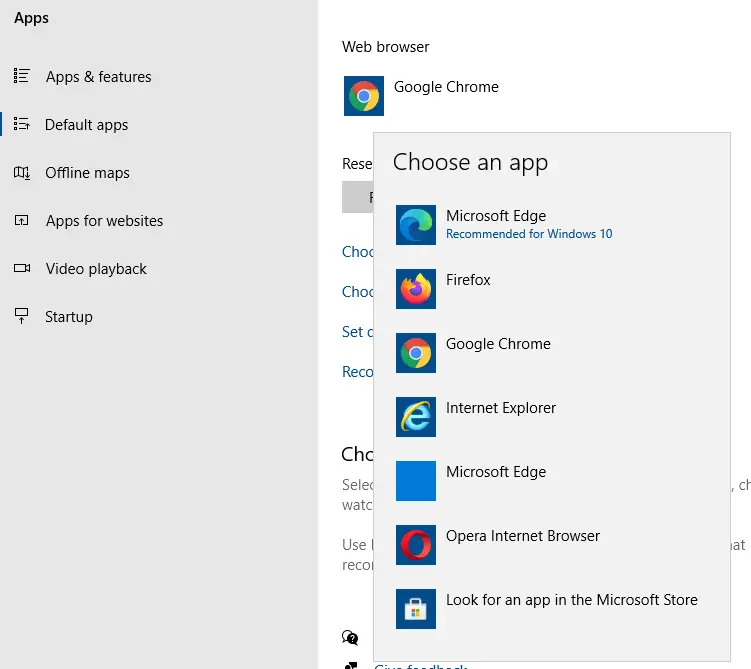
- Repeat the same, but select your preferred (original) browser this time.
Switching the default browser back and forth will resolve the file association issues.
For Windows 8 and earlier
- Click Start, and click Default Programs
- Click Set program access and computer defaults
- Click Custom, select your Web browser (e.g. Internet Explorer), and click OK
- Close and re-open Microsoft Outlook.
Step 2: Fix .HTML association settings using registry:
If resetting the default web browser doesn’t fix the problem, fix the default file class data for .html file type using the registry. It’s because Method 1 may not fix this particular registry setting.
- Copy the following lines to Notepad.
[HKEY_CLASSES_ROOT\.html]
@="htmlfile"
"Content Type"="text/html"
"PerceivedType"="text"
- Save the file as “
html.reg“ - Double-click
html.regto apply the settings.
This method fixes only the .html file class settings. Whereas, the procedure listed under “Step 1” fixes most of the per-user association settings.
Using Notepad++?
Alternately, if you’re using Notepad++, make sure you have not associated the .htm and .html file types with Notepad++.
- Open Notepad++ elevated (Run as administrator)
- From the Settings menu, click Preferences.
- Select “File association.”
- Remove .htm and .html from the list of “Registered extensions.”
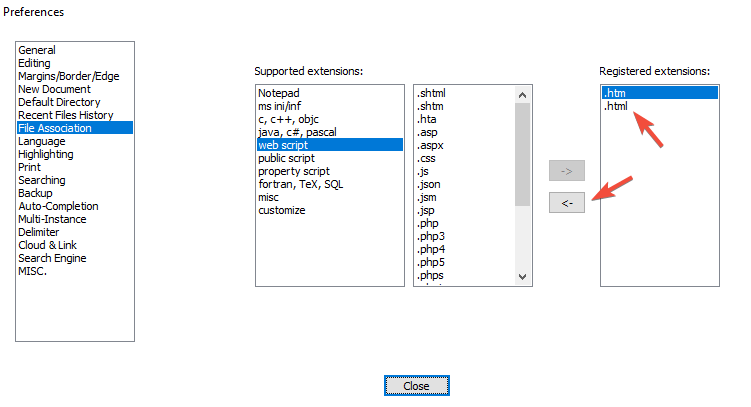
- Click OK and close Notepad++.
- Restart Outlook or your MS Office application.
One small request: If you liked this post, please share this?
One "tiny" share from you would seriously help a lot with the growth of this blog. Some great suggestions:- Pin it!
- Share it to your favorite blog + Facebook, Reddit
- Tweet it!
