 In Windows Vista, the Sync Center’s default view mode is Extended Tiles, which includes a sync progress bar. However, due to folder type corruption (incorrect “FFlags” data in the Bags registry key), the Extended Tiles option may be missing and default to the Tiles view.
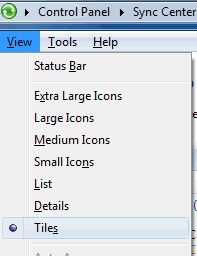
In the Tiles view, each tile has a fixed width and may be arranged in multiple columns. In the Extended Tiles view, each tile occupies the entire width. Here is how to restore the Extended Tiles view in Sync Center.
Resolution
To resolve the issue, reset the folder view settings.
Option 1: Reset folder views using a registry fix
Clearing all saved folder views should fix the problem. See section Clear all saved folder views in this article.
Option 2: Reset Sync Center folder views manually
Use this method if you don’t want to lose the saved folder views for other folders.
- Launch regedit.exe
- Backup the following key to a .REG file (e.g., bags.reg)
HKEY_CURRENT_USER\Software\Classes\Local Settings\Software\Microsoft\Windows\Shell\Bags
- Right-click the Bags key and choose Delete. Click Yes to confirm.
- Launch Sync Center (Click Start, type Mobsync.exe)
- Press and hold the CTRL key, and close the Sync Center window (click the Red X button).(A new bag # will be created for the Sync Center folder.)
- Refresh the Registry Editor (press F5) and note down the newly created Bag # (Example: 221)
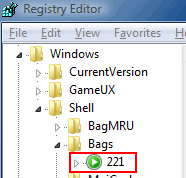
- Right-click the Bags key and choose Delete. Click Yes to confirm.
- Click File, Import… and select the .REG file (bags.reg), created using Step #2 above.
- Navigate to the following branch:*where the {Bag #} placeholder represents the actual Bag number found using Step #6.
HKEY_CURRENT_USER\Software\Classes\Local Settings\Software\Microsoft\Windows\Shell\Bags\{Bag #}\Shell\{5C4F28B5-F869-4E84-8E60-F11DB97C5CC7} - Double-click FFlags value.
- Set its value data to 2000001 (hex)
- Exit the Registry Editor.
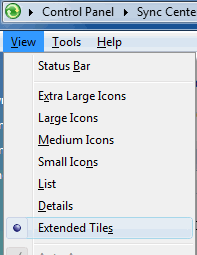
That resolves the problem.
One small request: If you liked this post, please share this?
One "tiny" share from you would seriously help a lot with the growth of this blog. Some great suggestions:- Pin it!
- Share it to your favorite blog + Facebook, Reddit
- Tweet it!

