In the recent versions of Windows 10 (Creators Update and higher), the “Open Command Prompt here” context menu entry has been removed and is replaced by “Open PowerShell window here”.
Microsoft, in an effort to bring the best command line experiences to the forefront for all power users, has made PowerShell the de facto command shell.
This article tells you how to add “Open command window here” to right-click menu in Windows 10. Optionally, you can also remove the Open PowerShell window here from the context menu.
You may also be knowing that since the preview build 14971, “Command Prompt” and “Command Prompt (Admin)” entries in the Win+X menu (the menu which appears when you right-click Start) were replaced with PowerShell links.
Quoting Microsoft:
It (PowerShell) replaces Command Prompt (aka, “cmd.exe”) in the WIN + X menu, in File Explorer’s File menu, and in the context menu that appears when you shift-right-click the whitespace in File Explorer. Typing “cmd” (or “powershell”) in File Explorer’s address bar will remain a quick way to launch the command shell at that location.
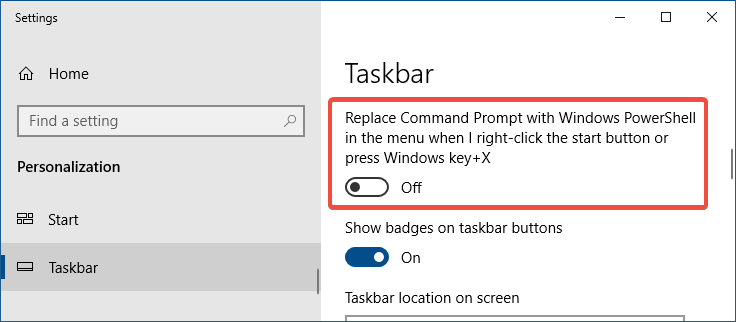
For those who prefer to use Command Prompt, you can opt-out of the WIN + X change by opening Settings → Personalization → Taskbar, and turning “Replace Command Prompt with Windows PowerShell in the menu when I right-click the Start button or press Windows key+X” to “Off”.
Although you can run the old commands in the PowerShell window, you need to use the “.exe” suffix when running certain commands. For instance, running the “SC” command under the PowerShell window gives different results than what you get when running the same command from a regular Command Prompt shell.
“SC” is understood as the alias for “Set-Content” PowerShell cmdlet. So to manage services using the SC (SC.EXE) command in the PowerShell window, you’ll need to type the file extension — .EXE. Whereas the regular Command Prompt (CMD.exe) shell knows SC is nothing but SC.EXE, assuming no file of the same name and with a .COM extension exists in the path.
Add Command Prompt to the Context menu
If you’re fond of the old Command Prompt (cmd.exe), you can add the traditional “Open Command window here” option back in the context menu for file system folders and drives, using a Registry edit.
Method 1
This method creates a new menu item named “Open command window here” by adding the necessary context menu registry entries.
- Open Notepad.
- Copy the following lines and paste them in Notepad:
Windows Registry Editor Version 5.00 [HKEY_CLASSES_ROOT\Directory\shell\cmdprompt] @="@shell32.dll,-8506" "NoWorkingDirectory"="" [HKEY_CLASSES_ROOT\Directory\shell\cmdprompt\command] @="cmd.exe /s /k pushd \"%V\"" [HKEY_CLASSES_ROOT\Directory\Background\shell\cmdprompt] @="@shell32.dll,-8506" "NoWorkingDirectory"="" [HKEY_CLASSES_ROOT\Directory\Background\shell\cmdprompt\command] @="cmd.exe /s /k pushd \"%V\"" [HKEY_CLASSES_ROOT\Drive\shell\cmdprompt] @="@shell32.dll,-8506" "NoWorkingDirectory"="" [HKEY_CLASSES_ROOT\Drive\shell\cmdprompt\command] @="cmd.exe /s /k pushd \"%V\"" - Save the file as “
cmdhere.reg“ - Double-click the file to apply the settings to the registry.
Alternately, you can download the following registry file:
- Download cmd-here-windows-10.zip
This adds the “Open command window here” option to the right-click menu for folders and drives, which, when clicked, opens a Command Prompt window at the current drive or directory path.
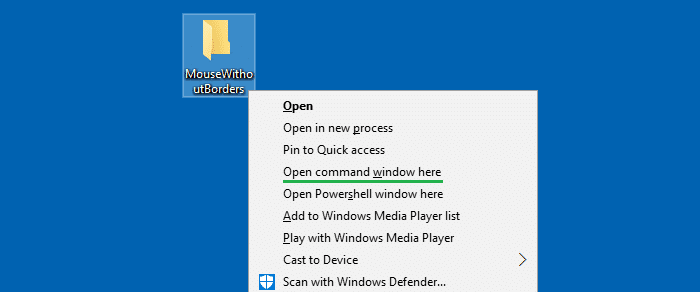
cmd-here-windows-10-with-icon.reg file included in the zip file.Additional Tip: Add “Open command window here” as an extended menu
If you want to show the “Open command window here” as an extended or hidden menu (to reduce clutter), use this registry file instead:
Windows Registry Editor Version 5.00

[HKEY_CLASSES_ROOT\Directory\shell\cmdprompt]
@="@shell32.dll,-8506"
"NoWorkingDirectory"=""
"Extended"=""

[HKEY_CLASSES_ROOT\Directory\shell\cmdprompt\command]
@="cmd.exe /s /k pushd \"%V\""

[HKEY_CLASSES_ROOT\Directory\Background\shell\cmdprompt]
@="@shell32.dll,-8506"
"NoWorkingDirectory"=""

[HKEY_CLASSES_ROOT\Directory\Background\shell\cmdprompt\command]
@="cmd.exe /s /k pushd \"%V\""

[HKEY_CLASSES_ROOT\Drive\shell\cmdprompt]
@="@shell32.dll,-8506"
"NoWorkingDirectory"=""
"Extended"=""

[HKEY_CLASSES_ROOT\Drive\shell\cmdprompt\command]
@="cmd.exe /s /k pushd \"%V\""
An “extended” menu appears only when you press and hold the Shift key when right-clicking on a folder or drive.
Method 2
The “Open command window here” context menu registry entry still exists by default in Windows 10. But it’s been made inactive with a registry value named HideBasedOnVelocityId.
In this method, we change the HideBasedOnVelocityId registry value to 0 using the HKEY_CURRENT_USER override. This will enable the built-in and dormant “Open command window here” in the right-click menu.
- Open Notepad.
- Copy the following lines and paste them in Notepad:
Windows Registry Editor Version 5.00 [HKEY_CURRENT_USER\SOFTWARE\Classes\Directory\shell\cmd] "HideBasedOnVelocityId"=dword:00000000 "Icon"=hex(2):25,00,73,00,79,00,73,00,74,00,65,00,6d,00,72,00,6f,00,6f,00,74,\ 00,25,00,5c,00,73,00,79,00,73,00,74,00,65,00,6d,00,33,00,32,00,5c,00,63,00,\ 6d,00,64,00,2e,00,65,00,78,00,65,00,2c,00,30,00,00,00 [HKEY_CURRENT_USER\SOFTWARE\Classes\Drive\shell\cmd] "HideBasedOnVelocityId"=dword:00000000 "Icon"=hex(2):25,00,73,00,79,00,73,00,74,00,65,00,6d,00,72,00,6f,00,6f,00,74,\ 00,25,00,5c,00,73,00,79,00,73,00,74,00,65,00,6d,00,33,00,32,00,5c,00,63,00,\ 6d,00,64,00,2e,00,65,00,78,00,65,00,2c,00,30,00,00,00 - Save the file as “
cmdhere2.reg“ - Double-click the file to apply the settings to the registry.
That’s it. This enables the “Open command window here” context menu item (with icon) for directories and drives.
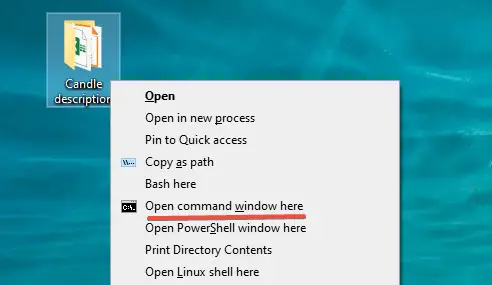
This method works only for the current user account — i.e., per-user account basis.
(For the Windows 11 version of this article, check out the page How to Add “Open command window here” Option in Windows 11.)
One small request: If you liked this post, please share this?
One "tiny" share from you would seriously help a lot with the growth of this blog. Some great suggestions:- Pin it!
- Share it to your favorite blog + Facebook, Reddit
- Tweet it!

Thanks so much, saved me so much hassle
thank you genius!
Nice post. very helpful
Thanx a lot
Thanks for the info and reg file!
I’m hoping somebody would stop Microsoft making a mess in every update for God’s sake!
Thank you very much!
Microsoft has given the fix for returning CMD back into the Start menu, but not for the Windows Explorer context.
Your .reg and explanation is very welcome.
Thank u man a lot
Geez! Thanks a lot
Thanksss.. help a lot
I downloaded the file, and it works perfectly. I personally think they should both be there. It should’ve been like that for a long time, in my opinion.
Thank you, so much Bhai. Its of lots of useful. And also working for me, not by creating a mess.
Thanks dude, saved my ass
Thanks, now I don’t have to open cmd from the menu and browse there through commands anymore. I don’t get why Microsoft decided to remove this, powershell can’t do everything that command prompt can.
uh yes it can and then some.
thank you so muchhh!!!you help me so much guys i’ve been checking all day and i finally found it here in this website lifesaver love you guys!!!
Dear WinHelpOnline,
Thank you very much for helping me out!
Your regedit works perfectly. The system should have been like this from Microsoft. Add new features, don’t delete the old ones!
Powershell does not do ‘dir’ correctly.
Björn
Thanks for the .reg file. I had to log out of my standard account and the log into my admin account for the .reg file to work.
I’ve created a .reg file with the contents shown above, run the reg file and confirmed that the registry contains these entries. Yet the context menu for any directory in File Explorer does NOT contain an entry for a command window.
@George: Press SHIFT when right-clicking a folder.
Neither the .zip nor the cut-and-paste txt work.
@Duane: Do you have admin priviliges?
The zip package worked excellently. Thanks a lot sir. Shame on you MS for “forcing” stuffs on us! Shameful act from MS.
Thanks a lot bro, it helped me in the crucial time.
Great .reg files… Just out of curiosity. Is there a way to make it a administrator cmd prompt?
thanks bro, did the job!
Thanks!
I use this so much I prefer leaving off the “extended” parts though, so it shows up without holding [shift].
Tkanks a lot
Thank you!
Thanks a lot bro…
This helps, and it’s so much easier than other instructions elsewhere! Thanks!
Kudos to a quick and easy solution to a problem that should not exist!
Great info! Thank you very much. It is up to the good people to fix MS crazy decisions :/
Thank you. very useful!
THANK YOU SO MUCH I LOVE YOU, YOU REPLACED MY NIGHTMARE DAY BY A SUNSHINE DAY. TANKS
Thanks, that was very helpful.
Thank you very much. I’m tired of windows and all its dum changes.
thanks buddy it works like a charm
Thanks!
Thank you so much!
worked perfectly, genius..!! 🙂
Also you can add this parameter:
“Icon”=”cmd.exe,0”
After each “NoWorkingDirectory”=”” line, so this menu option will have cmd.exe icon and get easier to distinguish in context menu.
Agree with SagePtr, but I used
“Icon”=”%windir%\system32\cmd.exe”
Maybe cmd wasn’t in my path for some reason. The “,0” is probably optional
Works great! Thanks
Works like a charm! Great post.
thanks, it worked
How to add icon on that context menu?
@Harry: See How to Add Icon to Right-Click Menu in Windows 7 and higher
Jesus… Thanks, I looked at so many older articles on how to do this. None of them worked.
Thanks man
Aweseome! THANK YOU!!!!
thank you so much sir… thank you!
Thank you so much….it really healps me!
Awesome. Thanks! Be gone the blue monstrosity that it power shell!
Thank you!
This article really works for me. And special thanks for this great article. This was really helpful for me Thanks a lot!
Omg, this work fine!! Thanks from Brazil!
Others in other places on the web trying to help with complex 10 step registry edits, including permissions changes which I know from past experience are problematic for even some who are willing to edit the registry when it’s straight forward. I followed and double-checked my steps, twice and they did not deliver! Your Reg delivered (THANKS), and thank you for including an UNDO in case I ever need that. I do wish Microsoft would allow me to have a stasis on my PC, as I’m happy with it as-is. The problem is while MS did an extensive check on my PC to upgrade to Windows 10 they don’t do anything like that on any subsequent upgrades since that change years ago. As a result Microsoft has taken their upgrades over a year past when my manufacturer, DELL, said my PC was no longer compatible with Win10 as it was in June 2020. Thanks again!
Dean Pennington
it appears even without shift can you update the script please
Works, Thanks 🙂
this edit will messup the VPN connection. Can you also provide a method how to restore to the default values ?
@Adarsha: Why do you think this edit messes up your VPN?
hmm how do we undo Method 2 if we want to remove it. I see how to undo the other methods (adding a – infront of their registry entry in the .reg file will remove key or – after the = will remove a value) however I’m not sure how to under the HKCU method on enabling the native-but-dormant cmd here (Method 2)
thanks for the wealth of knowledge
@watchutalkinboutwillis:
This registry modification will undo Method 2.
Hello,
Is there any way to undo Method 1? This method doesn’t launch CMD in Admin mode so I’d have to launch CMD manually and CD to the location that I want.
Thanks
@Hello: Yes. To reverse the changes (Method 1), run the file undo.reg which is enclosed in cmd-here-windows-10.zip
I edited Method 2 to add the option also in the context menu from right-click background of folders/drivers. Tested on Windows 10 versions 21H1 and 21H2.
HELP ME PLS…
I tried your Method 1… It worked perfectly but I want to revert it back as I only wanted the option to come up after pressing SHIFT KEY… The reg values are changed… Pls HELP… Someone pls tell me the original keys and values… i tried a System restore and it is failing due to some reason
@Aadyant: Run the undo.reg registry file (located inside the zip file). It will reverse the settings.
Sir, the Method 2 you told… It is still giving the same output as it gave in Method 1… Pressing SHIFT key or not doesn’t make a difference… Pls HELP