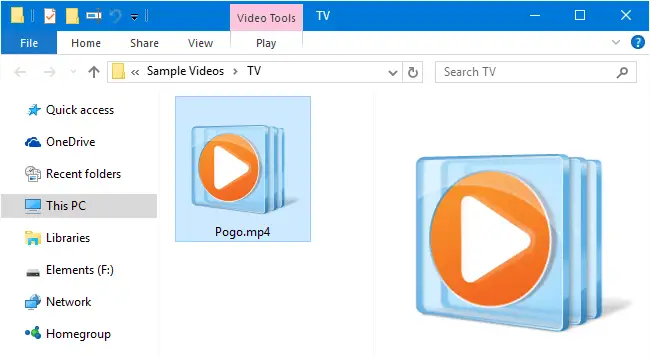
When you open a folder containing video files, no thumbnails may be displayed for your videos. Also, when you click a video file in File Explorer, the Preview pane may neither show the image preview nor the mini-player control for the chosen file. In some cases, No preview available message is shown in the Preview pane for selected or all media file types.
Resolution
Step 1: Enable Thumbnails and Preview Handlers
The first step is to make sure the folder settings are configured correctly.
- Click the File menu in File Explorer, and select Change folder and search options.
- In the Folder Options dialog, click the View tab.
- Uncheck Always show icons, never thumbnails
- Enable Show preview handlers in preview pane
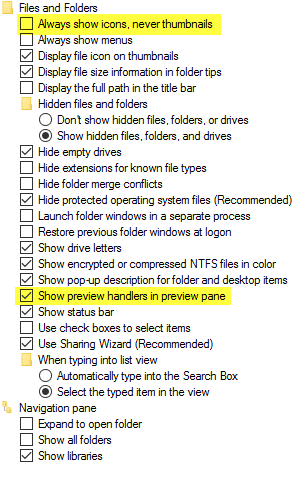
- Click OK.
This enables the thumbnail previews and also activates the Preview handlers that are registered for each file type.
Step 2: Fix the Thumbnail and Preview handler registry entries
There are situations where the Folder Options settings do not make any difference. Some video file types may still show “No preview available” and without displaying a thumbnail. This happens if the preview and/or thumbnail handler shell extension registration is missing for that file type.
By default, the Windows Media Player’s Rich Preview Handler is registered for the following video file types out of the box.
3G2, 3GP, ASF, AVI, M2TS, MP4, MPE, MPEG, MPG, TTS, WMV
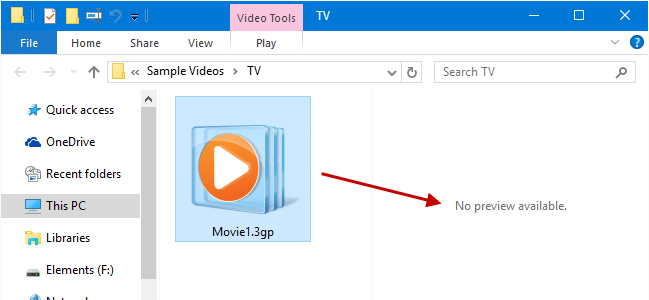
The “No preview available” error usually occurs after associating the file type with a different multimedia player but the player didn’t add the preview handler registry entries. The ultimate fix is to add the thumbnail hander and the preview handler shell extensions for media files using the registry fix below.
After running the fix, image thumbnails, as well as the previews, should work fine for the supported file types, no matter which program you set as the default.
Registry Fix
Windows Registry Editor Version 5.00

; Video Thumbnail and Preview Handler Fix (for video file types)
; Created  on: July 04, 2016
; Reviewed on: July 26, 2022
;https://www.winhelponline.com/blog/

[HKEY_CLASSES_ROOT\.3gp\ShellEx\{8895b1c6-b41f-4c1c-a562-0d564250836f}]
@="{031EE060-67BC-460d-8847-E4A7C5E45A27}"

[HKEY_CLASSES_ROOT\.3gp\ShellEx\{BB2E617C-0920-11D1-9A0B-00C04FC2D6C1}]
@="{9DBD2C50-62AD-11D0-B806-00C04FD706EC}"

[HKEY_CLASSES_ROOT\.3gp\ShellEx\{e357fccd-a995-4576-b01f-234630154e96}]
@="{9DBD2C50-62AD-11D0-B806-00C04FD706EC}"


[HKEY_CLASSES_ROOT\.asf\ShellEx\{8895b1c6-b41f-4c1c-a562-0d564250836f}]
@="{031EE060-67BC-460d-8847-E4A7C5E45A27}"

[HKEY_CLASSES_ROOT\.asf\ShellEx\{BB2E617C-0920-11D1-9A0B-00C04FC2D6C1}]
@="{9DBD2C50-62AD-11D0-B806-00C04FD706EC}"

[HKEY_CLASSES_ROOT\.asf\ShellEx\{e357fccd-a995-4576-b01f-234630154e96}]
@="{9DBD2C50-62AD-11D0-B806-00C04FD706EC}"


[HKEY_CLASSES_ROOT\.avi\ShellEx\{8895b1c6-b41f-4c1c-a562-0d564250836f}]
@="{031EE060-67BC-460d-8847-E4A7C5E45A27}"

[HKEY_CLASSES_ROOT\.avi\ShellEx\{BB2E617C-0920-11D1-9A0B-00C04FC2D6C1}]
@="{9DBD2C50-62AD-11D0-B806-00C04FD706EC}"

[HKEY_CLASSES_ROOT\.avi\ShellEx\{e357fccd-a995-4576-b01f-234630154e96}]
@="{9DBD2C50-62AD-11D0-B806-00C04FD706EC}"


[HKEY_CLASSES_ROOT\.mov\ShellEx\{8895b1c6-b41f-4c1c-a562-0d564250836f}]
@="{031EE060-67BC-460d-8847-E4A7C5E45A27}"

[HKEY_CLASSES_ROOT\.mov\ShellEx\{BB2E617C-0920-11D1-9A0B-00C04FC2D6C1}]
@="{9DBD2C50-62AD-11D0-B806-00C04FD706EC}"

[HKEY_CLASSES_ROOT\.mov\ShellEx\{e357fccd-a995-4576-b01f-234630154e96}]
@="{9DBD2C50-62AD-11D0-B806-00C04FD706EC}"


[HKEY_CLASSES_ROOT\.mkv\ShellEx\{8895b1c6-b41f-4c1c-a562-0d564250836f}]
@="{031EE060-67BC-460d-8847-E4A7C5E45A27}"

[HKEY_CLASSES_ROOT\.mkv\ShellEx\{BB2E617C-0920-11D1-9A0B-00C04FC2D6C1}]
@="{9DBD2C50-62AD-11D0-B806-00C04FD706EC}"

[HKEY_CLASSES_ROOT\.mkv\ShellEx\{e357fccd-a995-4576-b01f-234630154e96}]
@="{9DBD2C50-62AD-11D0-B806-00C04FD706EC}"


[HKEY_CLASSES_ROOT\.mp4\ShellEx\{8895b1c6-b41f-4c1c-a562-0d564250836f}]
@="{031EE060-67BC-460d-8847-E4A7C5E45A27}"

[HKEY_CLASSES_ROOT\.mp4\ShellEx\{BB2E617C-0920-11D1-9A0B-00C04FC2D6C1}]
@="{9DBD2C50-62AD-11D0-B806-00C04FD706EC}"

[HKEY_CLASSES_ROOT\.mp4\ShellEx\{e357fccd-a995-4576-b01f-234630154e96}]
@="{9DBD2C50-62AD-11D0-B806-00C04FD706EC}"


[HKEY_CLASSES_ROOT\.mpe\ShellEx\{8895b1c6-b41f-4c1c-a562-0d564250836f}]
@="{031EE060-67BC-460d-8847-E4A7C5E45A27}"

[HKEY_CLASSES_ROOT\.mpe\ShellEx\{BB2E617C-0920-11D1-9A0B-00C04FC2D6C1}]
@="{9DBD2C50-62AD-11D0-B806-00C04FD706EC}"

[HKEY_CLASSES_ROOT\.mpe\ShellEx\{e357fccd-a995-4576-b01f-234630154e96}]
@="{9DBD2C50-62AD-11D0-B806-00C04FD706EC}"


[HKEY_CLASSES_ROOT\.mpeg\ShellEx\{8895b1c6-b41f-4c1c-a562-0d564250836f}]
@="{031EE060-67BC-460d-8847-E4A7C5E45A27}"

[HKEY_CLASSES_ROOT\.mpeg\ShellEx\{BB2E617C-0920-11D1-9A0B-00C04FC2D6C1}]
@="{9DBD2C50-62AD-11D0-B806-00C04FD706EC}"

[HKEY_CLASSES_ROOT\.mpeg\ShellEx\{e357fccd-a995-4576-b01f-234630154e96}]
@="{9DBD2C50-62AD-11D0-B806-00C04FD706EC}"


[HKEY_CLASSES_ROOT\.mpg\ShellEx\{8895b1c6-b41f-4c1c-a562-0d564250836f}]
@="{031EE060-67BC-460d-8847-E4A7C5E45A27}"

[HKEY_CLASSES_ROOT\.mpg\ShellEx\{BB2E617C-0920-11D1-9A0B-00C04FC2D6C1}]
@="{9DBD2C50-62AD-11D0-B806-00C04FD706EC}"

[HKEY_CLASSES_ROOT\.mpg\ShellEx\{e357fccd-a995-4576-b01f-234630154e96}]
@="{9DBD2C50-62AD-11D0-B806-00C04FD706EC}"


[HKEY_CLASSES_ROOT\.wmv\ShellEx\{8895b1c6-b41f-4c1c-a562-0d564250836f}]
@="{031EE060-67BC-460d-8847-E4A7C5E45A27}"

[HKEY_CLASSES_ROOT\.wmv\ShellEx\{BB2E617C-0920-11D1-9A0B-00C04FC2D6C1}]
@="{9DBD2C50-62AD-11D0-B806-00C04FD706EC}"

[HKEY_CLASSES_ROOT\.wmv\ShellEx\{e357fccd-a995-4576-b01f-234630154e96}]
@="{9DBD2C50-62AD-11D0-B806-00C04FD706EC}"
How to use:
Copy the above .reg file contents to Notepad, and save the file as fix-video-preview.reg. Double-click the file to apply the settings to the registry.
Is K-Lite Codec Pack installed?
If you have K-Lite Codec Pack installed on the computer, configuring it incorrectly would delete the above Windows thumbnail and preview handler registry keys. A good thing is that K-Lite software backs up the registry values in another location so that you can restore them later.
To restore the Windows default preview and thumbnail handler registry entries using K-Lite, follow these steps:
- Open the K-Lite Codec Tweak Tool.
- Click Thumbnails.
- On the Thumbnail Settings page, click Reset.
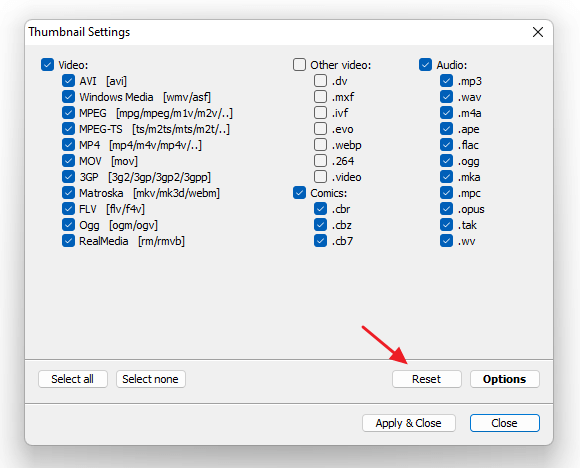
- Click Yes to reset thumbnail settings to Windows default settings. Note that it will replace the Icaros Thumbnail provider module
IcarosThumbnailProvider.dll(supplied by K-Lite Codec Pack) with Windows default thumbnail and preview handler shell extension(s).
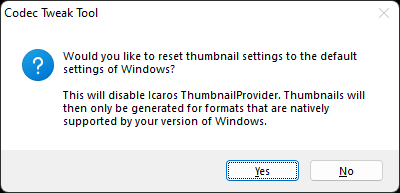
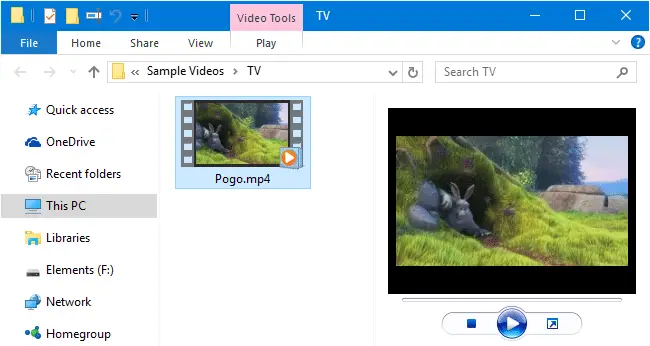
This should restore back the video thumbnails as well as previews in Explorer.
One small request: If you liked this post, please share this?
One "tiny" share from you would seriously help a lot with the growth of this blog. Some great suggestions:- Pin it!
- Share it to your favorite blog + Facebook, Reddit
- Tweet it!

Hello, just tried your solution but i didn’t work. Now I dont even get the “No preview available” in the preview pane. Any ideas?
@Fotis: For which filetype? Can you upload a FileTypeDiag report for that particular file type?
For .avi .3gp .mp4 for sure. Have not checked any others yet.
Unbelievable!!! You fixed both my issues, first I didn’t have any preview, pane was blank, then video files that were showing only thumbnails… Now all is good as new!!! Thanks!
I’ll share this everywhere!