Here is a mysterious case of the icon overlap problem, which the screenshot below explains perfectly. You can see the original icon for shortcuts is overlapped by a generic white overlay (which is shown for unknown file types). An incorrect icon overlay setting is causing the problem.
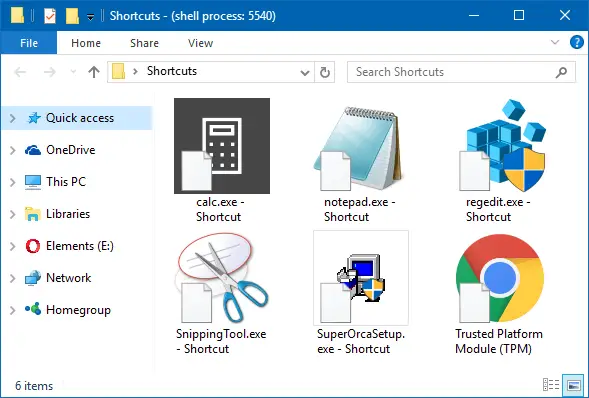
As the issue is seen only for shortcuts (.lnk and .url files), the problem is with the “Shell Icons” registry key which you can use to hide or change the arrow icon for shortcuts.
For a proper way to remove or modify the shortcut arrow icon overlay, read the article How to Remove or Modify the Shortcut Overlay in Windows.
And here is a variation of the same issue, but this time the black square boxes are covering up the shortcut icons. This can happen if the blank icon within shell32.dll, 50 is used to remove the shortcut arrows.
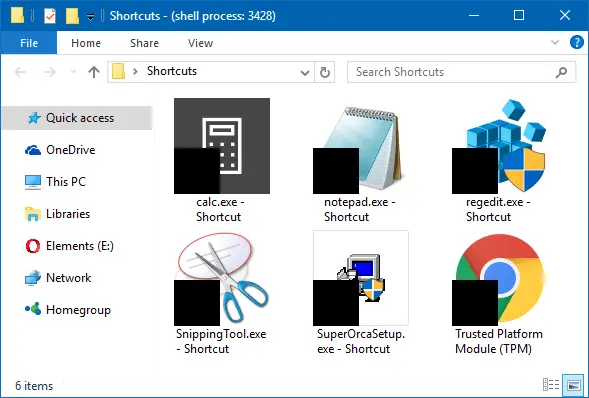
Here is the particular registry key you want to check out.
HKEY_LOCAL_MACHINE\SOFTWARE\Microsoft\Windows\CurrentVersion\Explorer\Shell Icons
In the subject computer, the value named 29 in the above registry location was pointing to the following .ico file:
%userprofile%\\Desktop\\WinBubble16\\WinBubble16\\icons\\noicon.ico
Presumably, a software called “WinBubble” was used to change the icons, and later the user removed the program — making the .ico file path invalid. The invalid reference causes the white icons (or black boxes) to show up as the shortcut overlay.
To remove the overriding registry value, start the Registry Editor (Regedit.exe) and go to the “Shell Icons” branch mentioned earlier.
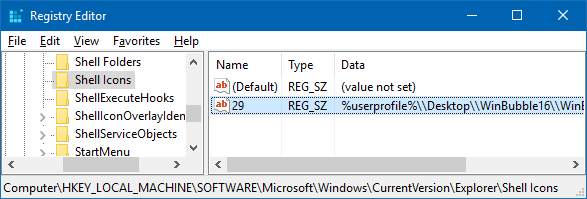
Delete the value named 29 and restart Windows.
This should resolve the problem.
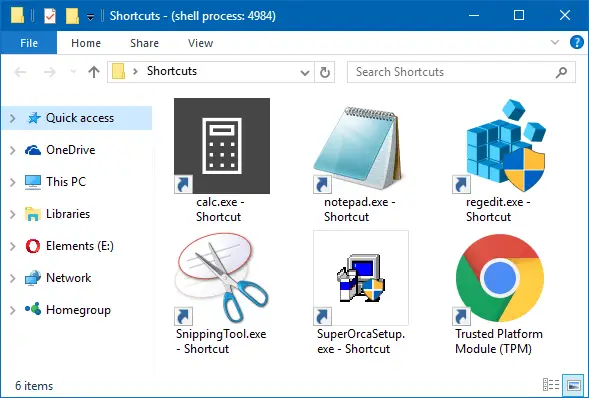
If the icons don’t refresh automatically, then refresh the icons manually. If that doesn’t do the trick, rebuild the icon cache.
See also: How to Fix Missing Shell Icons in Various Places in the Windows User Interface?
One small request: If you liked this post, please share this?
One "tiny" share from you would seriously help a lot with the growth of this blog. Some great suggestions:- Pin it!
- Share it to your favorite blog + Facebook, Reddit
- Tweet it!


I also had the same problem on Windows 7.
Look at this:
https://www.winhelponline.com/blog/how-to-rebuild-the-icon-cache-in-windows/
It works well on 7 as well.
Thank You for this help. Windows 7 and Same problem, corrected!
I had a similar issue.
Using regedit I changed the following:
%windir%\System32\shell32.dll,-50
to
%windir%\System32\shell32.dll,50
rebooted and the icons no longer have black squares covering them.
Note that for Windows XP, I have %windir%\System32\shell32.dll,-50
thanks. worked perfectly
Very excellent – issue fixed – Many Thanks
Thank you, an annoying problem solved
Excellent, fixed the problem!
Thanks for giving the exact regedit location for the fix. You are the first person I found online that actually had the solution to the missing shortcut arrows, instead of temporary fixes until the computer is restarted. This WinBubble software must have been included as bloatware in some other program I had uninstalled, because I never specifically ever installed or removed something called WinBubble.
nice – worked on win 10 – was bugging me with the white page – great stuff ! thanks very much
steve in thailand
Thank you so much for this!
More praise, from Flint, MI. Thanks so much!