Windows Live Mail includes the English (UK) spell check dictionary built-in, but the option is not exposed for some unknown reason. To enable the English (United Kingdom) spell check dictionary, using one of the methods below. Method 1 tells you how to manually add the UK English Spell check option in Windows Live Mail, and Method 2 uses a VBScript that I wrote to automate the task.
Credits to Bob Lucas for this excellent tip.
Method 1
Copying the files
Copy the files spell.ini, mssp3en.lex, MSSpell3.DLL from the following folder:
%ProgramFiles%\Windows Live\Mail\Proof\prf0009\2\
to the following folder:
(Windows XP)
%userprofile%\Local Settings\Application Data\Microsoft\Windows Live Mail\Proof\prf0809\1
(Windows Vista)
%localappdata%\Microsoft\Windows Live Mail\Proof\prf0809\1
Note that the destination path does not exist by default and you need to manually create the folders up to the level above. To access the above location, simply type the path in the Address bar in Windows Explorer or in the Start Run dialog.
Edit the Spell.ini file
After copying the files, you need to edit the spell.ini file (using Notepad) in the destination path and set the Lang value to 2057, which is the Locale ID decimal for English, United Kingdom. Save the file. The spell.ini file should now show the following contents:
[Spellchecker]
Engine=MSSPELL3.DLL
Lex=MSSP3EN.LEX
Lang=2057
Script to automate the above steps
Download ukspell_wlm.vbs and save to Desktop. Double-click the file to run it. The script carries out the steps listed in Method 1 quickly and you’ll see a message box when it’s complete.
English (United Kingdom) should now be added to the list of available languages in Windows Live Mail.
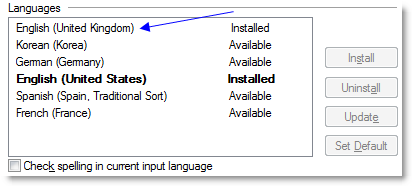
Set English (United Kingdom) as the default
- Start Windows Live Mail
- Use the Alt + T keyboard shortcut to access the Tools menu
- Click Options
- Select the Spelling tab
- Select English (United Kingdom)
- Click Set Default and click OK.
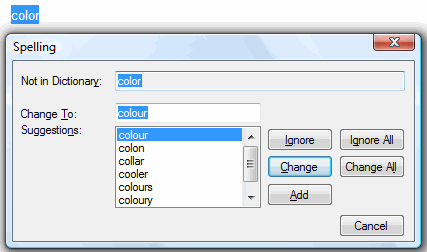
The UK Spell check dictionary is now set as the default!
One small request: If you liked this post, please share this?
One "tiny" share from you would seriously help a lot with the growth of this blog. Some great suggestions:- Pin it!
- Share it to your favorite blog + Facebook, Reddit
- Tweet it!


I’ve found the English (UK) spell checker in Windows 7.
On the Windows Live Mail drop down menu, select TOOLS, OPTIONS, SPELLING. In the window showing the available languages, scroll down to English (United Kingdom). Click on it to highlight it, select ‘Set Default’ and the ‘English (United Kingdom) goes bold, select ‘Apply’ and ‘OK’.
It works fine on my machine.
@BJ
Where d you find tools, options, spelling in windows live mail 2011? or for that matter the older version