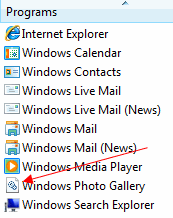
When you open Default Programs – Set your default programs applet, Windows Photo Gallery entry is displayed with an incorrect icon (showing two gears, which is the default icon for DLL files) instead of the nice looking Windows Photo Gallery icon.
![]()
This is because the image preview is handled by Windows Photo Gallery DLL file PhotoViewer.dll. Here is the command-line for the Preview action:
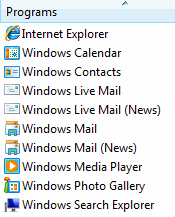
Although this is only a cosmetic issue and can be ignored, I’ve found a way to fix the Windows Photo Gallery icon in Default Programs. The trick is to insert an additional file type in the registry and associating it with WindowsPhotoGallery.exe. The tool below does that exactly.
1. Download WPGIconFix.zip and save to Desktop
2. Unzip the archive and extract the files to a folder
3. Run the file WPGIconFix.exe
4. Click Allow when you see the UAC elevation dialog.
![]()
Related Posts
- How to Hide Windows Photo Gallery After Installing Windows Live Photo Gallery
- Double Clicking an Image Opens Windows Photo Gallery Without Previewing the Image
- Fix: Windows Live Photo Gallery Update 955359 Breaks Image File Associations
- Straighten Up Slanted Photos Using Windows Live Photo Gallery
- Fix Error “There Was a Problem Starting PhotoViewer.Dll” When Editing Image Files in Windows 7
If you enjoyed this post, make sure you subscribe to our RSS feed! We feature Tips, Troubleshooting information, Scripts and Utilities for Microsoft Windows Operating Systems!
Prefer an E-mail subscription?


This does not work on x64 version…
Hi, in other words this fix will only work for Photo Gallery?
The only problem I have ever really had with Vista and can’t figure out what triggers it, is that every so offten something changes my icons either on the desktop or in folders and in the Start Menu folders to the gerneric paper looking icon. With most if I go to the icons properties I can change it back to the normal icon by doing it twice. Some Icon can not be changed back because the button is grayed out. Will this fix correct the icons back to their orig ones?
Thanks
Rick
@hexaae: Don’t have a fix for individual file types icon at the moment, but will work on this.
Wait a min… default icon used for JPEGS and other image formats is still the ugly DLL. Can this be fixed too or should fix every extension association class in the registry?
Thanks a lot Ramesh! :)