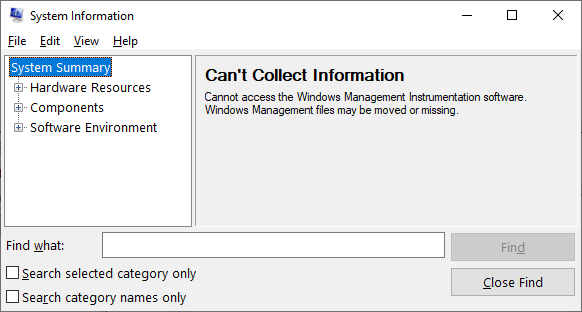
The System Information Tool (Msinfo32.exe) generates the error Can’t Collect Information if the Windows Management Instrumentation (WMI) service is not started.
Cause
The above error occurs if the Windows Management Instrumentation service is not running.
Resolution
Follow the steps below to resolve the issue. If Step 1 resolves the issue, no need to follow Step 2 and Step 3.
Step 1) Start the WMI Service
- Right-click Start, and click Run.
- Type Services.msc and click OK.
- Double-click Windows Management Instrumentation
- Set its Startup type to Automatic
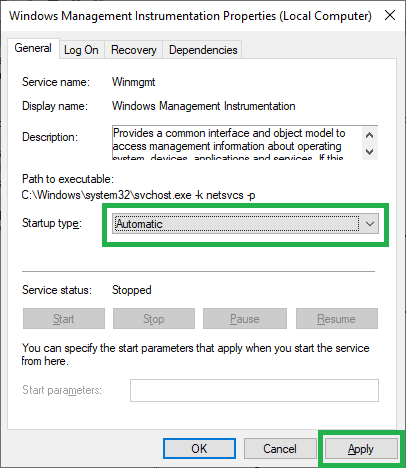
- Click Apply.
- Click Start to start the service.
- Click OK.
If the above steps do not work, try Step 2, and if necessary, Step 3 to re-register the WMI components.
Step 2) Reset the WMI Repository
Open an admin Command Prompt, and run the following commands.
winmgmt /backup c:\wmi_repository.bak
winmgmt /resetrepository
Restart Windows. If the problem persists, proceed to Step 3 below.
Step 3) Rebuild the WMI repository Completely
Open an admin Command Prompt, and run the following commands.
sc config winmgmt start= disabled

net stop winmgmt
(the blank space after start= is intentional)
(Note: Stopping WMI will also stop the other services that depend upon WMI. Please attempt the procedure via Safe mode if the WMI service can’t be stopped. Antimalware service(s) that depend upon WMI may not stop and thus prevent WMI from stopping. In that case, the Safe mode should help.)
Run the following commands to rebuild the repository:
CD /D %WINDIR%\System32\Wbem\Repository
DEL /F /Q /S %WINDIR%\System32\Wbem\Repository\*.*
CD /D %WINDIR%\System32\Wbem
for /f %s in ('dir /b *.dll') do regsvr32 /s %s
wmiprvse /regserver
sc config winmgmt start= auto
net start winmgmt
for /f %s in ('dir /b *.mof') do mofcomp %s
for /f %s in ('dir /b *.mfl') do mofcomp %s
dism /online /cleanup-image /restorehealth
sfc /scannow
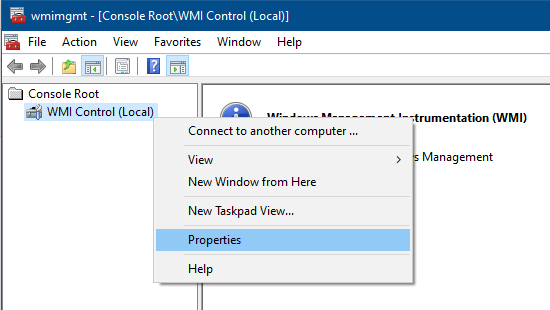
Launch wmimgmt.msc
Right-click “WMI Control (Local)” and click Properties.
The above step recreates the repository, which might take a minute or so.
Restart Windows.
The WMI components should be re-registered now. See if you can launch msinfo32.exe now.
One small request: If you liked this post, please share this?
One "tiny" share from you would seriously help a lot with the growth of this blog. Some great suggestions:- Pin it!
- Share it to your favorite blog + Facebook, Reddit
- Tweet it!


Thank you very much for helping me restore the files needed for viewing my system information !
Very good of you to provide the info as you did.
Thakyou verrrrrrrrrry much!! It saved me a lot of time..
In Windows XP Sp2 there is Service Named
DCOM Server Process Launcher
Goto Run: Goto services.msc
Scroll down to DCOM Server Process Launcher
Make sure it is on automatic or Manual by right clicking it and going to properties and choosing Manual or Automatic in the drop down, Apply then OK.
Then right click and “Start” DCOM Server Process Launcher.
Then try to run ‘msinfo32’ again
(This message brought to you by: Sysopo )
Thanks,
Followed the instructions and worked