When you click the Windows Explorer or File Explorer shortcut Pinned to the Taskbar, or when running explorer.exe directly, the following error message may be displayed:
This file does not have an app associated with it for performing this action. Please install an app or, if one is already installed, create an association in the Default Apps Settings page.

And the same error occurs when using the Win + E shortcut or running explorer.exe manually.
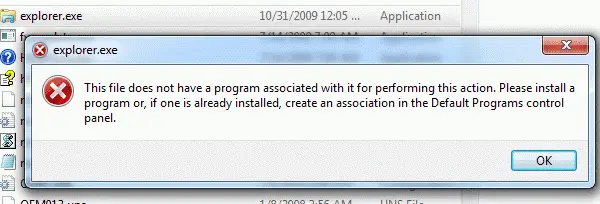
In earlier Operating Systems (e.g., Windows 8 and below), the following error is displayed:
This file does not have a program associated with it for performing this action. Please install a program or, if one is already installed, create an association in the Default Programs control panel.
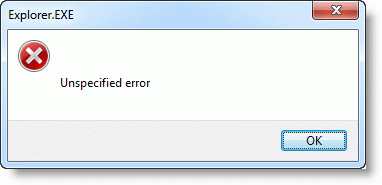
And using the Win + E key sequence causes “Unspecified error”
However, Explorer may launch correctly when including additional switches such as /e or /n with explorer.exe, or double-click the This PC icon. Also, all other shortcuts for other applications Pinned to the Taskbar may work fine, thus implying that this is not a Shortcut (.lnk) file association problem.
Cause
This problem occurs due to missing data in the HKEY_CLASSES_ROOT\Folders registry key. The File Explorer pinned shortcut located at the following path is a special shortcut that references a value under the “Folder” registry key:
%AppData%\Microsoft\Internet Explorer\Quick Launch\User Pinned\TaskBar
Information in this article applies to Windows Vista through Windows 10.
Fix for File Explorer shortcut association error
To fix the File Explorer shortcut association error, follow these steps:
- Start the Registry Editor (
regedit.exe) - Go to the following branch:
HKEY_CLASSES_ROOT\Folder\shell\opennewwindow\command
- Create a new String value (REG_SZ) named
DelegateExecute - Set its value data to
{11dbb47c-a525-400b-9e80-a54615a090c0} - Repeat steps #3 & 4 under the following registry key as well:
HKEY_CLASSES_ROOT\Folder\shell\explore\command
- Exit the Registry Editor.
The “Opennewwindow” branch is missing?
Some users have indicated that the entire key opennewwindow has been deleted from their computer. If the opennewwindow key is entirely missing, then download the “Folder” association registry fix for your Operating System from the links provided below:
Unzip the file and run the enclosed .reg file. You should now be able to start File Explorer from the Taskbar shortcut or using Win + E keyboard combo!
One small request: If you liked this post, please share this?
One "tiny" share from you would seriously help a lot with the growth of this blog. Some great suggestions:- Pin it!
- Share it to your favorite blog + Facebook, Reddit
- Tweet it!


Love my life, thanks its because of u..!!!!!!
Romeo
thanks. you are a life saver. 10 gold stars for you:)
I was looking for so long and tried so many other things that other fourms said would work but this simple reg file works. Thank God!!!!!!
Fixed it. I appreciate that you provided the exact screen clip of the problem. That assured me I was getting the right fix for my problem. Thank you. I’m running W7 SP1 32-bit.
Thanks for the registry file, it seems to have helped many users. I experienced the same issue although this fix did not work, it turned out that I did not have read permission to “HKEY_CLASSES_ROOT\Folder\shell\opennewwindow” – a key I had manually ‘hidden’ to reduce Context Menu clutter, it turns out that this is required.
This was driving me crazy, fixed the problem in 30 seconds, thanks so much!
guy u rock!!!!!
u fixed that problem 4 which i’ve been searching for 4 month.
gr8 thnx 2 u 🙂
At last my search for a solution to a pernicious Windows Explorer problem is solved — and so easily. I couldn’t find it on the Microsoft website, although many of us must have been afflicted by it.
Thank you and thank you again
Thanks for tht registry. Now I can open explorer by CTRL+E. Thanks once more time!
Just an FYI,
I did some digging around and came to find the root cause of this particular error is the absense of this value:
Key: HKCU\Folder\shell\opennewwindow\DelegateExecute
Type: REG_SZ
Value: {11dbb47c-a525-400b-9e80-a54615a090c0}
notice if you change this value in any way you will immidiately start getting the above said errors. This is useful for those who go around changing things and want to know what it was they did so they dont do it again 🙂
-O
YESSSS!!!! thank you so much! Problem fixed!!! I will not fiddle around with explorer replacements soon again…
Thanks so much master, now I’ve got something to die for 🙂
Awesome! Thanks, this fixed my issue also.
was messing with Better Explorer beta and got unspecified error with combination Windows+E. The patch fixed my problem. No need to re install windows7. Thanks.
problem fixed! thank you very much ^_^
That did not work for me ima getting the unspecified error from explorer.exe and nothing seems to be working if u have any other suggestion please do let me know
YESSSS!!!! thank you so much! Problem fixed!!! thank YOU VERY MUCH
Thanks for the fix, saved me alot of time! 🙂
Thanks!!! I thought I was going to have to give up and reload from scratch which would cause me to loose a lot of “stuff”. Your tool fixed the problem very quickly and without pages of “win this toaster etc…”
Thank you ;}
Can you please email me with what you would suggest as a complete system check out and repair bundle? I am asked from time to time to help other people and need a better set of the old tools that worked wonders with DOS and 3:11.
Yes. Once again you have fixed a major problem that even the “experts” at Microsoft could not solve. You are the master.
yesss!!!! The Problem have been fixed. Thank you so much…
Thank You so much!
Great job Sir thanx!
TQVM works great..
thanks, the best.
thanks very much, this worked
i had try all the way.. its not working..
but its working!!! thanks
you are the best fixer…
i tried all suggestion but for me i fix my problem from your trick..big thanks
Legend !
Thank you, worked perfectly! I appreciate the fix a lot.
Yay! It works! Thanks so much…
I bow to your greatness, Ramesh! I’ve been looking for a solution for WEEKS. Note to others (and hopefully indexed by search engines): this fix helped me solve an error with {26EE0668-A00A-44D7-9371-BEB064C98683}.
I was wondering if you could help me. When I try to open my downloads file I get the same error message. I was uninstalling programs on my computer and I know I was the cause of this problem…just not exactly sure how to fix it. I am running windows 7 thank you
Ran sfc /scannow and it found problems but was unable to fix! I merged your registry fix into the registry. I can now access windows explorer!
Thank you for this fix, works great.
Ramesh, i don’t imagine how do you have found this solution but i’m very grateful beacause thanks it i’ve solved.
Great!!!
This is amazing, I can open my explorer again after searching for many other problem solutions. This one really works! Great!
Thanks a lot. It solve my problem with my computer. :))
Thank you soooo much!!!!!
Wow. I’ve tried literally everything. I’ve searched and searched for a solution to this problem. Microsoft support was trying to make me pay $99 for a fix. THANK YOU!
Hi Ramesh, I have been suffering from this problem for more than a year! I can’t imagine that now I’ve fixed it with you help!!! Thanks!!!
Ramesh you rock buddy! Thanks!!!!
You are a Tech Marvel! Thanks Ramesh.
Thanks dude! it worked!
Worked!!! Tried everything…you really saved me! THANKS!!
Thank You Very Much bro. You’re best
I wanted to say thank you so much, I had been trying to find a fix for two weeks now after I had been trying to figure out what I could do to get it to work. Thank you!
Thank you so much!! This computer just loooooves making me miserable. Thank you so much for this fix.
This has worked perfectly. Thanks.
The program worded perfectory! Thanks a lot.
I just installed Win 10 and this problem came whit no reason. after searching through all the internet published “solutions”, nothing but problems until I tried this fix, that worked for me. Thanks
Thank you very much Sir! I’ve been finding a perfect solution for months now. Thank God I found your solution. God bless
Thank you! This was simple and worked perfectly! (I spent the whole day trying to figure out how to fix this.) : )
Hi. This registry fix worked perfectly even in Windows 8.1. Thanks
This works in Windows 10 too. Thanks for the easy fix!
I found the problem is if the Computer\HKCR\Folder\shell\opennewwindow key is deleted. Using Windows 10 1809
this bug ruined my weekend, suddenyl a blue screen and shut down my PC, then when restarted windows I got two errors, ONE made my Windows menu/cortana unabled, didnt react (it was fixed executing new task and making a windows repair trought some comands, it took some minutes) but also I had my explorer.exe unabled with that “shell:::{52205fd8-5dfb-447d-801a-d0b52f2e83e1}” error, I came this web by a forum and I cant believe the solution was so simple, thanks!
Two more possible fixes:
Windows 10 has twice broken this way on my laptop.
The 2nd fix below has worked both times.
1. Closing all explorer windows and run this cmd:
del /F /Q %APPDATA%\Microsoft\Windows\Recent\AutomaticDestinations\*
May require reboot.
2. Download the free Winaero Tweaker from winaero.com
Run Winaero Tweaker.
Under File Explorer, Explorer Starting Folder was not set.
Select any of the choices provided, then exit.
Did manual fix, but still error, however after ran your .reg file, all worked! Thank you!