When you insert a DVD media in the drive, right-click on the drive and choose Play from the context menu, the following error may occur.
Windows cannot access the specified device, path, or file. You may not have the appropriate permissions to access the item.

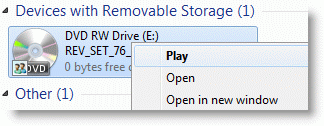
However, you may be able to play DVD movies via the AutoPlay dialog or start Windows Media Player and use the Play menu. This happens if the DVD/Play association setting is missing or incorrect or is of an incorrect value type. The DVD Play verb is stored in this registry key:
HKEY_CLASSES_ROOT\DVD\shell\play\command
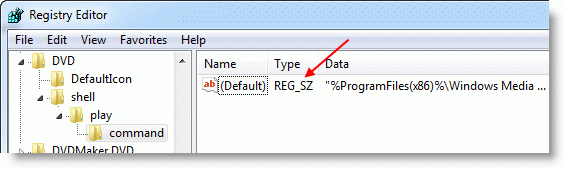
The value data for the (default) value in the above key is as follows:
Windows 7 64-bit:
"%ProgramFiles(x86)%\Windows Media Player\wmplayer.exe" /prefetch:4 /device:DVD "%L"
Windows 7 32-bit:
"%ProgramFiles%\Windows Media Player\wmplayer.exe" /prefetch:4 /device:DVD "%L"
How does this problem occur?
When the above key is missing or its (default) value data is incorrect, the following error occurs when accessing Play from the DVD drive context menu:
This file does not have a program associated with it for performing this action. Please install a program or, if one is already installed, create an association in the Default Programs control panel.
The user might then try to reset Windows Media Player as the default via Default Programs → Set program access and computer defaults.
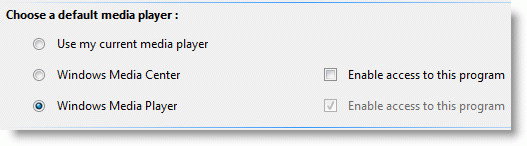
When resetting the values using Set program access and computer defaults, it resets the correct data (unexpanded path/environment variable), but the value type is set incorrectly as REG_SZ, whereas it should be REG_EXPAND_SZ. As a result, the following error occurs:
Windows cannot access the specified device, path, or file. You may not have the appropriate permissions to access the item.
Registry Fix
Download w7-dvd-play.zip, unzip, and run the corresponding REG file for your Windows 7 Edition (32-bit or 64-bit.)
One small request: If you liked this post, please share this?
One "tiny" share from you would seriously help a lot with the growth of this blog. Some great suggestions:- Pin it!
- Share it to your favorite blog + Facebook, Reddit
- Tweet it!


My god, you have no idea how much time I have spent looking for this fix!
I’ve found numerous links about default programs, then many about deleting some random registry keys, then the right registry path but with lengthy export/import description and than yours – simple key that need to be clicked/imported
I wonder if such a nuisance can happen on OS X
I get “Windows Media Player cannot access the file. The file might be in use, you might not have access to the computer where the file is stored, or your proxy settings might not be correct.” when attempting to play a DVD after the fix
You should be the boss of microsoft i even asked them how to fix it and they gave me nothing.Thanks so very much for this fix.
This fix also applies if you get the error message when you click “Play” on an Audio CD. Go to the key HKEY_CLASSES_ROOT\AudioCD\shell\play\command. In the value data for “Default” should read “%ProgramFiles%\Windows Media Player\wmplayer.exe” /prefetch:3 /device:AudioCD “%L” with the parenthesis included if you are running Windows 7 32-Bit. If you are running Windows 7 64-Bit, it should read “%ProgramFiles(x86)%\Windows Media Player\wmplayer.exe” /prefetch:3 /device:AudioCD “%L” with the parenthesis.
Wow – I haven’t rebooted yet – but this already fixed my problem (“This file does not have a program associated…”) . I manually changed the value of the …command key, and then it said the “Windows cannot access…” so I extracted and ran the Registry Fix which made my sweet little disk drives – a DVD and a BD – work again!! This info appears to be nowhere else. Although I’m relieved, the fact this problem ever existed is infuriating. Bookmarked!!
Thank you
I applied the fix and the registry value is definitely correct but I still cannot double click on the E-drve to set a disc going automatically in WMP. I have to use autoplay to select it from the list. Do I need to try anything else?
Thanks
Thank you for helping me sort my dvd drive problem
I was able to fix the DVD play option, but not the CD play option. Can you provide a zip file for the CD issue or show me how to edit the registry to include the EXPAND command? Thanks. I would appreciate your help.
i’m writing this because i had that problem with double clikc and getting that error about no assosiations etc.i’m not a pc genius and editing registry could make many more problems for me if i tried,so i serched and serched for a solution and i got your files and thanks to you things are normal again,thank you,you saved me from a big headache.
thx and thx again! I worked with this problem for a long time. You solved this problem for me and probably saved me a heart attck too : ). big thx and thumbs up!!!!!!!!!
Thank you! This worked like a charm. Very helpful. I don’t think I would have figured that out on my own… I generally stay away from the registry. Thank you again.
In case anyone was wondering the 32 bit also works for Win xp as well. I just ran it on mine and it worked! THANKS!!!
now how could i change this for CDs? i think real player caused this lol
Excellent resolution to my problem and yes, it happened following my download of real player. Thanks for your help.
This instantly corrected the problem on my laptop, which occurred after I had downloaded Real Player.
Thank you soooooo much!
Congratulations! The question of the error at hand, was replied in a concise professional and simple manner. The issue has been resolved for me on my i-7 930 intel machine Win 7 x64 with the enclosed fix.
Thank you so much for your effort
Fantastic,pages upon pages of search then I find your fix,Thanks very much
Thank you so much just put an older DVD/RW player in my new build with Win 7 and this fixed the problem right away!
This fixed the error problem however non of my players within my computer will play a DVD anymore and I can hear it reading the disc and it shows me the name of the DVD in the drive window. So I’m not sure what went wrong now.
OS 7 64bit
That was helpful. Thank you
I had similar symptoms, but the registry value for my Win7 (64) was already the same as you specified above. Any suggestions?