 The Start Navigation sound can be sometimes annoying. We understand that the clicking sound is generated when you click a hyperlink in Internet Explorer. That’s obvious! Have you wondered why the clicking sound is generated even though you don’t click on a link? It could be possible that the page you’re viewing is set to refresh automatically after some time. But that’s not the only action that triggers the Start Navigation sound event.
For example, when you visit a site that runs a lot of advertisements, and your HOSTS file or the Ad Blocker is blocking some of those servers, you get the clicking sound for each blocked (or redirected to 127.0.0.1 or 0.0.0.0) address. I recently visited a website which generated the clicking sound at least 6 times (which means 6 servers were blocked/redirected by my HOSTS file); I certainly want to disable this annoying sound.

Disabling the "Start Navigation" Sound in Internet Explorer
Windows 7
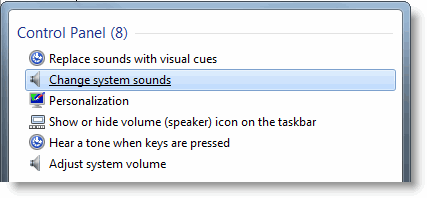
1. Click Start, type sounds
2. Select change system sounds option from the search results
3. Scroll down until you see the Start Navigation entry, and select it.
4. Select the option (None) from the Sounds drop-down list box.
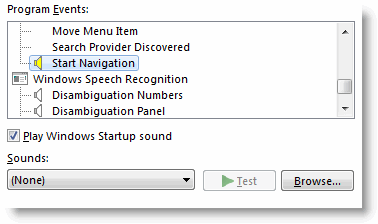
5. Click OK.
Windows Vista
1. Click Start, type sound
2. Click Sound from the search results, and select the Sound tab.
Alternately, open Control Panel, type sounds in the Search box, and click Change system sounds
3. Set the Start Navigation sound to (None)
4. Click OK.
Windows XP
1. Click Start, Control Panel.
2. Double-click Sounds.
3. In the Sounds Properties window, scroll down and select Start Navigation entry.
4. Click the drop-down menu.
5. Select (None), and click OK.
One small request: If you liked this post, please share this?
One "tiny" share from you would seriously help a lot with the growth of this blog. Some great suggestions:- Pin it!
- Share it to your favorite blog + Facebook, Reddit
- Tweet it!


OMG thanks! i was about to chuck the laptop out the window…i downloaded Outlook Social Connector and the clicking just wouldn’t stop
Thanks finally i can listen to my music while browsing the internet without having this annoying click going louder than the music
Thanks very much, this was bothering me for ages and you help me identify it ……. much much better without it
cheers !!!
Thank you so much the noise was driving me crazy!
Thanks a ton, this really helped.