Earlier we saw how to clear the search MRU entries in Windows. Are you one of those who finds the Search Box suggestion pop-ups annoying, and want to turn off the feature? Here is a registry edit which disables the search box suggestions in File Explorer.
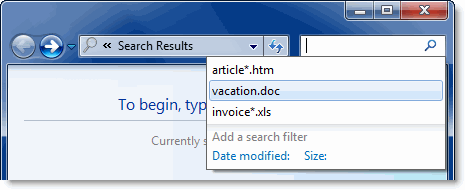
Disable File Explorer Search Box Suggestions
- Click Start, type Regedit.exe and press ENTER
- Navigate to the following branch:
HKEY_CURRENT_USER\Software\Policies\Microsoft\Windows\Explorer
The above key may not exist by default, and you may need to create the above branch manually.
- Create a DWORD value named DisableSearchBoxSuggestions
- Double-click DisableSearchBoxSuggestions and set its data as 1
- Exit the Registry Editor.
Command Prompt method
Alternately, you can open a Command Prompt window and type the following command in order to automate the steps above:
reg add HKCU\Software\Policies\Microsoft\Windows\Explorer /v DisableSearchBoxSuggestions /t reg_dword /d 1
This setting disables suggesting recent queries for the Search Box and prevents entries into the Search Box from being stored in the registry for future references.
Additional Note: The above registry setting, when applied to a Windows 10 computer, disables Windows 10 Start menu web search (Bing search). For more information, check out the article How to Disable Web Search in Windows 10 Start menu
Using the Group Policy Editor
- Launch the Group Policy Editor (gpedit.msc)
- Navigate to the following branch:
User Configuration > Administrative Templates > Windows Components > Windows Explorer
- Set Turn off display of recent search entries in the Windows Explorer search box to Enabled
- Exit the Group Policy Editor.
Note: If you enable this policy, Windows Explorer will not show suggestion pop-ups as users type into the Search Box, and it will not store Search Box entries into the registry for future references. If the user types a property, values that match this property will be shown but no data will be saved in the registry or re-shown on subsequent uses of the search box.
One small request: If you liked this post, please share this?
One "tiny" share from you would seriously help a lot with the growth of this blog. Some great suggestions:- Pin it!
- Share it to your favorite blog + Facebook, Reddit
- Tweet it!


Same issue as trying to do this through registry. I have NO “WINDOWS EXPLORER” entry to modify. If you are going to do a tutorial please make it a complete tutorial???
@Jay Lee: The key doesn’t exist by default, as the note in the article says “The above key may not exist by default, and you may need to create the above branch manually.”
Alternately, you can open a Command Prompt window and type the following command in order to create that registry value in 1-step.