Did you download a movie video recently and found that the movie’s audio or video part does not play? This could be due to missing audio or video codec. To know which codec your system needs, to play your favorite video files correctly, you may use one of these tools discussed in this article.
Even if you have a good codec pack installed on the computer, you sometimes get only audio and no video (often on .avi files). The following programs will help you to identify the missing codec.
If you don’t want to troubleshoot anything, then you may simply install VLC Player which comes with a large variety of codecs. Or install the K-Lite Codec Pack which is a collection of codecs that includes a video player. After installing these, the chances of “codec missing” errors or playback issues would be very less. Surprisingly, after installing the VLC Player or K-Lite Codec Pack, you may even find that your media file can now be played in Windows Media Player, or whatever failed to play it before.
Determine the Codecs used in a Media file
These tools help you find out the codec used in a particular media file so that you can download the appropriate codec from the web.
MediaInfo
MediaInfo is a convenient unified display of the most relevant technical and tag data for video and audio files. In addition to the list of codecs used in a media file, MediaInfo also displays the following info:
- Container: format, profile, commercial name of the format, duration, overall bit rate.
- Video: format, codec, aspect, frame rate.
- Audio: format, codec id, sample rate, channels.
- Text: format, codec id, the language of subtitle Chapters: count of chapters, list of chapters.
Download MediaInfo from → https://mediaarea.net/en/MediaInfo
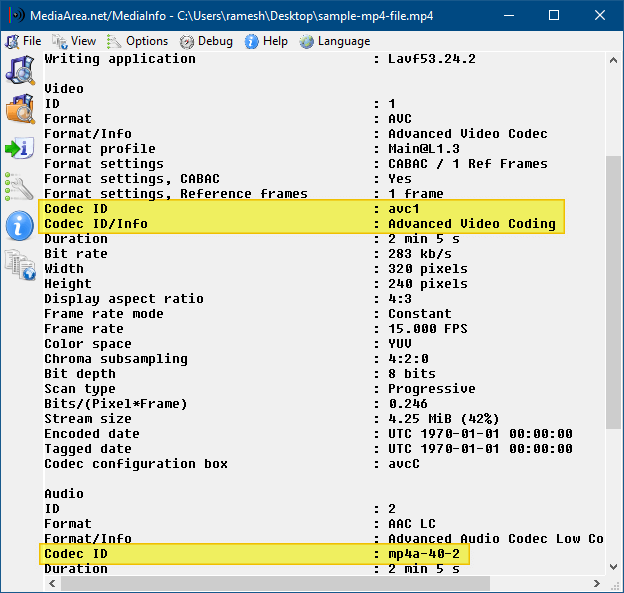
MediaInfo lets you switch between text, HTML, tree, JSON, and other view formats.
Unlike the other programs listed in this article, MediaInfo is being actively maintained and supports most video formats, including MP4 and MKV containers. It’s open-source software, and you can view the changelog here → https://mediaarea.net/MediaInfo/ChangeLog.
FFprobe
FFprobe, a command-line tool that is part of the FFmpeg installation package. Ffprobe documentation is here: → https://ffmpeg.org/ffprobe.html
FFprobe gathers information from multimedia streams and prints it in a human and machine-readable fashion. For example, it can be used to check the format of the container used by a multimedia stream and the format and type of each media stream contained in it.
Syntax:
ffprobe.exe filename.ext
Here’s a sample output with the video stream and audio stream codec information in bold text:
c:\>ffprobe D:\video_2020-05-01_09-44-30.mp4

ffprobe version N-94566-gddd92ba2c6 Copyright (c) 2007-2019 the FFmpeg developers
built with gcc 9.1.1 (GCC) 20190807
configuration: --enable-gpl --enable-version3 --enable-sdl2 --enable-fontconfig --enable-gnutls --enable-iconv --enable-libass --enable-libdav1d --enable-libbluray --enable-libfreetype --enable-libmp3lame --enable-libopencore-amrnb --enable-libopencore-amrwb --enable-libopenjpeg --enable-libopus --enable-libshine --enable-libsnappy --enable-libsoxr --enable-libtheora --enable-libtwolame --enable-libvpx --enable-libwavpack --enable-libwebp --enable-libx264 --enable-libx265 --enable-libxml2 --enable-libzimg --enable-lzma --enable-zlib --enable-gmp --enable-libvidstab --enable-libvorbis --enable-libvo-amrwbenc --enable-libmysofa --enable-libspeex --enable-libxvid --enable-libaom --enable-libmfx --enable-amf --enable-ffnvcodec --enable-cuvid --enable-d3d11va --enable-nvenc --enable-nvdec --enable-dxva2 --enable-avisynth --enable-libopenmpt
libavutil 56. 33.100 / 56. 33.100
libavcodec 58. 55.100 / 58. 55.100
libavformat 58. 30.100 / 58. 30.100
libavdevice 58. 9.100 / 58. 9.100
libavfilter 7. 58.100 / 7. 58.100
libswscale 5. 6.100 / 5. 6.100
libswresample 3. 6.100 / 3. 6.100
libpostproc 55. 6.100 / 55. 6.100
Input #0, mov,mp4,m4a,3gp,3g2,mj2, from 'D:\video_2020-05-01_09-44-30.mp4':
Metadata:
major_brand : isom
minor_version : 512
compatible_brands: isomiso2avc1mp41
creation_time : 2020-05-01T04:12:07.000000Z
Duration: 00:00:35.78, start: 0.000000, bitrate: 1692 kb/s
Stream #0:0(eng): Video: h264 (Baseline) (avc1 / 0x31637661), yuv420p, 352x640, 1559 kb/s, 30 fps, 30 tbr, 90k tbn, 180k tbc (default)
Metadata:
creation_time : 2020-05-01T04:12:06.000000Z
handler_name : VideoHandle
Stream #0:1(eng): Audio: aac (LC) (mp4a / 0x6134706D), 44100 Hz, stereo, fltp, 128 kb/s (default)
Metadata:
creation_time : 2020-05-01T04:12:06.000000Z
handler_name : SoundHandle
Editor’s note: When I loaded the same video file in the MediaInfo utility, it showed the audio codec as mp4a-40-2 (Format: AAC LC), but the ffprobe output shows mp4a (Format: AAC LC). I’m not an expert in media file formats, but it appeared to me that some specifics are missing in the FFprobe codec info output, albeit the extra information may not be of much significance for the end-user.
And, I found an explanation about this on the Mozilla website.
When the value of an entry in the codecs list begins with mp4a, the syntax of the value should be:
mp4a.oo[.A]
Here, oo is the two-digit hexadecimal Object Type Indication, which specifies the codec class being used for the media. The OTIs are assigned by the MP4 Registration Authority, which maintains a list of the possible OTI values. A special value is 40; this indicates that the media is MPEG-4 audio (ISO/IEC 14496 Part 3). In order to be more specific still, a third component—the Audio Object Type—is added for OTI 40 to narrow the type down to a specific subtype of MPEG-4.
The Audio Object Type is specified as a one or two-digit decimal value (unlike most other values in the codecs parameter, which use hexadecimal). For example, MPEG-4’s AAC-LC has an audio object type number of 2, so the full codecs value representing AAC-LC is mp4a.40.2.
Thus, ER AAC LC, whose Audio Object Type is 17, can be represented using the full codecs value mp4a.40.17. Single-digit values can be given either as one digit (which is the best choice, since it will be the most broadly compatible) or with a leading zero padding it to two digits, such as mp4a.40.02.
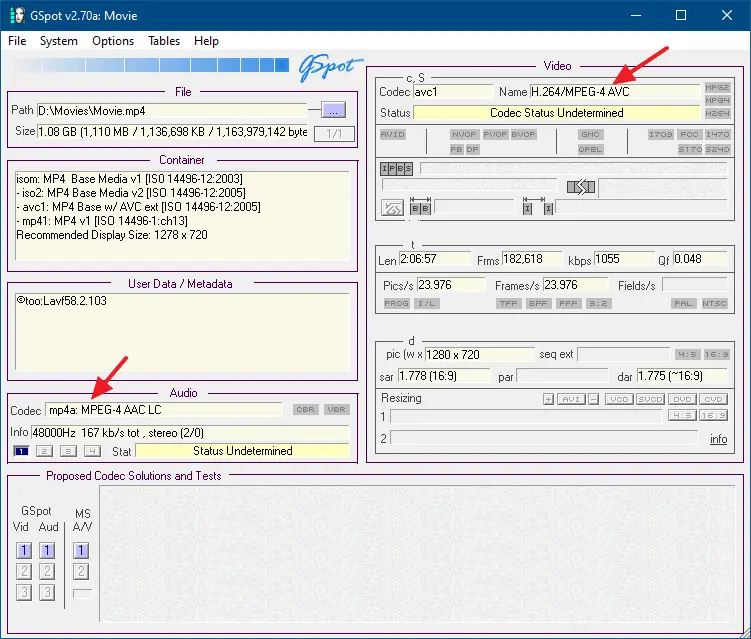
MediaInfo, by default, seems to have given the accurate, or more specific codec information, at least in this example. Perhaps I missed a command-line switch that retrieves the detailed codec information, or that extra information is not significant at all. I’ll try to figure that out. Other tools such as G-spot (covered later in this article) also displayed only mp4a: MPEG-4 AAC LC (no subtype info) in the codec information field.
GSpot
GSpot is a tool that provides you with detailed information about the codec used in audio and video files. It can tell you whether an AVI file uses DivX or XviD, and which version, what type of MPEG codec is used (DVD format or not), etc.
GSpot can be downloaded from headbands.com/gspot/
This tool was updated more than a decade ago, but it works fine on Windows 10 as well. One drawback is that, for mp4 file types, the tool cannot show the status (whether it’s installed on the computer or not) of the codec. It always shows “Codec Status Undetermined.”
VLC Player
If you’re able to open the video file using VLC Player on another computer (which has the specific codec installed), you can view the codec information by clicking Tools → Codec Information.
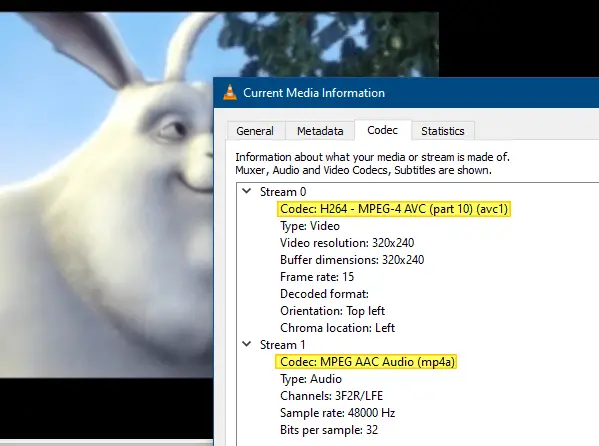
You can download VLC Media Player (which contains a large variety of codecs) from → https://www.videolan.org/
Now, all you need to do is download and install the missing codec on the device that doesn’t play the video file.
VideoInspector
VideoInspector is a tool designed to provide you with as much information as possible about your video files. With VideoInspector, you’ll know why your video files have no sound or refuse to play correctly.
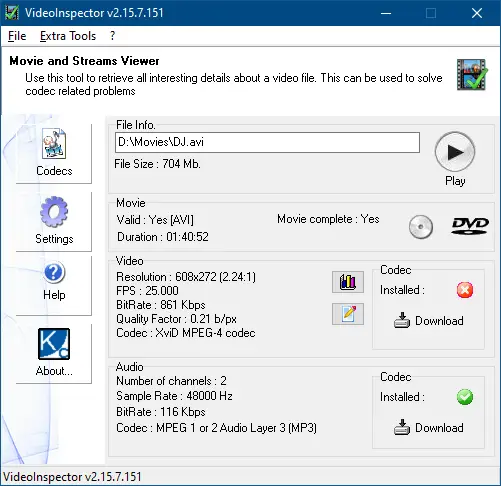
You can see that this video uses the XviD MPEG-4 & MPEG 1 or 2 Audio Layer 3 (MP3) codecs for video and audio, respectively.
(Though VideoInspector has been updated recently, it doesn’t work well for MP4 videos. Also, some users have noted that the software displays wrong bitrate info.)
AVIcodec
AVIcodec is another similar tool that helps you identify the codec used by video files. Some video files require additional codecs like DivX or VCD and others to play. When running such a media file with no proper codec installed, you will get an error message or be limited to audio playback only.
(AVIcodec is another outdated utility. It doesn’t support MKV or MP4 file formats.)
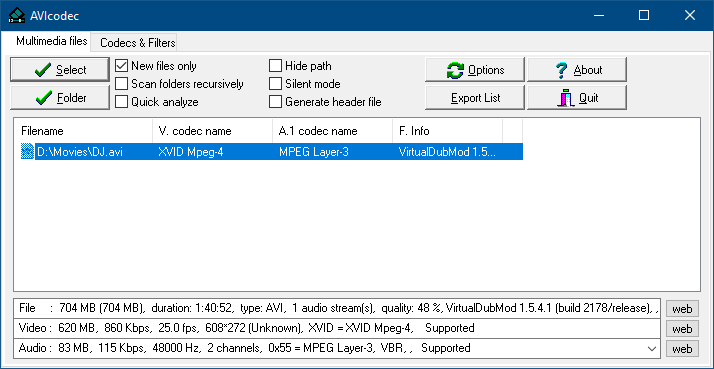
AVIcodec is available via snapfiles.com/get/avicodec.html.
(Also, check out the InstalledCodec utility, which shows the list of Codecs installed in the system.)
One small request: If you liked this post, please share this?
One "tiny" share from you would seriously help a lot with the growth of this blog. Some great suggestions:- Pin it!
- Share it to your favorite blog + Facebook, Reddit
- Tweet it!

