When you click the View Source command in Internet Explorer 8, it uses the built-in viewer, which is part of the Developer Tools in Internet Explorer 8. The built-in viewer lets you dynamically refresh the view source window, increase or decrease the text size and lists other standard options.

The new viewer does not allow editing the source though. Previous versions of Internet Explorer use Notepad as the default source editor, which lets you modify the source before saving. To set Notepad as the default view source editor in Internet Explorer 8 (and previous versions), use the instructions below.
Changing the View Source Editor in Internet Explorer
Method 1: Using the Built-in Option in IE8
Internet Explorer 8 includes a built-in option to change the default view source editor. The setting is provided in the Developer Tools.
1. Open Internet Explorer
2. Press the F12 button to start the Developer Tools
3. From the File menu, click Customize Internet Explorer View Source
4. Select one of the following options:
- Default Viewer
- Notepad
- Other…

If you choose Other…, you’ll be prompted to select the executable file of your preferred text editor. Use this option to set your third-party text editing program (e.g. Notepad+) to set as the default source editor.
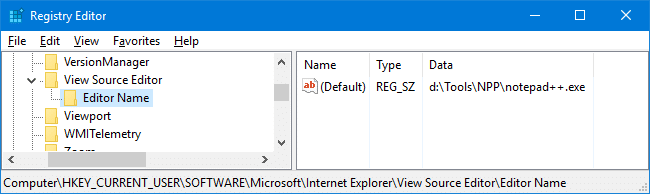
Method 2: Manual Registry Edit
1. Launch Regedit.exe and navigate to:
2. Create a subkey named View Source Editor
3. Under View Source Editor, create a subkey named Editor Name
4. Select the following key:
5. Double-click (default) and set Notepad.exe as its data
Note: If you prefer a third-party text editor (such as Notepad+, Notepad Lite etc), type the full path to the executable.
6. Exit the Registry Editor.
Registry Fix
Download viewsrc_ie8.zip, unzip the file and extract the contents to a folder. Double-click the file viewsrc-notepad.reg to set Notepad as the default View Source editor. To restore the original setting (built-in viewer as the default), run the file viewsrc-default.reg.
Note: The above REG files can be used with previous versions of Internet Explorer as well.

(Last Updated on March 22, 2009. Article modified for IE8 Final.)
Related Posts
- Edit the Information Displayed in the “Type” Column of Details View in Folders
- Fix: The Default Icon for .VBS Files Changed by Virus/Worm
- How to Determine the Last Shutdown Date and Time in Windows XP/2003/Vista
- How to Configure Services MMC Snap-in to Open in Standard View by Default
- Restore Extended Tiles View Option to Sync Center in Windows Vista
If you enjoyed this post, make sure you subscribe to our RSS feed! We feature Tips, Troubleshooting information, Scripts and Utilities for Microsoft Windows Operating Systems!
Prefer an E-mail subscription?


Thank you so much!! I knew how to open Notepad to change the source code in IE8, but I did not know how to make Notepad the default source viewer once gain. You have saved me a lot of time!
The ability to edit ‘on the fly’ was the reason I stayed using IE when it seemed most everyone else had gone over to FireFox. Once that edit capability was removed I saw no reason to keep IE as my default browser, but frustation eventually led me to find this Regedit solution – many thanks.
Thank you so much! I kept having computer issues at work and at one point lost the viewsource-notepad file that had enabled sources to open in Notepad. Opening in Word, copying into Notepad, then saving was terribly time-consuming and posed various problems. While the IT guy was trying different files, I googled and found this and it worked like a charm!
Thanks again!
THANK YOU THANK YOU… THANK YOU… can I say it again?…. I do all my website coding by notepad on my hard drive before loading it to my site.
Thanks for this tip, I was going crazy trying to figure how to edit the source code. This tip also works with Internet explorer 9