When you click the View Source command in Internet Explorer 8, it uses the built-in viewer, which is part of the Developer Tools in Internet Explorer 8. The built-in viewer lets you dynamically refresh the view source window, increase or decrease the text size and lists other standard options.

The new viewer does not allow editing the source though. Previous versions of Internet Explorer use Notepad as the default source editor, which lets you modify the source before saving. To set Notepad as the default view source editor in Internet Explorer 8 (and previous versions), use the instructions below.

Changing the View Source Editor in Internet Explorer

Method 1: Using the Built-in Option in IE8

Internet Explorer 8 includes a built-in option to change the default view source editor. The setting is provided in the Developer Tools.

1. Open Internet Explorer

2. Press the F12 button to start the Developer Tools

3. From the File menu, click Customize Internet Explorer View Source

4. Select one of the following options:

  • Default Viewer
  • Notepad
  • Other…

If you choose Other…, you’ll be prompted to select the executable file of your preferred text editor. Use this option to set your third-party text editing program (e.g. Notepad+) to set as the default source editor.

Method 2: Manual Registry Edit

1. Launch Regedit.exe and navigate to:

HKEY_LOCAL_MACHINE \ SOFTWARE \ Microsoft \ Internet Explorer

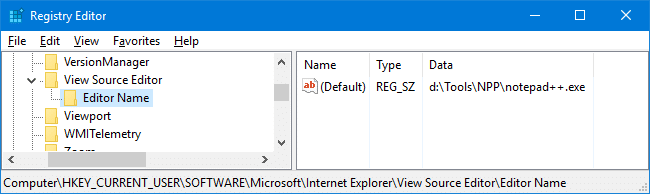
2. Create a subkey named View Source Editor

3. Under View Source Editor, create a subkey named Editor Name

4. Select the following key:

HKEY_LOCAL_MACHINE \ SOFTWARE \ Microsoft \ Internet Explorer \ View Source Editor \ Editor Name

5. Double-click (default) and set Notepad.exe as its data

Note: If you prefer a third-party text editor (such as Notepad+, Notepad Lite etc), type the full path to the executable.

6. Exit the Registry Editor.

Registry Fix

Download viewsrc_ie8.zip, unzip the file and extract the contents to a folder. Double-click the file viewsrc-notepad.reg to set Notepad as the default View Source editor. To restore the original setting (built-in viewer as the default), run the file viewsrc-default.reg.

Note: The above REG files can be used with previous versions of Internet Explorer as well.

(Last Updated on March 22, 2009. Article modified for IE8 Final.)

Bookmark this Page!

BlinkList | del.icio.us | Digg it | Furl | reddit | Spurl | StumbleUpon |

Related Posts


Email SubscriptionPrefer an E-mail subscription?

Enter your email address:

Delivered by FeedBurner

17 Responses to “The Default View Source Editor Has Changed in Internet Explorer 8” Subscribe to comments!

  1. said this on Thursday, August 6th 2009 8:29 pm

    Thanks. This was a suprise to me too.

  2. Mike Jaeger
    said this on Sunday, August 2nd 2009 1:36 pm

    Thanks for that.

  3. said this on Monday, July 13th 2009 8:52 pm

    Thanks indeed for that! I always use View Source for editing and the shock of losing the ability to edit without a lot of fiddling around for source files was almost too much for my old bones.

  4. Klaus Uhr
    said this on Thursday, July 9th 2009 6:13 pm

    If you only rely on the entry under the HKEY_LOCAL_MACHINE hive, it will be of no avail for the standard user (when you are not elevated nor the built-in administrator). You have to create the value under HKEY_CURRENT_USER as well (as it is shown in the .reg files).

  5. said this on Monday, June 22nd 2009 11:26 am

    [...] has changed in Internet Explorer 8 – The Winhelponline Blog” Retrieved June 22, 2009 from http://www.winhelponline.com/blog/default-view-source-editor-changed-in-ie8/   Create a free edublog to get your own comment avatar (and [...]

  6. Harish
    said this on Thursday, June 11th 2009 2:03 am

    Man this worked !!!….thanks

  7. greenfishfiles
    said this on Wednesday, May 27th 2009 3:27 am

    Thank you! Was completely taken aback by this little discovery and am thrilled that the fix was so simple.

  8. Kendoa2j
    said this on Friday, May 15th 2009 12:36 pm

    Yea method worked for me… thanks

  9. said this on Saturday, March 21st 2009 5:52 pm

    @David: FYI, the path seems to have changed again in IE8 Final.

  10. David Martin
    said this on Friday, March 6th 2009 10:10 pm

    For me this did not work – not exactly. I’m using IE8 RC1. (8.0.6001.18372). I had to create the View Source Editor key as you mentioned. However, I had to create a string value within that key named “Editor Name” and assign that new value the path to my editor. Having Editor Name as a sub key to View Source Editor did not work. Thanks though, you got me thinking.

Leave a Reply