When you open a dialog box containing checkbox or radio button controls, such as the Folder Options dialog’s View tab, the checkbox text labels may be appended with the word “-ON” or “-OFF” depending upon whether the option is enabled or not.
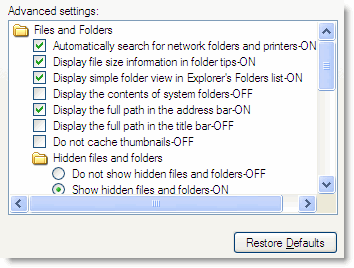
This happens if one of the Ease of Access features like Speech Recognition and/or Narrator is running. Narrator is a text-to-speech utility for users who are blind or have impaired vision. Narrator reads what is displayed on your screen: the contents of the active window, menu options, or the text you have typed. If you don’t plan to use Narrator, you can turn it off using the following steps:
Press Win-Key + U keys. In the Utility Manager window that opens, select Narrator… and click the Stop button.
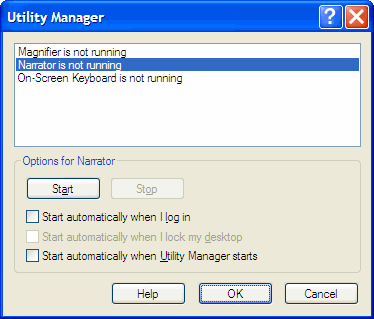
Also, uncheck the following options:
- Start automatically when I log in
- Start automatically when Utility Manager starts
Click OK.
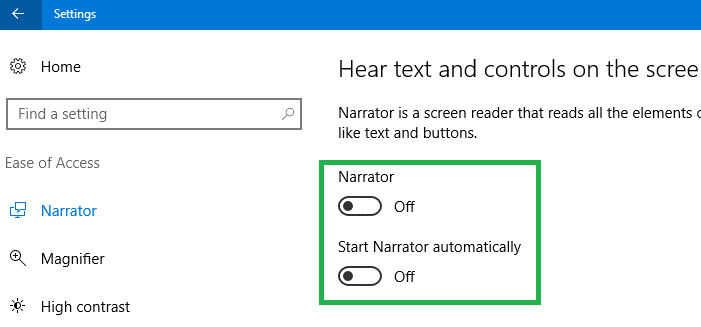
In Windows 10, the UI would be different. Press WinKey + U to open Narrator settings page, and turn off “Narrator” toggle button.
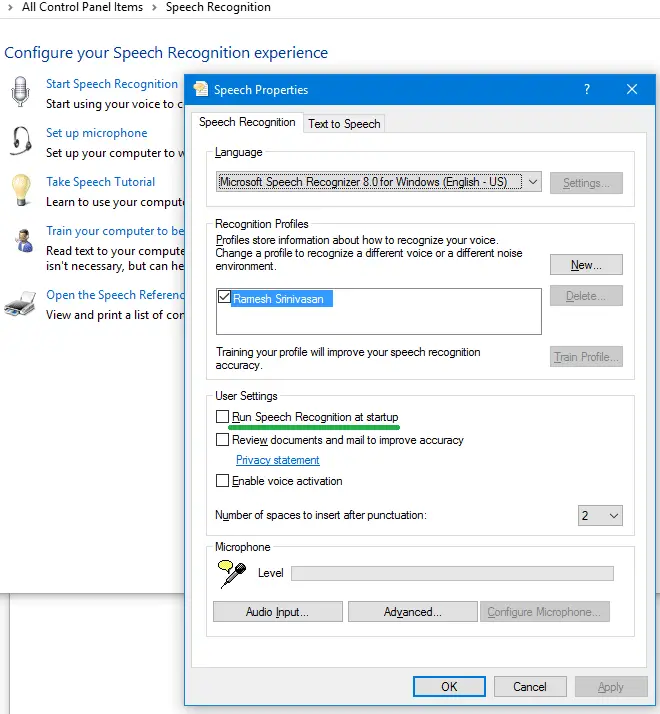
Also, open the classic Control Panel – Speech Recognition page. Turn off “Run Speech Recognition at startup” setting.
One small request: If you liked this post, please share this?
One "tiny" share from you would seriously help a lot with the growth of this blog. Some great suggestions:- Pin it!
- Share it to your favorite blog + Facebook, Reddit
- Tweet it!

