Archive for the ‘Internet Explorer’ Category

Add “Open in InPrivate Window” Option to the Right-Click Menu in Internet Explorer 8

InPrivate Browsing mode in Internet Explorer 8 helps prevent your browsing history, cache, form data, cookies, and usernames and passwords from being retained by the browser. Here is a menu extension for Internet Explorer 8, which adds the "Open in InPrivate Window" option to the context menu. This can be useful in situations where you want to open specific hyperlinks in InPrivate browsing window from the existing Internet Explorer window. This extension works in Windows XP, Windows Vista & Windows 7. (more…)

Feeds Plus Adds Aggregation and Notification Features to Your Feed Subscriptions in Internet Explorer

If you’re using Internet Explorer 7 for reading RSS feeds, then you’ll like Feeds Plus. Feeds Plus is a free companion tool (for Internet Explorer 7) developed by the Microsoft RSS Team that adds two useful features to the Windows Feeds experience: aggregation and notification. (more…)

IE8 Blocker Toolkit Now Available

The Internet Explorer 8 Blocker Toolkit enables IT Administrators to disable automatic delivery of Internet Explorer 8 as a high-priority update via Automatic Updates and the Windows Update and Microsoft Update sites.

The script creates a registry key and sets the associated value to block or unblock (depending on the command-line option used) automatic delivery of Internet Explorer 8 on either the local machine or a remote target machine. (more…)

Quickly Switch Your Internet Explorer Proxy Settings Using IEProxy

For laptop users who want to enable or switch to a different proxy server setting while at office (and disable proxy when at home), use the Internet Explorer Proxy Manager. IEProxy is a easy to use proxy Manager for the Internet Explorer and all depending applications. You can quickly add, delete and change (switch) your proxy settings via the Notification area in Windows XP/Vista. (more…)

Add “Explore Here” To the Right-Click Menu in Internet Explorer

We saw how to add the Go To Registry Key Internet Explorer extension which is used to open the selected registry key directly using the Registry Editor. Likewise, here is a Menu Extension for Internet Explorer that opens the target folder (text selection in Internet Explorer) using Windows Explorer. This extension works fine in Windows XP as well as in Windows Vista. (more…)

How to Clear IE8 Last Browsing Session History Using CCleaner

Internet Explorer 8 introduces the Reopen Last Browsing Session option in the Tools menu, which reopens the last browsing session from the most recently closed instance of Internet Explorer. Clearing the browsing history using Internet Options removes the last browsing session history as well. If you like to use CCleaner to clear the last browsing session history, here is how. (more…)

How to Restore the “You’ve Opened a New Tab” Window When Opening a New Tab in IE

When you open a new tab in Internet Explorer 7, the about:Tabs page opens which contains information about tabbed browsing and lists available tab shortcuts in Internet Explorer. If you had enabled the Don’t show this page again checkbox and closed the tab window, every new tab opens with a blank page. Here is how to reverse the setting if you need to restore the about:Tabs page at a later stage. (more…)

Fix Internet Explorer Defaults to runonce3.Aspx Page at Every Start

When you open Internet Explorer 7, it may default to runonce2.aspx or runonce3.aspx (Customize Your Settings) page. When saving the custom settings, a script error displaying Element not found message appears. (more…)

BlockThisSite Menu Extension for Internet Explorer

Did you accidentally land on a bad site when browsing the Web? While it’s advisable to close bad websites immediately, you can quickly block that particular site before closing it so that you don’t visit that site in future. This can be done using the BlockThisSite Internet Explorer Menu Extension that I’ve created. The extension works by automatically adding an entry to the HOSTS file for each site you block. (more…)

Add “Go to Registry Key” To the Right-Click Menu in Internet Explorer

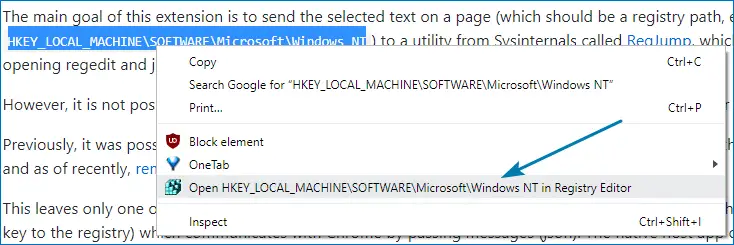
Many of our articles contain information about modifying the registry. To facilitate things for our readers, I’ve written a context menu Add-on (Menu Extension) for Internet Explorer that launches the Registry Editor and jumps to the specified registry key directly. (more…)