To select all files in a folder or the Desktop, you use the CTRL + A keyboard shortcut. If you’re an avid mouse user and need the select all functionality in the right-click menu in Windows, here is a registry tweak. This tweak adds the “Select All” option in the context menu for folder background and desktop.
Adding Select All option to the context menu
For Windows 10 only
- Copy the following contents to Notepad.
Windows Registry Editor Version 5.00 [HKEY_CLASSES_ROOT\Directory\Background\shell\Windows.selectall] "CanonicalName"="{b33bf5af-76d5-4d10-93e7-d8e22e93798f}" "CommandStateHandler"="{3756e7f5-e514-4776-a32b-eb24bc1efe7a}" "CommandStateSync"="" "Description"="@shell32.dll,-31277" "Icon"="imageres.dll,-5308" "ImpliedSelectionModel"=dword:00000020 "MUIVerb"="@shell32.dll,-31276" "Position"="Bottom" "NeverDefault"="" [HKEY_CLASSES_ROOT\Directory\Background\shell\Windows.selectall\command] "DelegateExecute"="{aa28fbc7-59f1-4c42-9fd8-ba2be27ea319}" - Save the file with a .reg extension, say selectall.reg
- Double-click selectall.reg to apply the contents to the registry.
You’ll see the Select All option in the right-click menu in the desktop and folder background.
To remove the option, make another file named undo.reg with the following contents and run it.
Windows Registry Editor Version 5.00

[-HKEY_CLASSES_ROOT\Directory\Background\shell\Windows.selectall]
For Windows 8 & earlier
- Download selectall.zip and save it to the Desktop.
- Unzip the archive and extract the contents to a folder.
- Move selectall.vbs to the C:\Windows directory.
- Double-click selectall.reg to add the Select All context menu option.
- The Select All option is added to the right-click menu. This menu option will be seen when you right-click on the Desktop and right-clicking on an empty area in a folder.
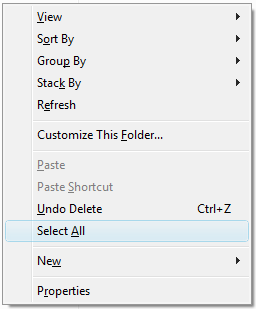
How to Undo: To remove the Select All option from the right-click menu, run the file undo.reg. Then delete the file selectall.vbs manually from the Windows directory.
More Information
The selectall.vbs file powers the Select All option in the context menu. It uses the Windows Scripting Host (WSH) SendKeys method to send the keystroke CTRL + A for selecting all items in a folder. Here are the contents of the file selectall.vbs.
set oShell = WScript.CreateObject("WScript.Shell")
oShell.SendKeys "^a"
One small request: If you liked this post, please share this?
One "tiny" share from you would seriously help a lot with the growth of this blog. Some great suggestions:- Pin it!
- Share it to your favorite blog + Facebook, Reddit
- Tweet it!


Works also in XP!
Windows Registry Editor Version 5.00 [HKEY_CLASSES_ROOT\CLSID\{242BC78A-5586-46FD-B277-1340F62E3A0C}] @="Select All" [HKEY_CLASSES_ROOT\CLSID\{242BC78A-5586-46FD-B277-1340F62E3A0C}\InProcServer32] @=hex(2):25,00,53,00,79,00,73,00,74,00,65,00,6d,00,52,00,6f,00,6f,00,74,00,25,\ 00,5c,00,73,00,79,00,73,00,74,00,65,00,6d,00,33,00,32,00,5c,00,73,00,68,00,\ 64,00,6f,00,63,00,76,00,77,00,2e,00,64,00,6c,00,6c,00,00,00 "ThreadingModel"="Apartment" [HKEY_CLASSES_ROOT\CLSID\{242BC78A-5586-46FD-B277-1340F62E3A0C}\Instance] "CLSID"="{3f454f0e-42ae-4d7c-8ea3-328250d6e272}" [HKEY_CLASSES_ROOT\CLSID\{242BC78A-5586-46FD-B277-1340F62E3A0C}\Instance\InitPropertyBag] "CLSID"="{13709620-C279-11CE-A49E-444553540000}" "command"="Select All" "method"="ShellExecute" "Param1"="C:\\WINDOWS\\selectall.vbs" [HKEY_CLASSES_ROOT\Directory\Background\shellex\ContextMenuHandlers\select all] @="{242BC78A-5586-46FD-B277-1340F62E3A0C}"This works, but whenever I use select all now, my Logitech Setpoint program sends a splash screen message that says “Num Lock On.” Any idea how to fix this bug?
Didnt work for me. Windows 10 64bit v1909
thank you a lot You wonderful savior!
Big salute to your wonderful servant
I wish you all progress and prosperity