The HOSTS file, originally introduced to resolve hostnames to IP addresses, is also an effective tool to block Malware. To modify the HOSTS file in Windows, you need to elevate Notepad.exe or any other text editor which you use. Otherwise, you’ll see the following error when trying to save the HOSTS file:
Cannot create the C:\Windows\system32\drivers\etc\hosts file.
Make sure that the path and the file name are correct.
Here is a registry edit which adds the Edit HOSTS file option in the (This PC) Computer context menu, which when clicked, runs Notepad.exe elevated and opens the HOSTS file for you. This uses the runas verb for elevation.
“Edit HOSTS File” context menu option
- Download edit-hosts-context-menu.zip and save to Desktop
- Extract the files EditHosts.reg and undo.reg to a folder
- Double-click EditHosts.reg to apply the contents to the registry. Click Yes when asked for confirmation.
Edit HOSTS file option is now in the context menu of This PC (Computer).
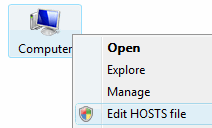
- To remove Edit HOSTS file from the context menu, apply the undo.reg file.
Related Posts
We’ve used the runas verb in the past to do the following:
One small request: If you liked this post, please share this?
One "tiny" share from you would seriously help a lot with the growth of this blog. Some great suggestions:- Pin it!
- Share it to your favorite blog + Facebook, Reddit
- Tweet it!
- Open an elevated Command Prompt from the folder context menu
- Elevate a Vbscript file using the “runas” parameter in ShellExecute
- Register DLLs (elevated) using the context menu


Remove_Edit_HOSTS_file_to_(My) Computer_Context_Menu.reg
And for those who wish to remove it again, Enter the following in notepad and save as .reg file.
For Example: (Remove_Edit_HOSTS_file_to_(My) Computer_Context_Menu.reg)
Enter the following, WITHOUT the Asterisks…
************************************
Windows Registry Editor Version 5.00
;EditHosts.reg – created on March 25, 2008
;Created by Ramesh Srinivasan, https://www.winhelponline.com
;Desc: Adds the “Edit HOSTS file” context menu option to Computer (My Computer)
;Desc: Starts Notepad under elevated user rights to edit the HOSTS file.
[-HKEY_CLASSES_ROOT\CLSID\{20D04FE0-3AEA-1069-A2D8-08002B30309D}\shell\runas]
************************************
Hope this helps someone, enjoy… (“,