Archive for July, 2009

Windows Easy Transfer Wizard Runs When Double-Clicking a Drive in Windows XP

After using the Windows Easy Transfer wizard to collect files and settings in the source computer running Windows XP, you may notice that the Windows Easy Transfer wizard runs every time when the drive is double-clicked in My Computer. Also, the drive icon is changed, representing the Windows Easy Transfer program icon.

(more…)

How to Adjust Aero Peek Desktop Preview Mouse Hover Delay in Windows 7

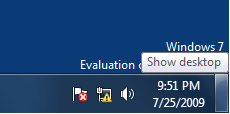
Aero Peek is a new feature introduced in Windows 7, which allows you temporarily view the desktop, without having to minimize all the open windows. You can temporarily preview the desktop by moving the mouse pointer over the Show desktop button at the end of the taskbar. The default hover delay is 1 second. If this time is too short for you, you can delay it further more to avoid accidental preview of the desktop, using the registry hack discussed in this article.

(more…)

Determine Which Codecs You Need to Play a Multimedia (Audio/Video) File

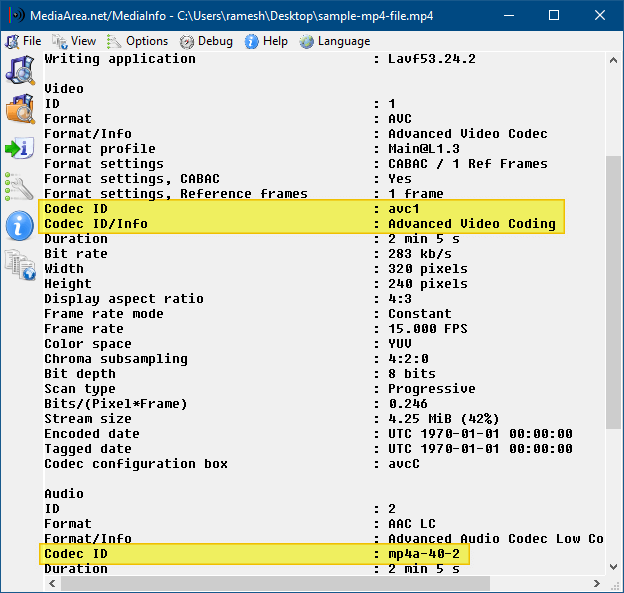
Did you download a movie video recently and later found that the audio or the video part of the movie does not play? This has to do with a missing audio or video Codec. To know which Codec you need to play your favorite video files correctly, you may use one of these tools discussed in this article. These tools help you find out the Codec used in a particular media file, and then download the appropriate Codec from the web. (more…)

How to Disable Internet Explorer 8 Welcome Screen (Tour and RunOnce) for All Users

When you open Internet Explorer 8 the first time, you’ll see the Set Up Windows Internet Explorer 8 screen asking you to configure the search and accelerator settings. After configuring the settings, a new tab window opens automatically, redirecting to Microsoft Internet Explorer 8 Website. This article tells you how to disable the Internet Explorer 8 Tour (Set up & Welcome screen) for all user accounts.

(more…)

Fix: Places Bar in Open/Save as (Common Dialog) Box Is Empty in Windows XP

The places bar which appears in the left side of the Open and Save As dialog boxes in Windows XP, contains shortcuts to the following folders by default:

  • Recent
  • Desktop
  • My Documents
  • My Computer
  • My Network Places

The default places can be customized by editing the registry. After adding/removing custom places using a third-party tool, you may experience a problem where the places bar is completely empty.

(more…)

The Windows 7 ISO Verifier Checks the Integrity of Windows 7 ISOs

OK, you got the ISO of latest Windows 7 build from a friend. Before installing it, how do you make sure that the ISO was obtained from a trustworthy source and that it had not been tampered with? The Windows 7 ISO Verifier was created exactly for that purpose. The Windows 7 ISO Verifier tool, created by Long Zheng and Sven Groot, verifies the integrity of the Windows 7 ISO by verifying the MD5 hash to ensure that it has not been tampered with.

Image: Courtesy of istartedsomething.com

You can download The Windows 7 ISO Verifier from Long’s site. As noted in their site, this download only works for English versions of Windows 7 ISOs.

How to Remove the “Download Windows Search” Prompt in Internet Explorer 8 Address Bar

When you type something in the Internet Explorer 8 Address bar, you may be prompted with the message Download Windows Search to improve history and favorites results. This message is shown in systems where Windows Search is not installed or if it is disabled. I’m sure there are still a lot of users who prefer not to install Windows Search, and want to remove the annoying "Download Windows Search" prompt in IE8.

Microsoft KB968513 instructs to download Windows Search in order to remove the prompt, but does not tell how to remove the prompt without having to install or enable Windows Search. That’s the reason I wrote this article. (more…)

ScreenRecorder: Free Screen-to-Video Capture Utility From Technet

Earlier we wrote about the Problem Steps Recorder (PSR) tool in Windows 7. It’s a nice tool that records the steps to reproduce a problem in the computer, and stores the data in a MHTML document. Here is another tool from Microsoft Technet which helps you record the steps you perform in your computer and store it in a video (.WMV) file. It’s the ScreenRecorder utility, which is similar to Microsoft Camcorder (utility written for Windows 95/98 which saves the output to an .AVI file). ScreenRecorder works in Windows XP (.NET Framework 3.5 SP1 or higher), Windows Vista and Windows 7. (more…)