Microsoft earlier announced the availability of Service Pack 2 for Windows Server 2008 and Windows Vista to MSDN and TechNet Plus Subscribers. Now the public download of Windows Vista/Windows Server 2008 Service Pack 2 is available. Here are the download links for the standalone installer. Note that it has not hit Windows Updates yet. (more…)
Archive for May, 2009
Windows Vista Service Pack 2 Available for Public Download
Enable InPrivate Filtering by Default for All Internet Explorer 8 Sessions
InPrivate Filtering is a feature introduced in Internet Explorer 8 which provides users with greater control over which third-parties can potentially track your browsing activities. InPrivate Filtering is turned off by default, and can be activated using the CTRL + SHIFT + F key sequence, or via the menu options. The problem is that the InPrivate Filtering feature is not automatically enabled when you open a new Internet Explorer window, and users need to enable it on a per-session basis. However, there is a registry edit to enable InPrivate Filtering by default in every Internet Explorer session. (more…)
Register Internet Explorer (InPrivate) With Default Programs in Windows 7 and Vista
InPrivate Browsing in Internet Explorer 8 helps prevent your browsing history, temporary Internet files, form data, cookies, and usernames and passwords from being retained by the browser, leaving no evidence of your browsing or search history. We covered InPrivate browsing in our previous articles which our readers found useful. Here is an utility which adds Internet Explorer (InPrivate) entry to the Default Programs applet in Windows Vista and Windows 7. (more…)
Fix for System File Checker Error 0×000006ba RPC Server Is Unavailable
When you attempt to run the System File Checker (sfc.exe /scannow command) to restore missing or corrupted system files, the following error message may be seen:
This happens if the Windows File Protection (WFP) is disabled in the registry. (more…)
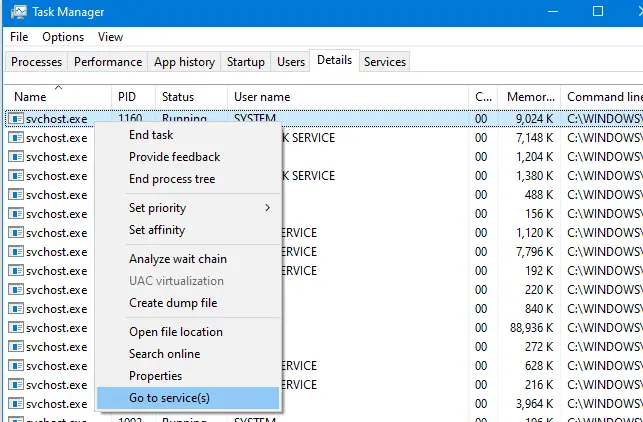
View the List of Services Hosted by the Svchost.exe Process Using Task Manager in Windows 7 and Vista
Svchost.exe is a process that hosts other Services to perform various functions. There can be multiple instances of svchost.exe running on your computer, with each instance containing different services. In Windows 2000/XP, you need Tasklist or Process Explorer to view the list of Services running under a particular svchost.exe process. This is much easier in Windows Vista and Windows 7, wherein you can view the Services list using Task Manager. (more…)

