If User Account Control (UAC) is turned off in Windows 7, none of the desktop gadgets would run. Also, when you right-click on the Desktop and click Gadgets, the Desktop Gadget Gallery would not start. This could be a deliberate move by Microsoft to enhance the security by preventing gadgets from running under administrative privileges. By amending a registry value, you can make the gadgets work even if UAC is disabled. (more…)
Archive for January, 2009
Make Windows 7 Gadgets (Sidebar) Work With UAC Disabled
How to Enable and Disable Aero Snap (Docking) Feature in Windows 7
Aero Snap is a new feature in Windows 7 wherein the windows will automatically arrange (dock) when moved to the edge of the screen. When you drag a window to the left side of the screen, it will automatically dock to the left side of the screen taking half of the screen space. The same goes for the right side. When dragged to the top of the screen, the window maximizes. (more…)
How to Customize the Library Icons in Windows 7
Windows 7 does not provide a GUI to change the icons shown for Libraries, and the Libraries don’t use the icon references provided in the desktop.ini file. Here is a nice way to customize the Library icons in Windows 7. (more…)
How to Delete the System Restore Points in Windows 7
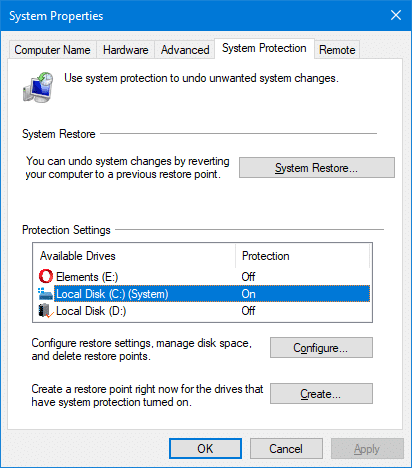
Running out of hard disk space even after clearing out the temporary folder and other junk files? You may consider lowering the disk space allotted to System Restore, or delete the System Restore snapshots which includes previous versions of files. Upgrading the hard disk is the ultimate solution though. (more…)
How to Access the Hidden Themes in Windows 7
Windows 7 includes additional themes set which are kept hidden from the themes dialog. The hidden international themes are stored in a super-hidden folder. Here is how to access the hidden wallpapers & themes set. (more…)
Windows Explorer Defaults to Libraries Folder in Windows 7
When you open Windows Explorer in Windows 7, it opens the Libraries folder by default. You can change the default startup folder using the Windows Explorer shortcut properties, as you did in earlier versions of Windows. Note that you cannot change the default start folder if you’re using WinKey + E to launch Explorer. (more…)
Fix: Cannot Unpin Pinned Folders From Windows 7 Start Menu
Windows 7 allows you Pin folders to the Start menu by dragging it over the Start menu, as in Windows XP/Vista. However, there is no option provided to remove a folder from the Pinned items list in Windows 7. As a result, you’re unable to remove Pinned folders from the Start menu without resetting the entire Pinned items listing. This looks like a bug in Windows 7 (which is in Beta as of this writing), but we have a workaround for you. (more…)
Show the Window Menu (Restore, Minimize, Close) for Taskbar Icons in Windows 7
When you right-click on an icon in the Windows 7 Taskbar, the Jump List pops up which shows a list of common tasks for the corresponding application. But where have the Restore, Maximize and Close options gone? (more…)
WhoCrashed: Free Crash Dump Analyzer for Windows
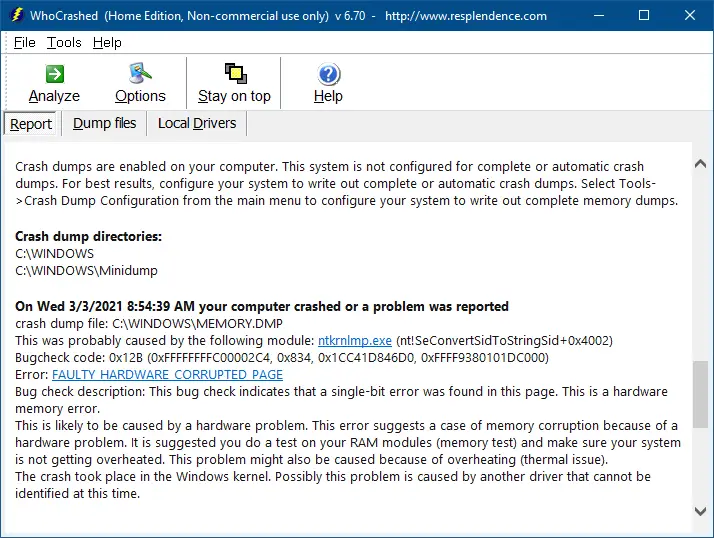
Frequently experience application crashes, blue screen errors or sudden reboot problems? For every crash, a memory dump file will be generated by Windows, which can be analyzed using a debugger in order to determine the root cause for the crash. For those who don’t know how to use a debugger, download WhoCrashed Home Edition, a free Crash Dump Analyzer program from Resplendence Software. This program checks for drivers which have been crashing your computer by performing post-mortem Crash Dump analysis, and presents all gathered information in a comprehensible way. (more…)
Windows 7 Feature Walkthroughs From Microsoft
Want to know more about a feature in Windows 7? Explore new and updated features in Windows 7 with these short screencasts from Microsoft. Microsoft has made available the walkthrough videos for the following features in Windows 7. (more…)