- Home
- Windows XP
- Customize
- How to copy Mouse settings to the Logon Desktop
How to copy Mouse settings to the Logon Desktop
- Ramesh Srinivasan
- November 21, 2006
- Windows XP
Question
I have changed the mouse settings for my profile to left handed, but I notice that the login screen after the machine initially boots still thinks that the mouse is right handed. Is it possible to change settings so that the initial login screen also uses left handed settings. I had a look in gpedit.msc but couldn't see anything under computer configuration that could be set. I'm using Windows XP Professional SP2.
Answer
The mouse settings are stored on a per-user basis. To swap the mouse buttons (for left handed user) for the logon desktop, use one of these methods:
Method 1
- Click Start, Run and type Regedit.exe
- Navigate to the following branch:
HKEY_USERS\.DEFAULT\Control Panel\Mouse
- Create a new string value (REG_SZ) named SwapMouseButtons
- Double-click SwapMouseButtons and set 1 as its data
- Close Regedit.exe
- Restart Windows for the changes to take effect
Note: If the above branch is missing, you need to create it.
Method 2
TweakUI PowerToy can be used to copy the mouse settings of an user profile to the logon desktop. Using this method, all the mouse settings (such as mouse speed, sensitivity, double-click speed etc) are copied to the logon desktop. Follow these steps:
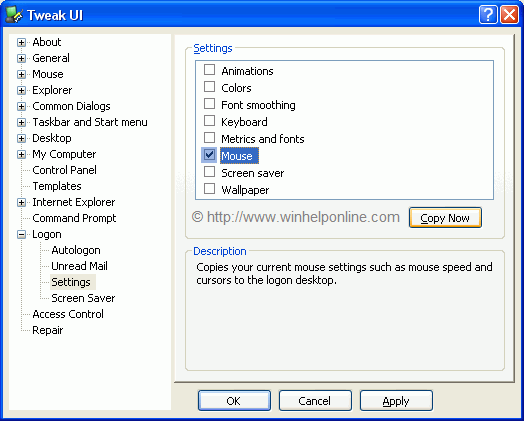
- Download and install TweakUI PowerToy for Windows XP
- Launch TweakUI from Start menu, or by typing TweakUI.exe in Start, Run dialog
- Double-click Logon, and select Settings
- Place a checkmark near Mouse
- Click Copy Now
- Click OK to close TweakUI
 If you enjoyed this post, make sure you
subscribe to our RSS feed!
We feature Tips, Troubleshooting information, Scripts and Utilities for Microsoft Windows Operating Systems!
If you enjoyed this post, make sure you
subscribe to our RSS feed!
We feature Tips, Troubleshooting information, Scripts and Utilities for Microsoft Windows Operating Systems! Prefer an E-mail subscription?
