- Home
- Windows Vista
- Error messages
- Error "Registry editing has been disabled by your administrator" when you open the Registry Editor in Windows Vista
Error "Registry editing has been disabled by your administrator" when you open the Registry Editor in Windows Vista
- Ramesh Srinivasan
- March 3, 2007
- Windows Vista , Error messages
Symptom
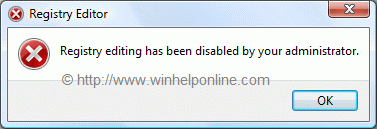
When you attempt to start the Registry Editor (regedit.exe) in your Windows Vista system, you may receive the following message:
Registry editing has been disabled by your administrator
Resolution
If the above error message is shown in a standalone system, then it may be a result of Malware infection. It is also possible that the DisableRegistryTools policy had been enabled by a third-party tweak program which you may be using. It's highly advisable to follow up with a complete system checkup for Virus and Malware, especially when you're unsure about the cause.
Method 1 - Using Group Policy Editor
If you are using an edition of Windows Vista (Windows Vista Business, Enterprise and Ultimate editions) which includes the Group Policy Editor, follow these steps:
- Click Start, type gpedit.msc in the Search box, and press ENTER
- Go to the following branch:
User Configuration | Administrative Templates | System
- Double-click Prevent access to registry editing tools
- Set it as Not Configured
Important: If it's already set to Not Configured, set it to Enabled and click Apply. Then repeat the steps and revert the setting back to Not Configured. This removes the registry based policy if set already.
Method 2
This method should work in all editions of Windows Vista.
- Download reg_enable.vbs attached at the end of this article, and save it to Desktop
- Open an elevated command prompt. To do this, click Start, click All Programs, click Accessories, right-click Command Prompt, and then click Run as administrator. If you are prompted for an administrator password or for a confirmation, type the password, or click Allow.
- Switch to your Desktop directory by typing the following command, and then pressing ENTER:
cd /d %userprofile%\desktop
- Then, type the following command and press ENTER
wscript.exe reg_enable.vbs
- Type EXIT to close the Command Prompt window.
If everything worked fine, the DisableRegistryTools policy should have been removed by now. See if you're able to launch Regedit.exe now.
Attachments
Related Articles
Related Links
 If you enjoyed this post, make sure you
subscribe to our RSS feed!
We feature Tips, Troubleshooting information, Scripts and Utilities for Microsoft Windows Operating Systems!
If you enjoyed this post, make sure you
subscribe to our RSS feed!
We feature Tips, Troubleshooting information, Scripts and Utilities for Microsoft Windows Operating Systems! Prefer an E-mail subscription?
